


Can't get English

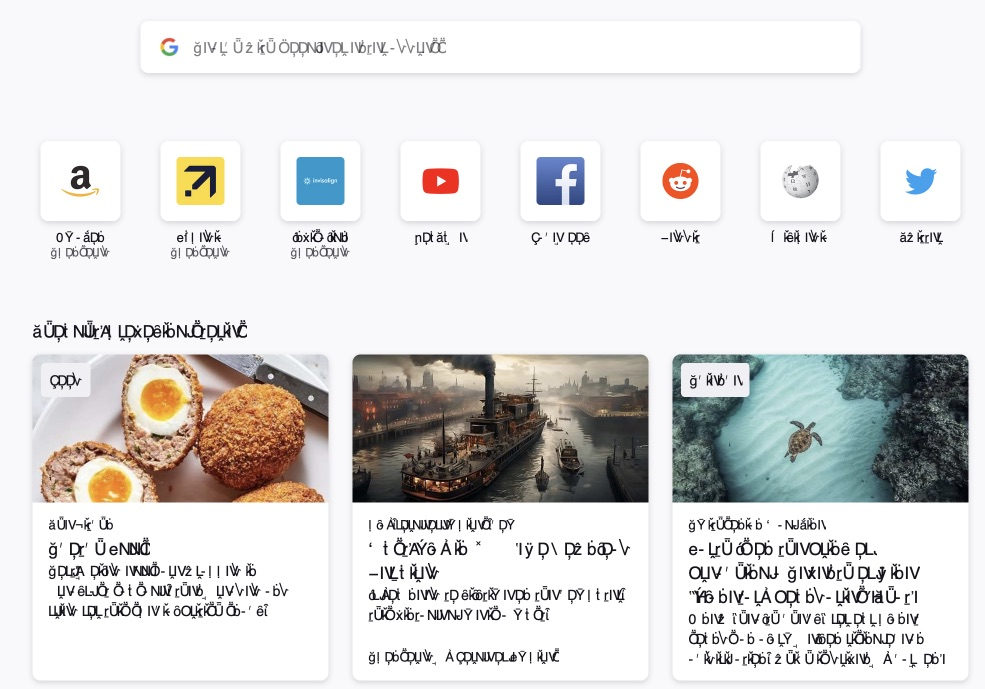
I've uninstalled + reinstalled Firefox English for Mac OS 15 THREE time. Each time there is an unknown language that I cannot fix in settings because I can't read the language. See screenshot.
Όλες οι απαντήσεις (1)
This is a problem with the font that Firefox uses to display this content and not a language problem.
It is possible Firefox uses a corrupted font or a font that isn't available or can't be accessed. You can check for issues like corrupted and duplicate fonts in Font Book.
You can right-click and select "Inspect" to open the built-in Inspector with this element selected.
- https://firefox-source-docs.mozilla.org/devtools-user/page_inspector/how_to/open_the_inspector/
- https://firefox-source-docs.mozilla.org/devtools-user/page_inspector/how_to/examine_and_edit_html/
You can check in the Rules tab in the right panel in the Inspector what font-family is used for selected text. You can check in the Fonts tab in the right panel in the Inspector what font is actually used because Firefox might be using a different font than specified by the website, if necessary expand "All fonts...". If the Fonts tab is hidden, click the Down arrow at the right end.