


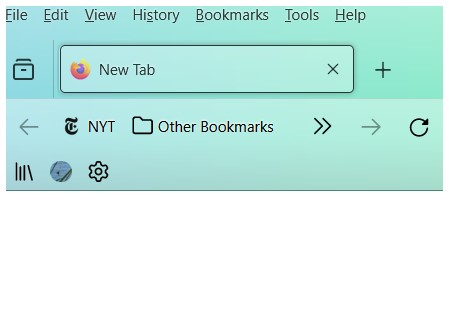
No longer able to display a menu bar with many bookmarks, only 2 to >>.
previously I added bookmarks to a menu bar at top of firefox. Now I have a bar that displays 2 bookmarks than a >>. I cannot expand this limited display or create a menu to display bookmarks though I can see them by clicking on the >>. Non of the menu suggestions is a fix.
Does anyone know how to control this and get me a more useful bookmarks menu display?
Όλες οι απαντήσεις (2)
I'm a little confused about your toolbars, because it's much more typical to have the address bar in the position where you have your bookmarks bar. Is the "Bookmarks toolbar items" box meant to be on that main toolbar, or one bar down on the Bookmarks Toolbar?
It look like you placed the "Bookmarks Toolbar Items" control on the Navigation Toolbar and since this item has a flex attribute, this will cause this control to collapse with only the chevron showing. Best is to leave this control on the Bookmarks Toolbar and not one a toolbar like the Navigation Toolbar that has items like the address bar that has a higher flex attribute.