Boldfaced "S" does not print

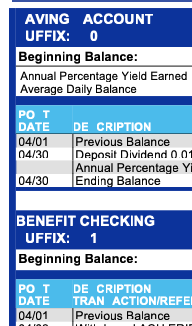
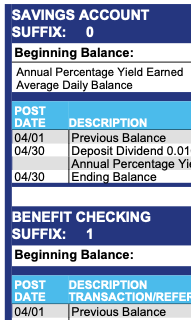
When I view my bank statement in Firefox, everything appears fine, but when I print the statement, all occurrences of boldfce "S" on the printout are blank. This problem does not occur with Google. Running macOS Catalina, all maintenance applied, Firefox is at 125.0.3.
Όλες οι απαντήσεις (6)
As a Windows person, I'm not very knowledgeable about MacOS fonts. I have heard of the option to repairing the font book. ??
Are the statements in PDF format? Often PDFs use embedded fonts, which adds another variable. You may want to print those from Preview or Acrobat for now.
If the font book were an issue, the document wouldn't print properly under Google either - but it does. It's only Firefox that has this issue with printing.
Do you see this in the print preview?
Does the same thing happen with the print destination being "Save to PDF"?
Does it still happen in Troubleshoot Mode?
Do you see this in the print preview? No.
Does the same thing happen with the print destination being "Save to PDF"? Good question. When I do a save to PDF in Firefox and then bring up the PDF, the problem with the missing "S" exists there. When I log into the bank using Google, and save the statement as a PDF and then bring up that PDF, it appears as it should - the "S" is there, and prints properly. Does it still happen in Troubleshoot Mode? Didn't try it.
See reply above.
I've scanned in the printed statements and uploaded two partial images so the problem can be clearly seen. The one on the left was printed from Firefox, the one on the right was printed from Google.