


I can't add an icon to my short list on the Firefox homepage.I can'

I can't add icons to the short list on my Firefox home page. The menu button has no options for "add to homepage"
Όλες οι απαντήσεις (2)

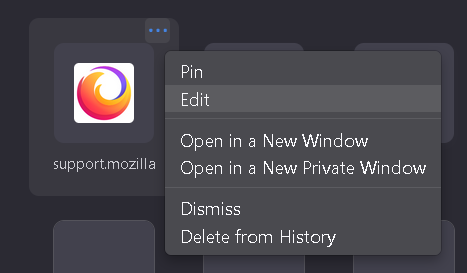
By default, you can edit the existing icon that is currently showing on your FireFox Homepage. Step 1: click into the open menu function on the icon( the 3 dots) edit :https://user-media-prod-cdn.itsre-sumo.mozilla.net/uploads/images/2022-06-15-20-12-15-0e0619.png
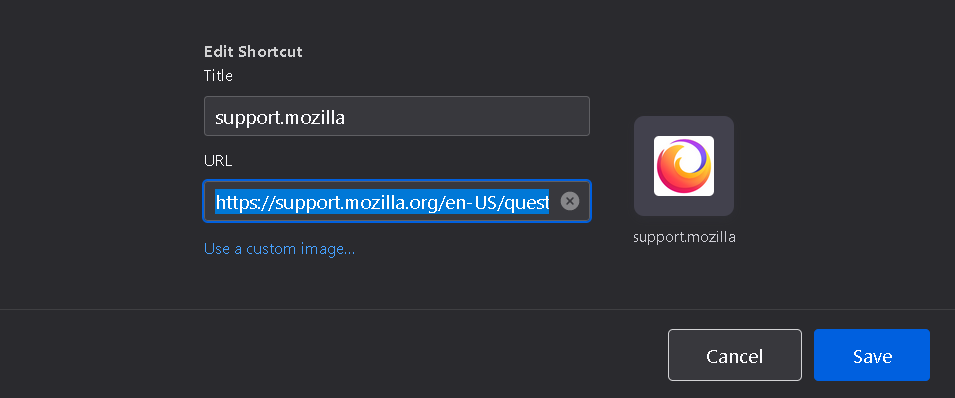
Step 2: click on edit, then you can paste the url/link you want into the existing one to change it. url/link:https://user-media-prod-cdn.itsre-sumo.mozilla.net/uploads/images/2022-06-15-20-13-38-b2b3b2.png
If you want to add new icon
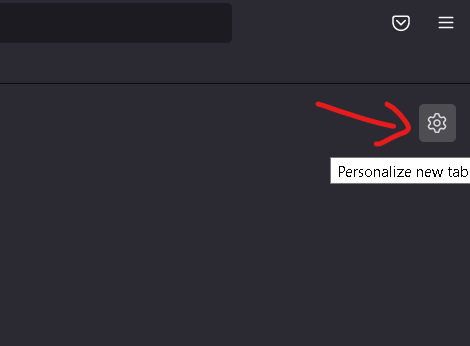
Step 1: click on the setting button which is on your top right corner at your homepage.
Setting button: https://user-media-prod-cdn.itsre-sumo.mozilla.net/uploads/images/2022-06-15-20-06-24-8a68ec.png
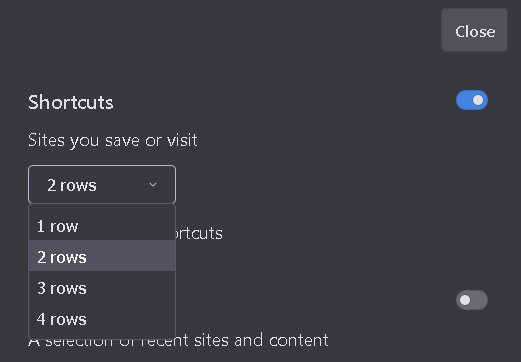
Step 2: once you clicked on it you should be able to see a shortcut that has the option that allow you to choose how many row you want. Shortcut:https://user-media-prod-cdn.itsre-sumo.mozilla.net/uploads/images/2022-06-15-20-10-47-6d00fc.png


I don't use a home page but this article may help.
https://support.mozilla.org/en-US/kb/how-to-set-the-home-page