


Lost all my bookmarks - cannot find backup
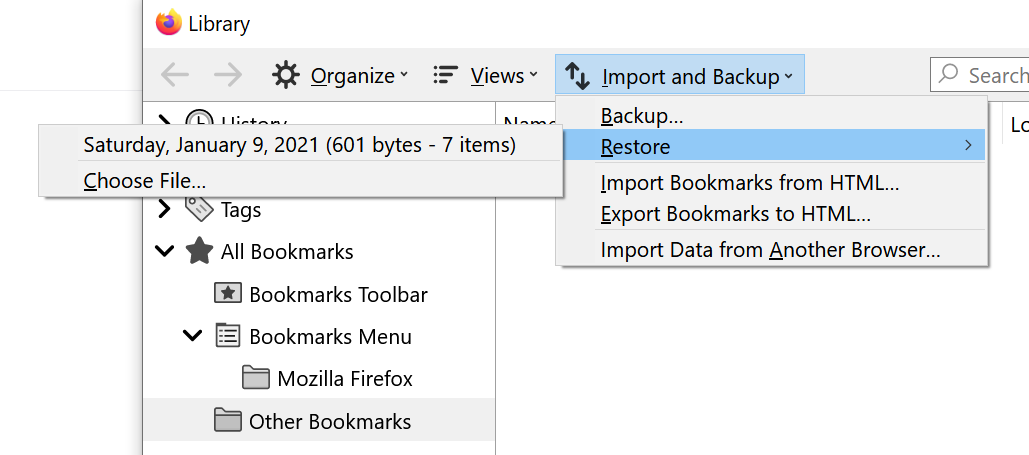
I've just updated my browser and all of my bookmarks have disappeared without a trace. I've tried every bit of useful information I could find here, but nothing seems to be working and even after following the Show All Bookmarks > Import and Backup > Restore, the only backup file that appears is one which has been automatically created with the new update. The "Old Firefox Data" folder mentioned in similar treads has saved only the most recent bookmarks after the update.
Any and all help will be appreciated, as I am extremely distressed at the thought of having lost so many important bookmarks forever.
Όλες οι απαντήσεις (1)

Επιλεγμένη λύση
Sunny said
The "Old Firefox Data" folder mentioned in similar treads has saved only the most recent bookmarks after the update.
https://support.mozilla.org/en-US/kb/how-run-firefox-when-profile-missing-inaccessible
http://kb.mozillazine.org/Profile_folder_-_Firefox#Navigating_to_the_profile_folder
https://support.mozilla.org/en-US/kb/profile-manager-create-and-remove-firefox-profiles
https://support.mozilla.org/en-US/kb/back-and-restore-information-firefox-profiles
Type about:profiles<enter> in the address bar.
How many profiles are listed?
How many should be there?
Also, open the profile folder in your file explorer.