


Windows 10 reached EOS (end of support) on October 14, 2025. If you are on Windows 10, see this article.

Avatar for Username

Αναζήτηση στην υποστήριξη

Προσοχή στις απάτες! Δεν θα σας ζητήσουμε ποτέ να καλέσετε ή να στείλετε μήνυμα σε κάποιον αριθμό τηλεφώνου ή να μοιραστείτε προσωπικά δεδομένα. Αναφέρετε τυχόν ύποπτη δραστηριότητα μέσω της επιλογής «Αναφορά παραβίασης».

Μάθετε περισσότερα
Αυτό το νήμα αρχειοθετήθηκε. Κάντε νέα ερώτηση αν χρειάζεστε βοήθεια.
Αρχειοθετήθηκε

is it possible to automate memory garbage collection

Roland Tanglao απαντήθηκε
rjackdaw

win10 1903 i7 3770 + 12gb ddr3 + 1060 6gb

FF 75 beta 64bit enhanced tracking protection = strict content process limit = 2

I always used firefox and game at the same time . if not mistaken , cache memory should be free within a second or two after closing a tab/multiple tabs but after closing those tab for more than 10 secs , the cache memory is not being release by the browser itself
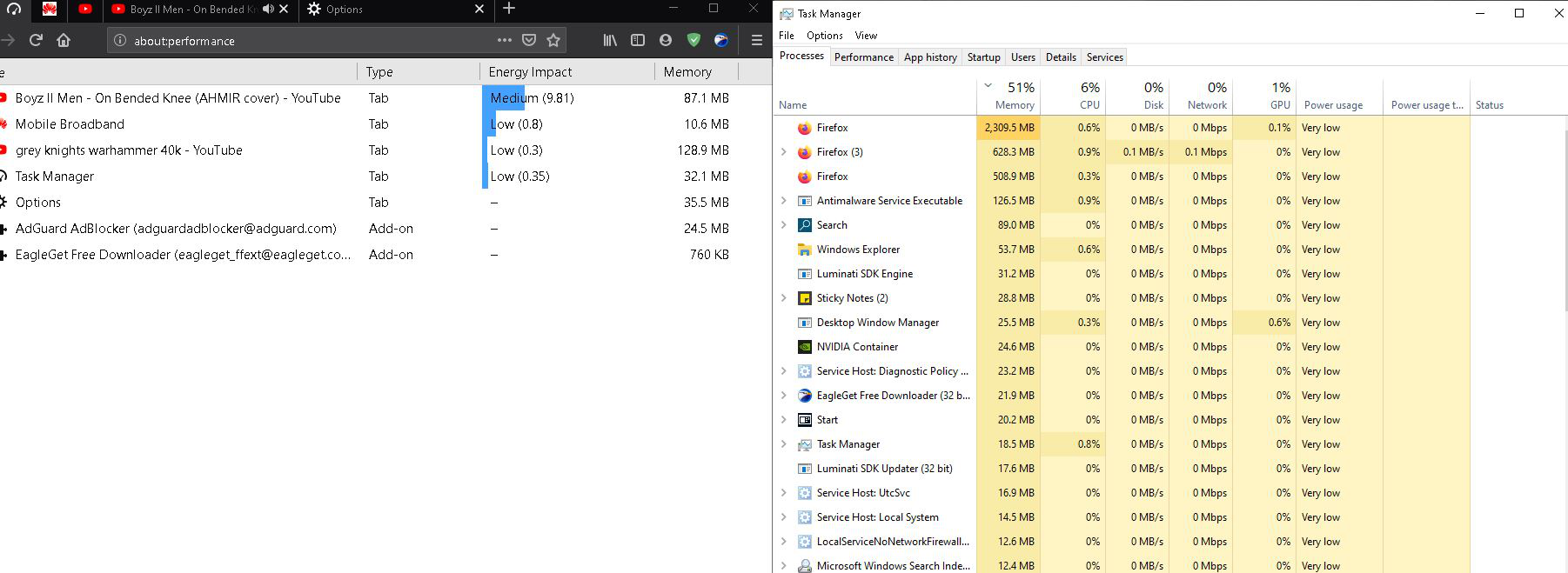
win10 1903 i7 3770 + 12gb ddr3 + 1060 6gb FF 75 beta 64bit enhanced tracking protection = strict content process limit = 2 I always used firefox and game at the same time . if not mistaken , cache memory should be free within a second or two after closing a tab/multiple tabs but after closing those tab for more than 10 secs , the cache memory is not being release by the browser itself
Συνημμένα στιγμιότυπα

Όλες οι απαντήσεις (1)

Hi rjackdaw:

Did the freeing of cache memory change in Firefox 75 or has it been like this in older releases e.g. FF74?

Does this happen if you run in Firefox Safe Mode? If it doesn't happen in Safe Mode then it's probably one of your add-ons. https://support.mozilla.org/en-US/kb/troubleshoot-extensions-themes-to-fix-problems#w_start-firefox-in-safe-mode

Cheers! ...Roland