


New Windows 10, saving book mark only shows five of my folders out of many more. Did not have this problem on 7
When attempting to save a bookmark, using "Bookmark this page" and then selecting Bookmark Menu to display a list of saved folders, the list of saved folders that appears is a short partial list. This list does not permit scrolling to view the remaining unlisted folders. I hope to be able to use as before with all the folders showing in the save dropdown,, not having to save in "Other Bookmarks and then drag all the way to the folder I want. No problem seeing all of the folders in library or in side bar.
Επιλεγμένη λύση
Hi terrypaints,
Προβολή απάντησης εντός συζήτησης 👍 1Όλες οι απαντήσεις (5)

Επιλεγμένη λύση
Hi terrypaints,
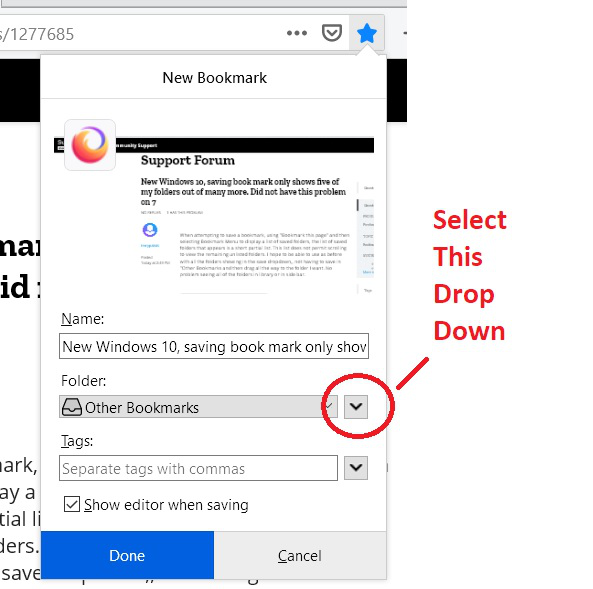

RobertJ is correct.
See "How do I change the name or location of a bookmark?"
Other book marks list just bought up Other Book Marks, Book Marks Menu and Book Marks toolbar. just like I was getting with all my other tries. Not sure what happened but this time I double clicked on one of them and all my folders are now showing in both Other Book Marks and Book Marks Menu. Whatever!!! Problem solved - thanks!
Double-clicking on a folder will expand and display the sub-folders. You should see an arrow to the left of a folder, if there are sub-folders, and clicking on the arrow will do the same.
Glad you finally found it.
Browse Safe!