


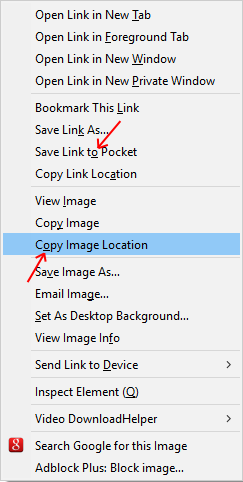
The "save link to pocket" and "copy image location" menu items have overlapping shortcut keys (both are "o"), can one be changed?
When right clicking an image, the new "save link to pocket" option now overlaps with the "copy image location" option, both menu items use the shortcut key "o". Is there anyway to remove the "pocket" menu item, or at least change its shortcut key?
Επιλεγμένη λύση
Never mind, if you disable "extensions.pocket.enabled" from the about:config menu, it will remove it from the context menu.
Όλες οι απαντήσεις (3)
You can move the pocket button (right-click: Remove from Toolbar) on the Navigation Toolbar to the Customize palette to disable Pocket and have the pocket items removed from the (context) menu.
This removed it from the toolbar, but not the context menu.
Επιλεγμένη λύση
Never mind, if you disable "extensions.pocket.enabled" from the about:config menu, it will remove it from the context menu.