Wócynjony
Firefox Automatically Opens Print Preview When Opening a PPT/PDF

I am experiencing an issue with Firefox where the Print Preview window automatically opens whenever I open my PPT/PDF file in Firefox.
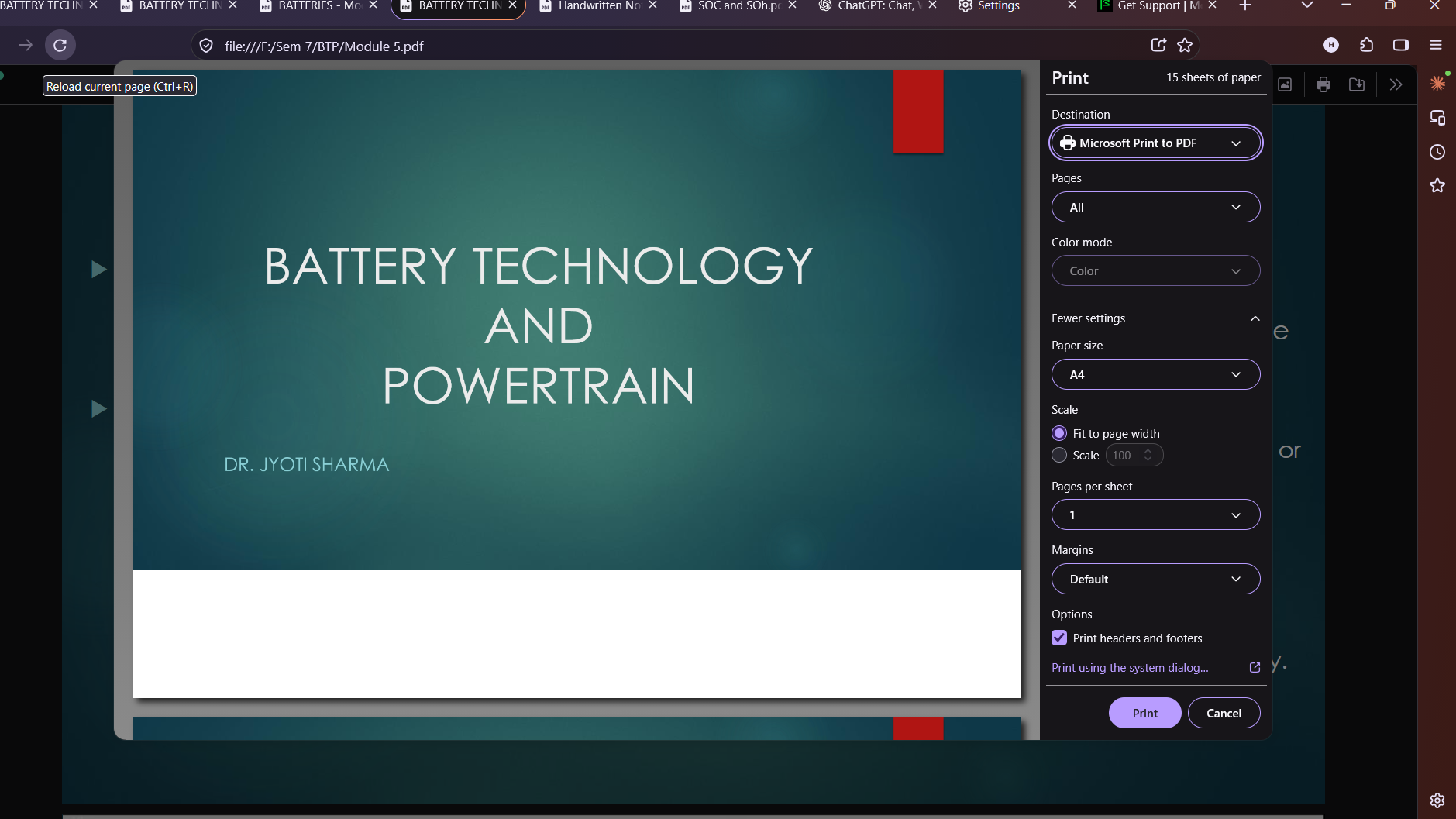
As shown in the attached screenshot, Firefox immediately displays the Print panel instead of simply opening the document for viewing. I have to manually click Cancel or press Esc every time.
I did not intentionally select the Print option, and I would like Firefox to open the document normally without automatically launching Print Preview.
Could you please investigate this issue and let me know how I can prevent the Print Preview window from opening automatically?
Latest version of Firefox Windows 11 26H5
I am experiencing an issue with Firefox where the Print Preview window automatically opens whenever I open my PPT/PDF file in Firefox.
As shown in the attached screenshot, Firefox immediately displays the Print panel instead of simply opening the document for viewing. I have to manually click Cancel or press Esc every time.
I did not intentionally select the Print option, and I would like Firefox to open the document normally without automatically launching Print Preview.
Could you please investigate this issue and let me know how I can prevent the Print Preview window from opening automatically?
Latest version of Firefox
Windows 11 26H5