


account breached

I believe I was hacked into. One minute I'm signed in the next minute after I leave a site I am being asked to sign back in again and again. This time someone is changing my sign in credentials.why??
Wšykne wótegrona (1)
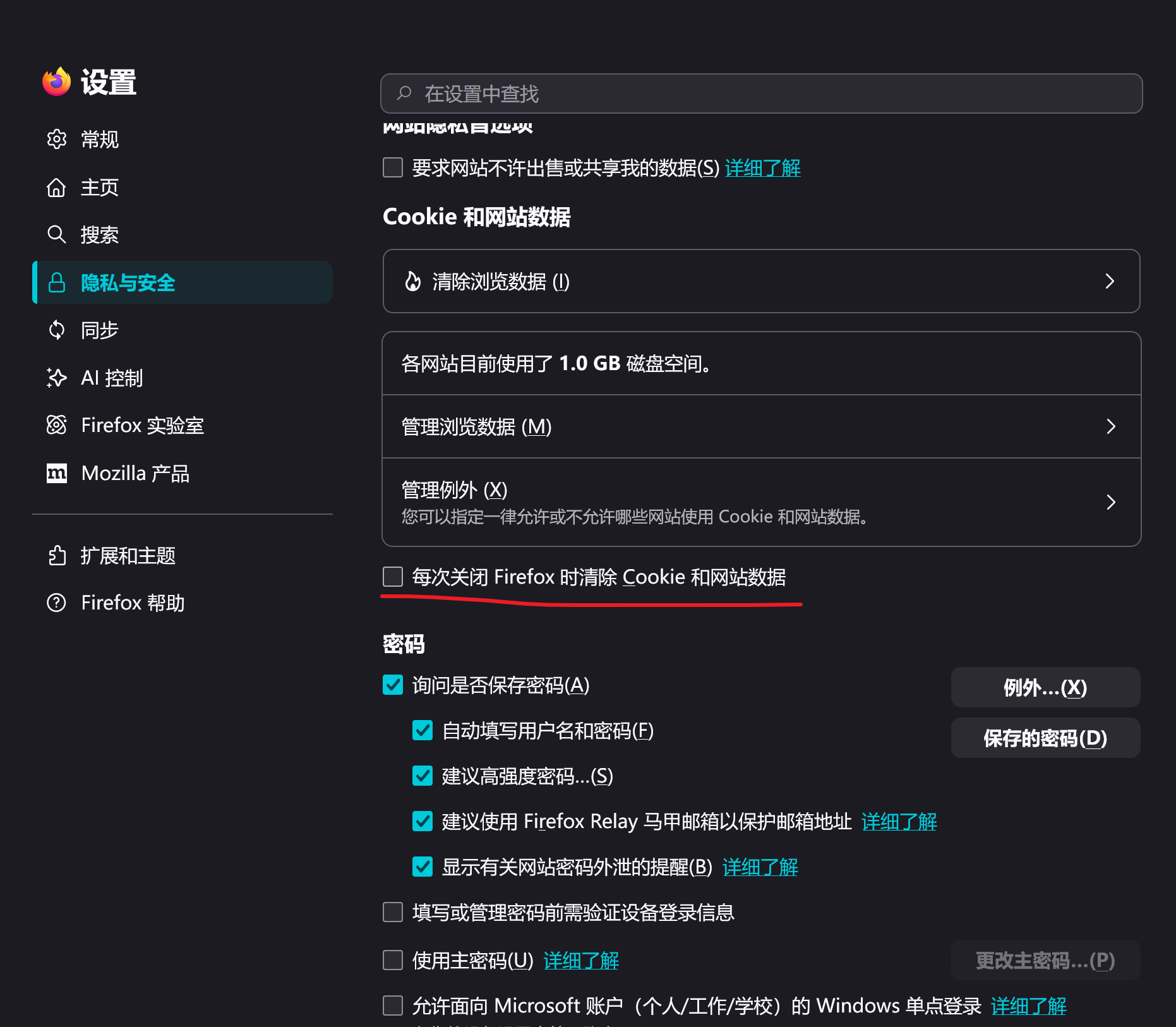
Hello! Your situation is indeed very stressful. However, usually it is not caused by account intrusion. You can follow the following steps to check: 1. Log in to the same website with a different browser: You can use a different browser (such as Edge or Chrome) to log in to the same webpage. If everything is normal, then the problem lies in the settings of Firefox itself, please refer to step 2. If it's also not normal, then it could be a problem with the website itself (or maybe there are really some issues with your account) 2. Check if Firefox has set "Clear cookies and website data every time closed": You can uncheck 'Clear cookies and website data every time Firefox is closed' in 'Settings - Privacy and Security - Cookies and website data'. If you haven't enabled this option, please refer to step 3 3. Check if there are any extensions in automatic data cleaning: Have you installed an extension like 'Privacy Badger' that automatically cleans up history? If so, please disable it and observe if you still need to log in again. If not, please refer to step 4 4. Check if browsing is done in privacy mode: If you use privacy mode for browsing, then your situation is normal. To ensure privacy, Firefox automatically clears browsing history and cookies every time the browser is closed while in privacy mode. Here's some advice for you: If you have followed the steps above to check but still haven't solved the problem, please note: Does this situation of needing to log in repeatedly exist on multiple web pages? If it only exists on a single website, it may be a website issue. To dispel concerns, you can change the password of this website; If your problem exists on multiple web pages at the same time, you need to immediately change the passwords of these websites and use software similar to 360 Security Center for antivirus to ensure the security of your account.
Hope to help you!
Wót Handsome turtle změnjony