


Windows 10 reached EOS (end of support) on October 14, 2025. If you are on Windows 10, see this article.

Pomoc pśepytaś

Glědajśo se wobšudy pomocy. Njenapominajomy was nigda, telefonowy numer zawołaś, SMS pósłaś abo wósobinske informacije pśeraźiś. Pšosym dajśo suspektnu aktiwitu z pomocu nastajenja „Znjewužywanje k wěsći daś“ k wěsći.

Dalšne informacije
Toś ta nitka jo se archiwěrowała. Pšosym stajśo nowe pšašanje, joli trjebaśo pomoc.
Rozwězany Archiwěrowany

Address bar jumps to top of window when I type

Frustrated_John wótegronjony
Frustrated_John

I am one of those old-fashioned guys who has a title bar on the main window, and inside this (from top to bottom) a menu bar (File/Edit/View etc), then the current set of tabs, then the address bar.

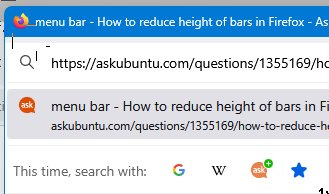
I can click in the address bar and the caret appears, but the moment I start to type anything to edit the URL the address bar jumps up to to the top of the window, covering up the menus and tabs, with a menu of suggested URLs that at times covers most of the rest of the screen. Some images attached to show what I mean.

This started in a recent-ish release -- it didn't use to do this.

How can I prevent this behaviour, so I can just edit a URL in place the way I used to without the address bar jumping to the top of the window?

Currently using FF 135.0 (64-bit), Windows 11.
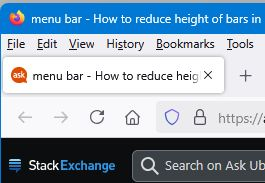
I am one of those old-fashioned guys who has a title bar on the main window, and inside this (from top to bottom) a menu bar (File/Edit/View etc), then the current set of tabs, then the address bar. I can click in the address bar and the caret appears, but the moment I start to type anything to edit the URL the address bar jumps up to to the top of the window, covering up the menus and tabs, with a menu of suggested URLs that at times covers most of the rest of the screen. Some images attached to show what I mean. This started in a recent-ish release -- it didn't use to do this. How can I prevent this behaviour, so I can just edit a URL in place the way I used to without the address bar jumping to the top of the window? Currently using FF 135.0 (64-bit), Windows 11.
Pśipowjesone fota wobrazowki

Wót Frustrated_John změnjony

Wšykne wótegrona (2)

Wubrane rozwězanje

Do you use a custom userChrome.css file?

Try to enter about:config in the address bar and confirm if toolkit.legacyUserProfileCustomizations.stylesheets is false.

Sorry for the delay in replying. Yes, that fixed it. Many thanks. Now all I have to do is remember if there was a reason why it was set true in the first place...!