


"Firefox is installing components needed to play this audio or video on this page. Please try again later"

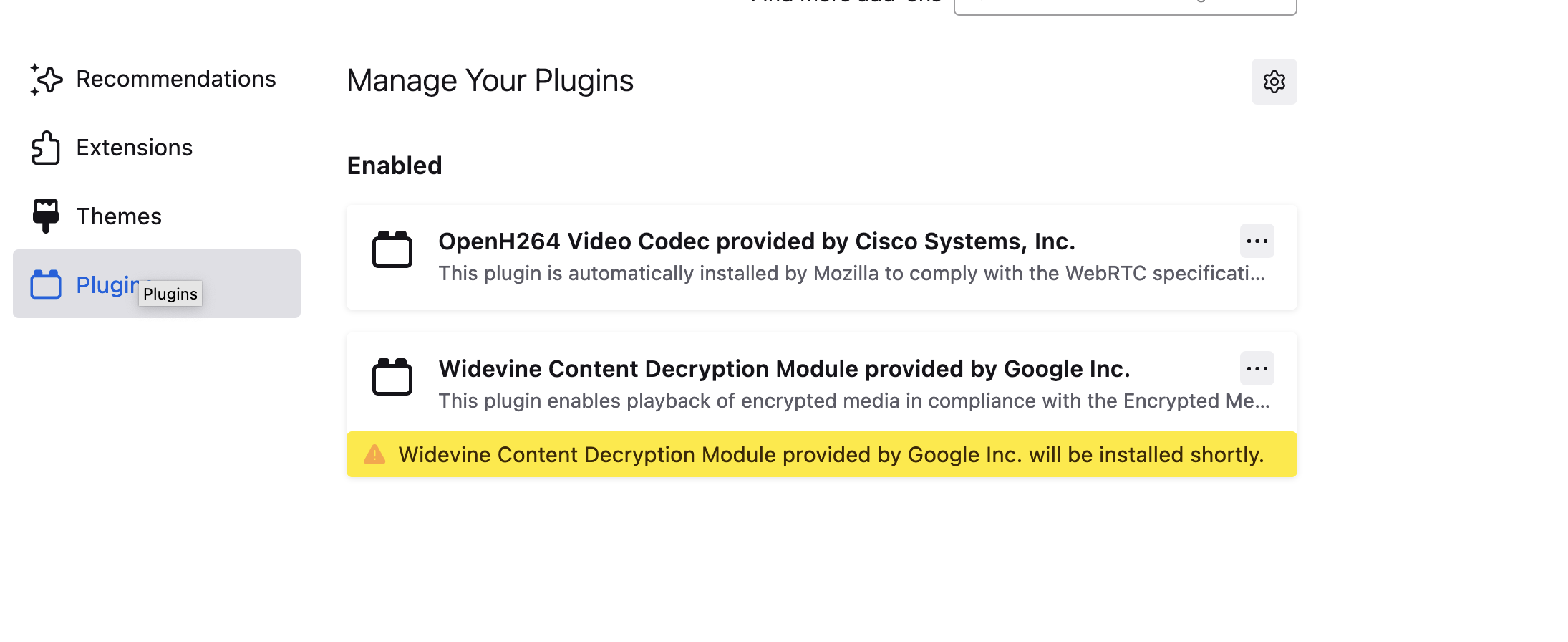
When trying to play Netflix, or any streaming service that is not Youtube, this error message appeared. I followed the DRM troubleshooting, reset the user configurations, and because the error code when trying to play something on Netflix said I was out of date (even though I'm on the latest version of firefox) I deleted and redownloaded Firefox and synced everything again. It says Widevine will be downloading shortly, and I think this might be a part of the problem but I'm not sure how to get it to manually download. I am on a Macbook Air, I've also followed the instructions on the Rosetta troubleshooting and nothing has changed. I've restarted after toggling the options on and off for always allowing the DRM as well as after setting Widevine to always allow and allowing automatic updates. I don't have Avast but I do use a separate VPN, and I also have U-Block origin and adblock not sure if that's messing with it? I really love Firefox and this is the first time I've followed through all the troubleshooting and something still doesn't work. If anyone has any idea on what to do, would love some help :) Thanks in advance!

Wšykne wótegrona (1)
Make sure you have updated the Widevine plugin to the latest version (4.10.2557.0).
- Tools -> Add-ons -> Plugins
You can toggle DRM off/on to see if that makes Firefox (re)load DRM components.
- Settings -> General: Play DRM
- https://support.mozilla.org/en-US/kb/enable-drm
You can possibly check the XHR requests in the Browser Console if this doesn't work.