


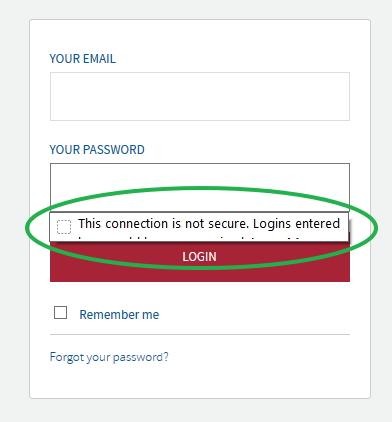
chopped off notification for insecure login

Hi When I login to a website, the notification message is chopped off. I have attached a screen that shows the only a partial message.
This Mozilla page, shows the full message https://support.mozilla.org/en-US/kb/insecure-password-warning-firefox?as=u&utm_source=inproduct
Thanks
Wubrane rozwězanje
If this happens on all websites then something else is wrong
Start Firefox in Safe Mode to check if one of the extensions ("3-bar" menu button or Tools -> Add-ons -> Extensions) or if hardware acceleration is causing the problem.
- switch to the DEFAULT theme: "3-bar" menu button or Tools -> Add-ons -> Appearance
- do NOT click the "Refresh Firefox" button on the Safe Mode start window
- https://support.mozilla.org/en-US/kb/troubleshoot-firefox-issues-using-safe-mode
- https://support.mozilla.org/en-US/kb/troubleshoot-extensions-themes-to-fix-problems
Wšykne wótegrona (8)
here is the picture
Hi
Is this happening with all websites that show this warning or only on a few websites or the website in the screenshot?
If the latter is the case then can you provide the URL, so we can check if we can replicate this?
The screenshot shows that the message stops just above the Login button, so there might be a problem with the some CSS properties like the z-index.
almost all websites. not sure if this is related but i also have an extension that wont show the menu. How can i reset the css properties or the z-index?
Wubrane rozwězanje
If this happens on all websites then something else is wrong
Start Firefox in Safe Mode to check if one of the extensions ("3-bar" menu button or Tools -> Add-ons -> Extensions) or if hardware acceleration is causing the problem.
- switch to the DEFAULT theme: "3-bar" menu button or Tools -> Add-ons -> Appearance
- do NOT click the "Refresh Firefox" button on the Safe Mode start window
- https://support.mozilla.org/en-US/kb/troubleshoot-firefox-issues-using-safe-mode
- https://support.mozilla.org/en-US/kb/troubleshoot-extensions-themes-to-fix-problems
TY. solved
You're welcome.
Can you tell us what the problem was and what solved it? It helps others with a similar problem who read this thread.
Yes. had an incompatible skin called simple white x https://addons.mozilla.org/en-US/firefox/addon/simplewhitex/