

Toś ta nitka jo se archiwěrowała.
Pšosym stajśo nowe pšašanje, joli trjebaśo pomoc.

Archiwěrowany
tiles no longer appear in new tab and unable to repin new

When i open a new tab its just white no outlines of tiles nothing just blank ive reset my history so its public and ive tried clicking the gear to set it but it just opens the rest of the options none one them are for "To turn on the new tab page, click on the gear icon in the upper-right corner of the page and choose Enhanced or Classic from the menu. " and i dont see a similar button in the tabs setting section.
When i open a new tab its just white no outlines of tiles nothing just blank ive reset my history so its public and ive tried clicking the gear to set it but it just opens the rest of the options none one them are for "To turn on the new tab page, click on the gear icon in the upper-right corner of the page and choose Enhanced or Classic from the menu. " and i dont see a similar button in the tabs setting section.
Wšykne wótegrona (2)

would you mind sending a screenshot of just after you click that gear icon? Make sure you are clicking the gear that is in the screenshot.
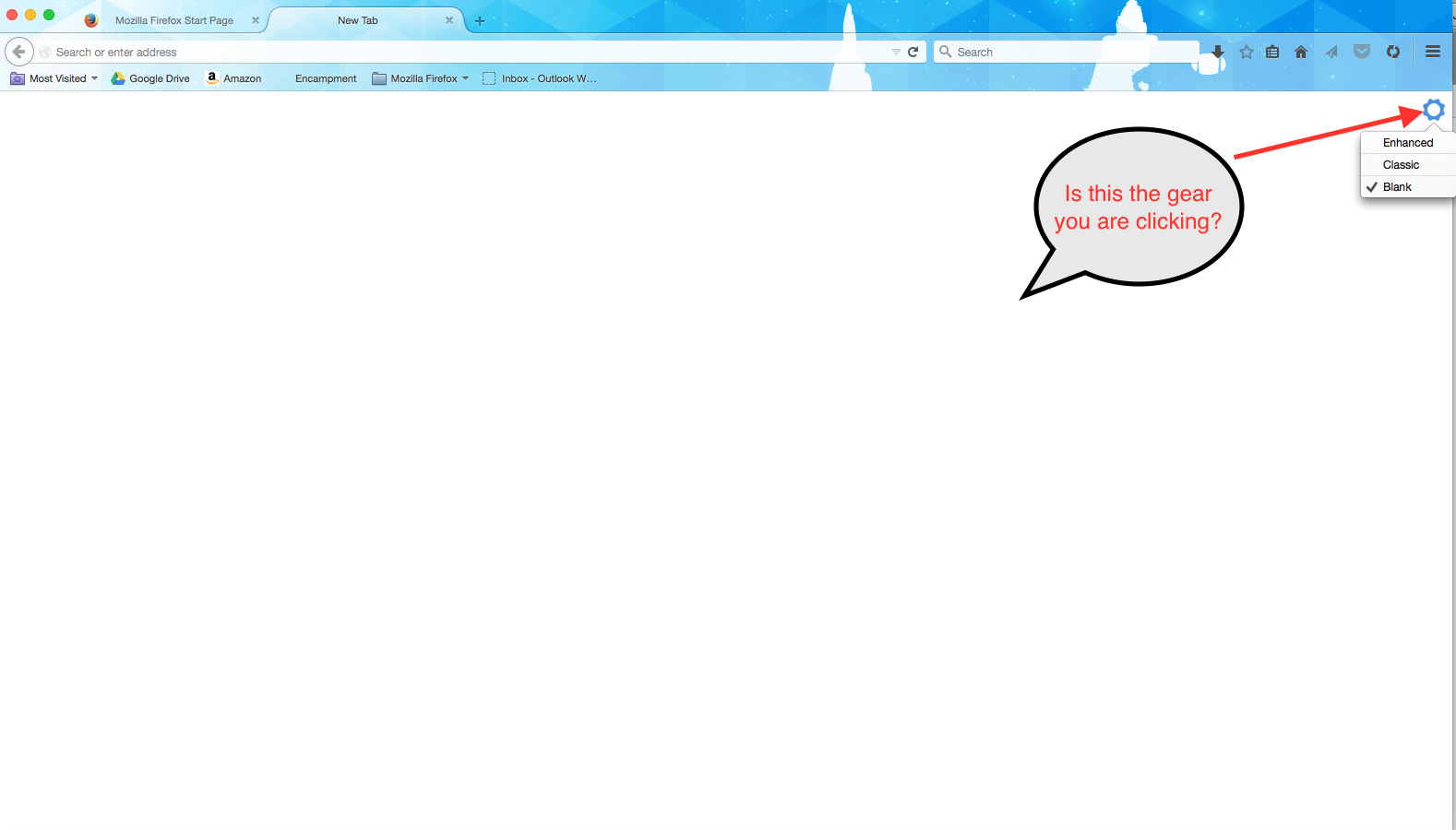
Wót Jon Gregory změnjony
Can you drag any bookmark or history items in one of the tiles?
See also this article about the New Tab page (about:newtab):