


YouTube Insane Memory Leakage

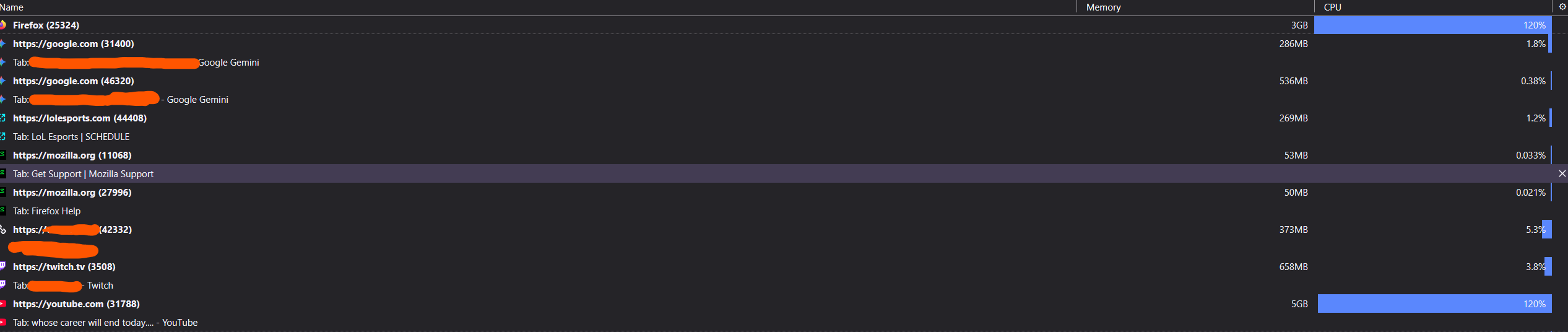
I am using YouTube. One singular tab of YouTube takes up 4 GB of ram. Two tabs take 8 GB. Having more than two tabs quite literally provides me 20 GB of memory usage. This is preposterous.
The fixes I have tried is
- Disabling all extensions; this does not help in the slightest. - Refreshing the startup cache - helped first 10 minutes went from 400mb to later 5 gb (one tab) - Refreshing the Firefox cache - helped also first 10 min, and then memory leakage came back. - Disabled YouTube Ambience - did not help.
I have a top-end gaming computer, this should not be an issue.
I am not sure what to do from here on out, please advice
Alle Antworten (2)
I forgot to mention:
I enableded hardware acceleration; did not help I switched to av1 decoding and that did not help
Hello,
This is a known memory leak issue.
You can reduce this by going to about:config, accept risk (use at own discretion), search for dom.ipc.processCount, and set it to 1 or 2.
Next, you can go to about:memory, and click "minimize memory usage" and it will automatically reduce the ram.
Next, try opening youtube in a private window and testing, and if the memory leak disappears, it is likely a cookies/cache issue.
Lastly, try without adblock or tracker blockers for a bit. These can sometimes balloon memory usage.