


Windows 10 reached EOS (end of support) on October 14, 2025. If you are on Windows 10, see this article.

Hilfe durchsuchen

Vorsicht vor Support-Betrug: Wir fordern Sie niemals auf, eine Telefonnummer anzurufen, eine SMS an eine Telefonnummer zu senden oder persönliche Daten preiszugeben. Bitte melden Sie verdächtige Aktivitäten über die Funktion „Missbrauch melden“.

Weitere Informationen
Gelöst

I need a better understanding of Firefox Profiles - Single Account - Multiple Profiles

Kelly

At first deployment of multiple profiles in early 2026, my use was really intuitive and I was able to understand the FAQ and Community notes. Early October, the releases started to implement some refinements. I am not understanding these refinements and while I am seeing the error message (attached), I am not understanding what the fix is to use my additional profiles (two), int the past month, I have not found a way to get to my two additional profiles.

My environment: Windows 11 Pro - Firefox 158.0 (64 bit) I have Profiles "Original" and two others. I have one single Mozilla account. I copied my two profiles from original and had made great progress culling the profile passwords and bookmarks, I have only been syncing my original profile two my two cellphones. 95% of my use is from desktop Firefox.

Attached is a well documented result error but I am not locating how to get to the profiles I had created from the attached error message.
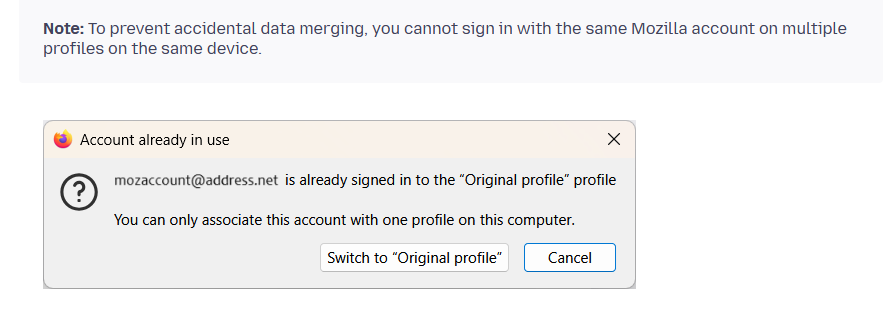
At first deployment of multiple profiles in early 2026, my use was really intuitive and I was able to understand the FAQ and Community notes. Early October, the releases started to implement some refinements. I am not understanding these refinements and while I am seeing the error message (attached), I am not understanding what the fix is to use my additional profiles (two), int the past month, I have not found a way to get to my two additional profiles. My environment: Windows 11 Pro - Firefox 158.0 (64 bit) I have Profiles "Original" and two others. I have one single Mozilla account. I copied my two profiles from original and had made great progress culling the profile passwords and bookmarks, I have only been syncing my original profile two my two cellphones. 95% of my use is from desktop Firefox. Attached is a well documented result error but I am not locating how to get to the profiles I had created from the attached error message.
Angefügte Screenshots

Alle Antworten (1)

Ausgewählte Lösung

Try typing about:profiles in Firefox’s address bar and pressing Enter. Your two extra profiles should be listed there, with a Launch profile in new browser button under each. Don’t delete or reset anything yet.

The newer profile manager also prevents the same Mozilla account from syncing across multiple profiles on one device. Since you only want your original profile synced to your phones, keep the other two profiles separate and don’t sign them into that same account.

Stellen Sie eine Frage

Sie müssen sich mit Ihrem Benutzerkonto anmelden, um auf Beiträge zu antworten. Bitte stellen Sie eine neue Frage, wenn Sie noch kein Benutzerkonto haben.