

Windows 10 reached EOS (end of support) on October 14, 2025. If you are on Windows 10, see this article.

Hilfe durchsuchen

Vorsicht vor Support-Betrug: Wir fordern Sie niemals auf, eine Telefonnummer anzurufen, eine SMS an eine Telefonnummer zu senden oder persönliche Daten preiszugeben. Bitte melden Sie verdächtige Aktivitäten über die Funktion „Missbrauch melden“.

Weitere Informationen
Gelöst

How to create a Mailing List in Thunderbird v156.0.1

Supertech

I'm still learning Thunderbird after years of using/supporting Outlook. So far, so good. Today I wanted to create a Mailing List. I found a support article on this dated 2/13/15. It said:

Create a mailing list

   Open the Address Book.
   Select File > New > 'Mailing List'.
   Enter a suitable name for the mailing list.

In version 156.0.1 this doesn't seem correct any more. I've uploaded an image of the menu I get. There doesn't seem to be any Mailing List option. 2015 was a long time ago, so I'm guessing this Article is WAY out of date and Mailing List creation has changed. Any guidance?
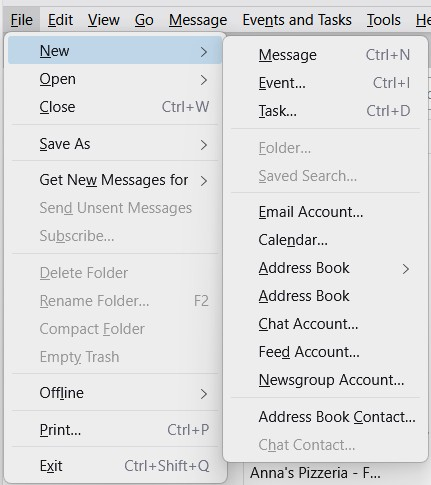
I'm still learning Thunderbird after years of using/supporting Outlook. So far, so good. Today I wanted to create a '''Mailing List'''. I found a support article on this dated 2/13/15. It said: '''Create a mailing list''' Open the Address Book. Select File > New > ''''''Mailing List''''''. Enter a suitable name for the mailing list. In version 156.0.1 this doesn't seem correct any more. I've uploaded an image of the menu I get. There doesn't seem to be any Mailing List option. 2015 was a long time ago, so I'm guessing this Article is WAY out of date and Mailing List creation has changed. Any guidance?
Angefügte Screenshots

Alle Antworten (2)

Ausgewählte Lösung

You are referring to https://support.mozilla.org/en-US/kb/how-create-and-use-mailing-lists-thunderbird

You are correct, the article was outdated. I have reviewed and approved the changes which bring it up to date.

Thanks for bringing this to our attention.

Thanks for the stunningly fast reply. This does, indeed, solve the issue. Thanks!

Stellen Sie eine Frage

Sie müssen sich mit Ihrem Benutzerkonto anmelden, um auf Beiträge zu antworten. Bitte stellen Sie eine neue Frage, wenn Sie noch kein Benutzerkonto haben.