


You just introduced a new "HTTPS-Only Mode" -- as of the last version or two, it no longer allows access to an "http://" site. All such sites are blocked only by Firefox. Is there a fix?

In the Settings, the "HTTPS-Only" feature seems broken. There is an option to 'Don't enable" this feature, but that doesn't make any difference. I can get to an "http:" site using any other browser, but not with the latest Firefox.
Alle Antworten (2)
The https:// only mode has been there for a couple of years from what I recall or even longer, when did you last update?
and see image
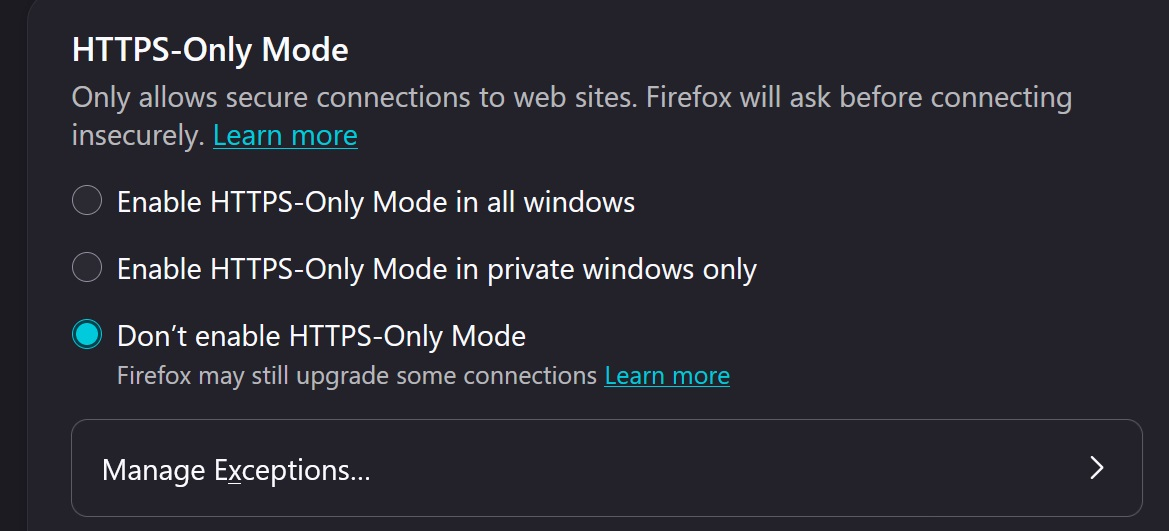
As of a couple of days ago, I was at Firefox 154.0.1. My settings are as you show in the image -- to "Don't Enable" the block. Yesterday I updated to 155.0.1. The HTTPS-Only setting is the same, but now it ALWAYS blocks any http:// call.
Here's an example you can run:
http://www.ancestralquestonline.com/ancestry.com.launch/default.asp?fn=Hannah&ln=Stones&by=1794
Firefox 155.0.1 now converts this to:
https://www.ancestralquestonline.com/ancestry.com.launch/default.asp?fn=Hannah&ln=Stones&by=1794
Which always fails, whereas prior to version 155, this always succeeded.
I create a genealogy software, that allows users to do online research. They initiate such calls to the Internet via our software. Starting a couple of days ago, we started getting a lot of calls asking why their calls to initiate research are always failing, and we have traced it to Firefox 155. We are now encouraging them to use a different default browser so that the calls to "http://" will function properly.
I expect that this is a bug in Firefox 155.0.1, which they would like to get fixed, but it is currently causing havoc with my customers.