


How to update Firefox without it leaving the registry entry from the previous version

I am running Firefox version 155.0.1 under Windows 10. I am receiving Extended Security Updates. When I update Firefox with the automatic updater it replaces the old version with the new one and everything runs fine but the automatic updater fails to clear the leftover registry key from the previous installation. This leaves me with two versions of Firefox listed on the Apps & features page. In order to avoid having this extra entry I have been uninstalling Firefox and then running the installation program to update to the next version. Uninstall removes both entries, but if try using the automatic updater again, once again it fails to clear the leftover registry key from the previous installation. Any ideas on how to resolve this issue. With the frequency of updates being released, I would like to update with the automatic updater without having to remove the ghost registry key each time or resorting to uninstalling the previous version before running the install program.
Alle Antworten (5)
When I update Firefox with the automatic updater
What updater?
Do you get a message from Windows or Firefox to prompt you?
I see you say you want to use the auto updater, . . . hmmm.. I just either wait till I see there is one or check and then update with the Firefox GUI :: Settings > About Firefox
Sorry, bad wording on my part. I was trying to say when I update via the update option in the Firefox program. Help>About Firefox I have Firefox set to notify me when an update is available rather than having it automatically update. If I update via the update option in the Firefox program it fails to clear the leftover registry key from the previous. ie. After updating from 155.0 to 155.0.1 via the Firfox GUI, I would then have two entries for Firefox on the Apps and Features Page. One for 155.0 and one for 155.0.1.
Yes OK, just about what I thought, but I don't actually get a notification by request, where did you get that option. See my image.
I have noticed other people with the same/similar double up but that has never happened to me on any of my devices Win 11 | Ubuntu | Debian | Android
So I am wonder what the difference is each of us is doing or if you have some conflicting issue on your Windows setup ??
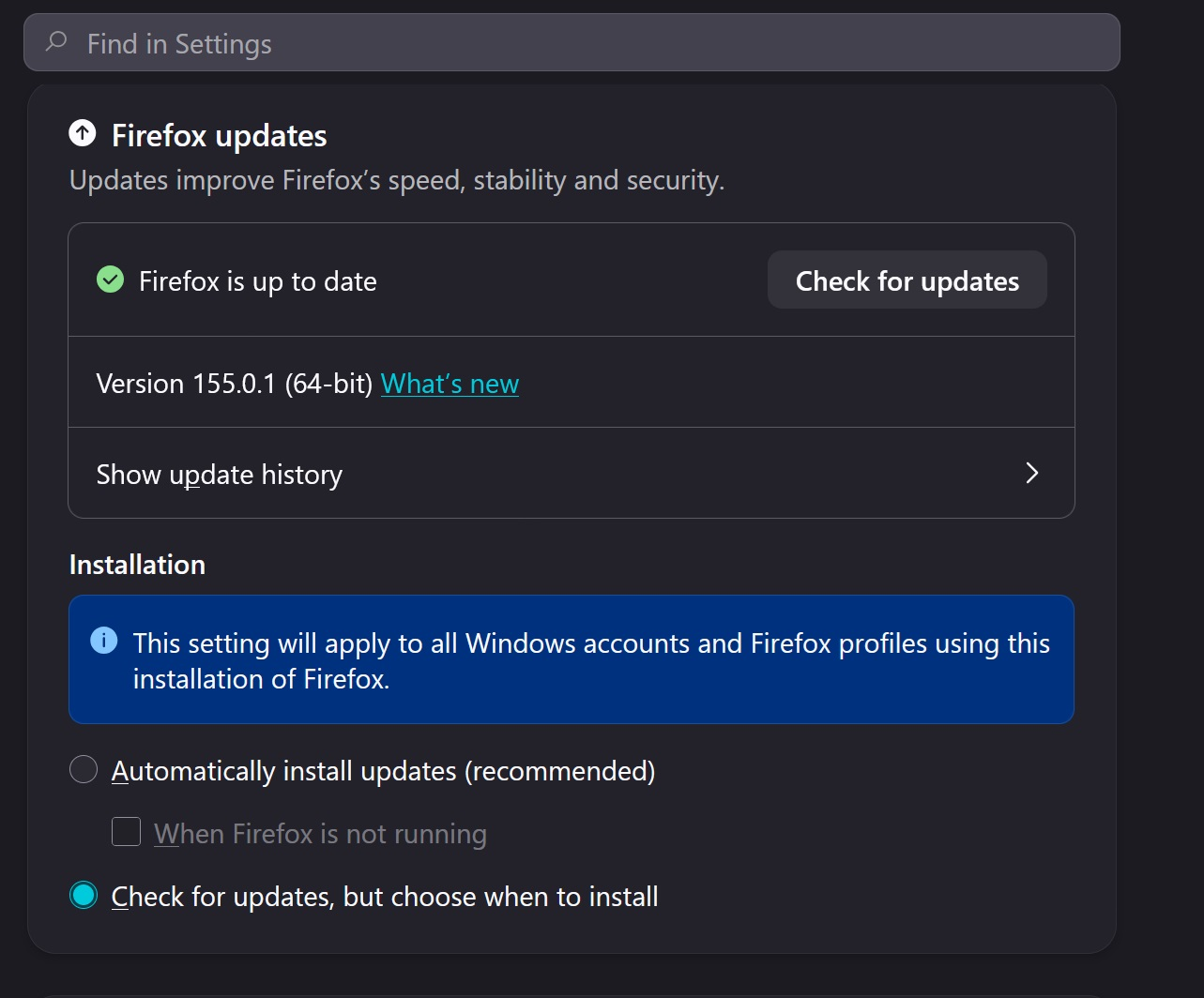
Yes, there is not a specific get a notification by request, I was just thinking that when you select "Check for updates, but choose when to install" Firefox lets you know when an update is available. Whereas when you select "Automatically install updates (recommended) Firefox just goes ahead and installs the update without letting you know that it is available. You would just get the what's new page loaded when you start up the new version of Firefox for the first time after it is downloaded.. If memory serves me right, but unfortunately my memory is not always correct.
I used to install the updates through the Firefox GUI
but abandoned that method after the problem continued through multiple updates.
I do not have the technical knowledge or experience to determine what is causing the problem on my own and what information I was able to find so far by using Google was either 1. How to remove the leftover registry entry manually after the update is run from the Firefox GUI or 2. to not run the updater from the Firefox GUI. as opposed to a method to allow the updater run from the Firefox GUI to perform an update without leaving behind the old registry entry. I only revisited this issue after Mozilla forced an update to a recent version (I don't remember which one) and I was made aware of the update when I observed two entries for Firefox in the "Apps & features" page.
Geändert am von kabhome
1. How to remove the leftover registry entry manually after the update is run from the Firefox GUI or
Read up on Windows regedit
I have gone over this before so will see if i can find the post
OK So as this is a windows issue better refer to a Windows forum by the way do you actually [Restart] Windows rather than [Shut down] after an update? You can uninstall an app via the Gui Windows > Settings > Apps ..... where you may find two Firefox entries with dif versions etc.
If you do go down that road yes the Key_Current_user Will have a lot of references to Firefox, and I do mean a lot, it will take probably an hour or so to find them :)
If you are brave enough to use regedit there is an option to export under [File] but all such work and queries are best done on a Windows forum, this is not the place to focus on regedit though it could help resolve issues that are probably linked to your installation and nothing to do with Firefox.
Geändert am von amoun