


Windows 10 reached EOS (end of support) on October 14, 2025. If you are on Windows 10, see this article.

Hilfe durchsuchen

Vorsicht vor Support-Betrug: Wir fordern Sie niemals auf, eine Telefonnummer anzurufen, eine SMS an eine Telefonnummer zu senden oder persönliche Daten preiszugeben. Bitte melden Sie verdächtige Aktivitäten über die Funktion „Missbrauch melden“.

Weitere Informationen
Offen

Can No Longer Edit Profile

J H

Hi, When I click on the profile icon in the top right, I can no longer edit one of my profiles ("School"). I can still open it, bookmarks/passwords are still there, but I have to log back into everything and in the School profile, I can't switch back to "Personal" by clicking on the profile icon like normal.

I'm on Windows, and yesterday was showing something on my laptop to a mac user. They kept right clicking or something, and some tabs greyed out before I had to just close firefox. When I opened it again later using the "School" profile shortcut on my desktop, it opened a blank/new page. I was able to sign back into the account since I have sync on, so my passwords/bookmarks/etc are there, but I can't edit it any longer and can't make a new profile shortcut for my desktop. And when I open Firefox from my taskbar, it automatically opens my Personal profile instead of letting me choose which. Any ideas on what might have gone wrong & how I can fix it? Thank you!
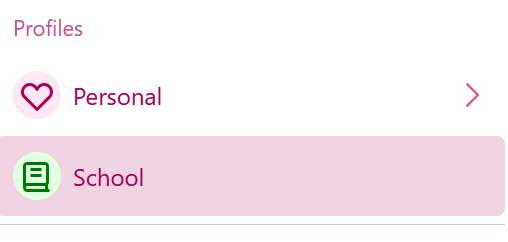
Hi, When I click on the profile icon in the top right, I can no longer edit one of my profiles ("School"). I can still open it, bookmarks/passwords are still there, but I have to log back into everything and in the School profile, I can't switch back to "Personal" by clicking on the profile icon like normal. I'm on Windows, and yesterday was showing something on my laptop to a mac user. They kept right clicking or something, and some tabs greyed out before I had to just close firefox. When I opened it again later using the "School" profile shortcut on my desktop, it opened a blank/new page. I was able to sign back into the account since I have sync on, so my passwords/bookmarks/etc are there, but I can't edit it any longer and can't make a new profile shortcut for my desktop. And when I open Firefox from my taskbar, it automatically opens my Personal profile instead of letting me choose which. Any ideas on what might have gone wrong & how I can fix it? Thank you!
Angefügte Screenshots

Alle Antworten (3)

Have you checked the [profiles.ini] to see how it registers your Profiles

Friends messing with my computer is a def no :)

amoun said

Have you checked the [profiles.ini] to see how it registers your Profiles Friends messing with my computer is a def no :)

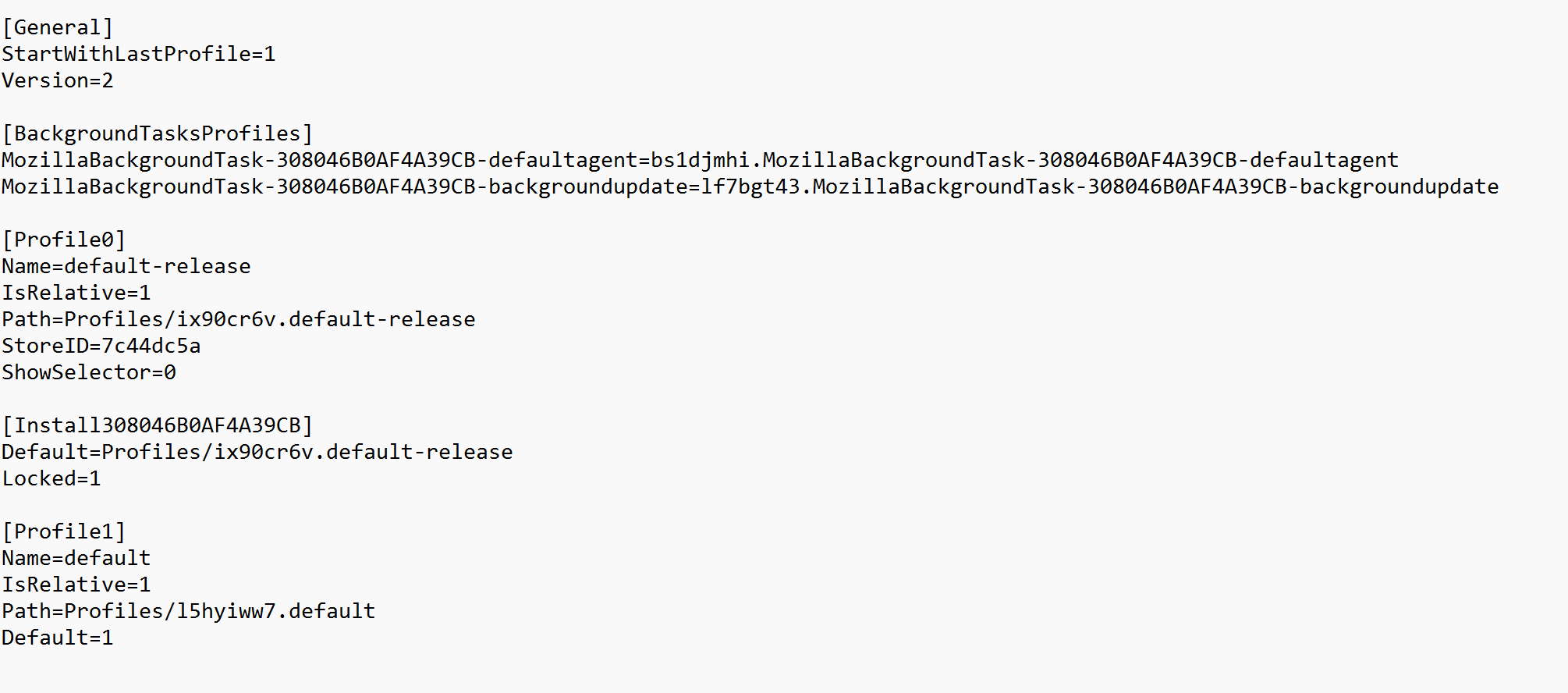
I looked, and it seems to have my 2 profiles. There's also this [Install] part for one of the profiles that might be the issue? I will keep looking into it, thank you!
Interesting:

So which is the locked profile as you see it?

Before you mess with the file make a copy :)

A few things that I'm looking at, though better investigate the profiles.ini before you take note of my ideas

1. Show selector could be changed from 0 to 1 2. Locked could be changed from 1 to 0

Just found this

https://dredyson.com/firefox-multiple-profiles-management-i-tested-every-solution-including-legacy-vs-new-selectable-profiles-aboutprofiles-command-line-and-third-party-workarounds-heres-what-actually-wor/

This link may also help understand how the file works

https://support.mozilla.org/en-US/questions/1035516

Stellen Sie eine Frage

Sie müssen sich mit Ihrem Benutzerkonto anmelden, um auf Beiträge zu antworten. Bitte stellen Sie eine neue Frage, wenn Sie noch kein Benutzerkonto haben.