


Thunderbird suddenly started asking for Crendentials for yahoo account. "Something went wrong We could not sign you in. Try again from a different device." with AVG VPN turned off. But works with AVG VPN turned on.

Hi, T/bird working fine upto Thurs night Feb 26th then yesterday morning I got pop up windows asking for login credentials. Nothing had changed. Tried logging in thru them put it errored: <<
Something went wrong
We could not sign you in. Try again from a different device. >>
I can log into my Yahoo accounts using Firefox so passwords isn't the issue
I've read thru a number of threads on here and elsewhere but no solution so far. K9 is working on my Android phone and my wife's and her T/bird is working on her PC. Just checked versions, she is on 140.8 ESR and I'm on 148.0. Both running Win 11 Pro.
Tried changing from OAuth2 to Normal, pop window asking for password but that doesn't work
Seems to me to be an issue with Ver 148.0 as my wife's working
What am I missing?
Geändert am von Wayne Mery
Ausgewählte Lösung
Happy to report all still working today, great news but I can't help feeling baffled as to what started it all
Hey ho :-) Thank you for your suggestions etc
Mark
Diese Antwort im Kontext lesen 👍 0Alle Antworten (13)

When you have not yet been successful to login, please tell us:
1. With the password that failed with Thunderbird, can you log into the account(s) using the mail provider’s web interface (webmail)? (Note: you must use the account password, not an "app password" that was created by Yahoo) 2. What are the full domain name(s) of all the affected account(s)? (for example yahoo.co.uk) 3. Are cookies enabled in Thunderbird at Settings > Privacy & Security > "Accept cookies from sites …" 4. Are you able to login using Thunderbird after you do the following?
- At the top right of the Thunderbird window, click the menu button ≡ > Settings > General > Config Editor
- find mailnews.oauth.usePrivateBrowser (screen shot below - you can paste it into the search field)
- click the two-headed arrow icon to toggle false to true
- restart Thunderbird (make sure it has fully shut down before starting it up)
- retry the login
Report back if you were not successful after step 4 …

Geändert am von christ1
Hi,
Sadly no change after making the change in the Config and Cookies setting already as advised
Webmail - Yes I can log into Yahoo.co.uk addresses and the password are stored in StickyPasswords and haven't been changed for sometime
And android phone is not having a problem via K9 Cheers
Geändert am von Wayne Mery
1. Can you see the entire OAuth dialog panel - no action buttons are missing? 2. No authentication dialogs are hidden behind what you currently see? 3. You don’t have the preference javascript.enabled set to false in Settings > Config editor? 4. Are you in the country in which you normally use the account? (rule out geoip) 5. Related to #4 above: are you using a VPN? 6. Is the authentication method in Account Settings set to OAuth2? 7. Are you using MFA/2FA? (enabling multi-factor authentication / two-factor authentication in your mail provider settings might be blocking you) 8. Are you running a local web server on your computer, or any other service which may occupy TCP port 80? 9. If you are using Windows, does it help to start Windows in Safe Mode? See https://support.microsoft.com/en-us/windows/windows-startup-settings-1af6ec8c-4d4a-4b23-adb7-e76eef0b847f If you feel the instructions are too complicated, printing them often helps.
Hi 1. Can you see the entire OAuth dialog panel - no action buttons are missing? Yes I can 2. No authentication dialogs are hidden behind what you currently see? No 3. You don’t have the preference javascript.enabled set to false in Settings > Config editor? Set to TRUE 4. Are you in the country in which you normally use the account? (rule out geoip) Yes 5. Related to #4 above: are you using a VPN? No 6. Is the authentication method in Account Settings set to OAuth2? Yes tried 'normal' but changed back to Oauth2 7. Are you using MFA/2FA? (enabling multi-factor authentication / two-factor authentication in your mail provider settings might be blocking you) 8. Are you running a local web server on your computer, or any other service which may occupy TCP port 80? No
Haven't tried 'safe mode' but just been summonised for dinner LOL
The thing is as far as I am concerned it was working fine until Thurs late afternoon when I switched off and went out. Next morning I get this problem. For me it is either: 1. T/bird update - I've now chenged the setting to advise only of new updates 2. Or a Windows update
I can't see it being Yahoo as my mobile, my wife's mobile and her PC using T/bird albeit it a different version all work and all Yahoo.co.uk addresses
Geändert am von Wayne Mery

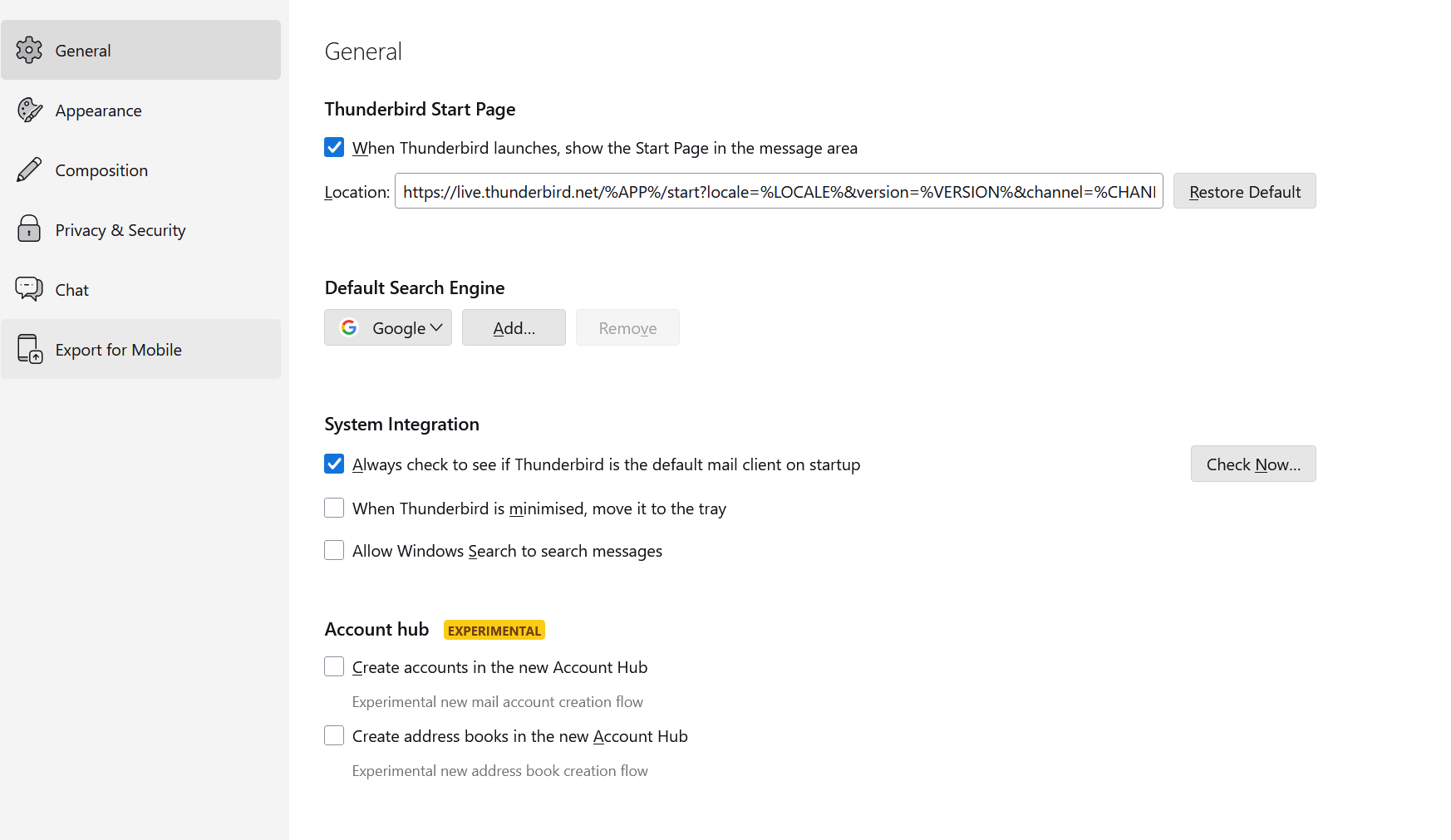
Try turning off "Create accounts in the new Account Hub" feature in Settings>General>Account Hub.
I had similar issue with outlook and I was able to fix with this.
I got the solution from user sfhowes and https://support.mozilla.org/ca/questions/1417298 forum post.
Geändert am von nrusimhamurthy
I tried booting up into Safe Mode, still doesn't work
Rebooted Win 11 and checked "Try turning off "Create accounts in the new Account Hub" feature in Settings>General>Account Hub", already Off
I've tried switching off AVG firewall, made no difference
I must get some work done having lost hours on this issue and now find I'm suffering from creeping paralysis in that I can't login using Webmail using Firefox, Edge or Chrome on my PC, advises I need to try another device!
Webmail works fine on a PC downstairs and my mobile. A nightmare for me, I don't do email management on my mobile unless I absolutely have too, I'm the wrong generation ;-)
Geändert am von Wayne Mery
Don't ask me why but having been asked early on regarding location and VPN I just tried switching on AVG VPN, pointed to nottingham [UK] and I'm living in the UK and webmail works again.
Restarted T/bird and Credentials windows opened up for each Yahoo address and it all seems to be working again. Some addresses didn't verify first or even second time but all done now.
Question is will they work after closing T/bird and restart, I'll leave that for now and get some work done. Maybe later. Also if I turn the VPN off?
I'll report back in due course
Thanks for everyone's input. Feel free to suggest why this has worked as the PC downstairs AVG VPN is switched off and it's webmail is fine
Geändert am von Wayne Mery
Just closed T/bird and restarted, no pop ups :-)
Closed T/bird, turned off AVG VPN and restarted T/bird, no pop ups
Great news but why has it fixed the issue or is just pure coincidence
Fingers crossed it behaves and if not I remember a possible solution
I'll see what a fresh start tomorrow brings before closing this thread off
Geändert am von Wayne Mery
Ausgewählte Lösung
Happy to report all still working today, great news but I can't help feeling baffled as to what started it all
Hey ho :-) Thank you for your suggestions etc
Mark
VPN should not affect webmail - webmail should just work with VPN off or on.
markpeters said
Just closed T/bird and restarted, no pop ups :-) Closed T/bird, turned off AVG VPN and restarted T/bird, no pop ups
I don't understand. If "no pop ups" means you didn't get the login prompts, then how did you get Thunderbird connected to the account??
Plse see my thread above "3/1/26, 3:15 AM" which says the credentials opened and now worked etc. Question was would it still work after a full switch off? ie this morning
My comment to no pop ups related to this morning and booting up my laptop and it T/bird still working as had been doing last Thursday before it started playing up
Geändert am von Wayne Mery
So previously you were getting no login prompts in Thunderbird??
And what about AVG VPN ? Was it running and enabled when the prompts appeared? Or had you turned it off? (You previously wrote "I tried booting up into Safe Mode, still doesn't work" - the VPN would have been disabled at that time)
Hi, as I detailed earlier in my posts, all was fine close of play Thursday but Fri morning and loading T/bird resulted in Credential pop ups for all of my Yahoo emails. VPN was off as usual. Webmail was fine.
I tried various things to fix, some suggested by others on this forum. It was only on Sunday by which time webmail was now failing but fine on another PC did I try turning on the VPN and hey presto T/bird was working. A full power up Monday morning and still working and with VPN now back to Off. So basically everything back to where I was last Thursday, so what caused the T/bird issue in the first place? I've no idea.
Geändert am von Wayne Mery