


Windows 10 reached EOS (end of support) on October 14, 2025. For more information, see this article.

Hilfe durchsuchen

Vorsicht vor Support-Betrug: Wir fordern Sie niemals auf, eine Telefonnummer anzurufen, eine SMS an eine Telefonnummer zu senden oder persönliche Daten preiszugeben. Bitte melden Sie verdächtige Aktivitäten über die Funktion „Missbrauch melden“.

Weitere Informationen

"allow audio and video autoplay" exception doesn't transparently work on all sites

  • 1 Antwort
  • 0 haben dieses Problem
  • 16 Aufrufe
  • Letzte Antwort von jonzn4SUSE

Weitere Optionen

In Firefox, I have audio and video autoplay blocked globally, and added an exception for one particular website (Discord). However, Discord now only autoplays videos once, but doesn't loop them as it should (they implemented GIFs as videos, but now they don't loop).

Of course this could be interpreted as a bug in Discord's web client. However, there shouldn't be a difference between a website that got an exception and autoplay being globally allowed. Therefore i suspect that there is a bug in firefox where some property, state, or hint is set differently depending on whether a page has been added to exceptions or autoplay is allowed globally.

Is there anything i can do to work around this? I really want an autoplay exception to actually work as expected (the website doesn't need to know that it's special)
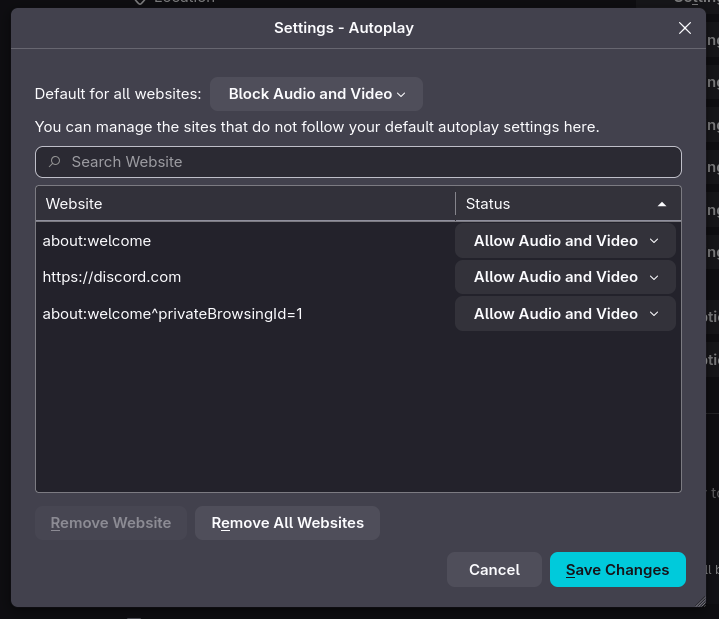
In Firefox, I have audio and video autoplay blocked globally, and added an exception for one particular website (Discord). However, Discord now only autoplays videos once, but doesn't loop them as it should (they implemented GIFs as videos, but now they don't loop). Of course this could be interpreted as a bug in Discord's web client. However, there shouldn't be a difference between a website that got an exception and autoplay being globally allowed. Therefore i suspect that there is a bug in firefox where some property, state, or hint is set differently depending on whether a page has been added to exceptions or autoplay is allowed globally. Is there anything i can do to work around this? I really want an autoplay exception to actually work as expected (the website doesn't need to know that it's special)
Angefügte Screenshots

Alle Antworten (1)

Weitere Optionen

Examples please. What OS? What Desktop? X11 or Wayland? Does it happen with Firefox in Troubleshoot Mode? https://support.mozilla.org/en-US/kb/diagnose-firefox-issues-using-troubleshoot-mode#search

Try downloading Firefox from Mozilla. Download, unzip, and run firefox-bin from the folder and see if you have the same issue. https://www.mozilla.org/en-US/firefox/all/#product-desktop-release

Stellen Sie eine Frage

Sie müssen sich mit Ihrem Benutzerkonto anmelden, um auf Beiträge zu antworten. Bitte stellen Sie eine neue Frage, wenn Sie noch kein Benutzerkonto haben.