


Windows 10 reached EOS (end of support) on October 14, 2025. For more information, see this article.

Hilfe durchsuchen

Vorsicht vor Support-Betrug: Wir fordern Sie niemals auf, eine Telefonnummer anzurufen, eine SMS an eine Telefonnummer zu senden oder persönliche Daten preiszugeben. Bitte melden Sie verdächtige Aktivitäten über die Funktion „Missbrauch melden“.

Weitere Informationen

Firefox 146 active bookmark aggressive bookmark color

  • 10 Antworten
  • 0 haben dieses Problem
  • 115 Aufrufe
  • Letzte Antwort von load232

I have upgraded my Firefox to version 146 and I have a disruptive color of active bookmark in left sidebar. How could I change this color into moderate one - dark grey.
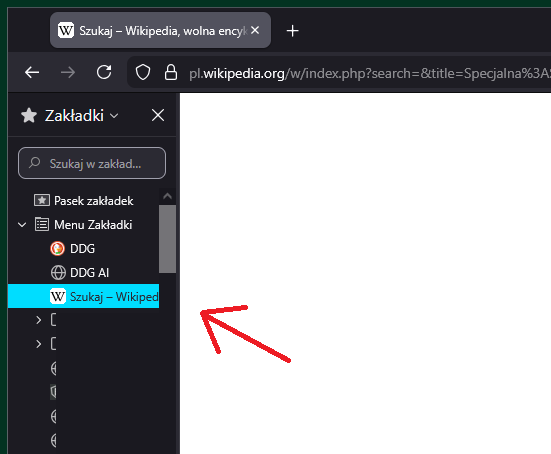
I have upgraded my Firefox to version 146 and I have a disruptive color of active bookmark in left sidebar. How could I change this color into moderate one - dark grey.
Angefügte Screenshots

Alle Antworten (10)

Hi, we're tracking this issue under bug 2005430. Hopefully they'll fix it in 147.

Isn't it possible to ad a simple .js file with RGB to overrun this color? Or get the version 145 back?

Geändert am von load232

Should be already fixed in 146.0.1.

Thanks for the answers!

TyDraniu, I was creating and coding web pages many years ago (html times). Could you please tell me where in Firefox folders should I place the code you mentioned in reddit link? AppData -> Roaming -> Mozilla -> Firefox -> Profiles -> xxx.default-release -> chrome -> userContent.css ?


There is another color problem in Firefox 146 that I have not noticed before - even more screaming blue! (maybe something for another post)

Yes it's there, but you also have to switch toolkit.legacyUserProfileCustomizations.stylesheets to true in about:config.

Must be something more. Maybe my bad somewhere. I have updated to 146.0.1 -> no changes about:config was already switched -> no changes (userContent.txt as on screenshot then changed to userContent.css and put to chrome folder as I specified before)

Geändert am von load232

Hello

Try, userChrome.css

For illustration, other color.

Works! Thank you very much! What a fantastic morning!


The code just in case - original Firefox 145 color:


treechildren::-moz-tree-row(hover) {

   background-color: rgba(51, 50, 57, 1) !important;

}

treechildren::-moz-tree-row(selected) {

   background-color: rgba(51, 50, 57, 1) !important;
   outline: none !important;

}

treechildren::-moz-tree-row(selected, focus) {

   background-color: rgba(51, 50, 57, 1) !important;

}

treechildren::-moz-tree-image(selected), treechildren::-moz-tree-twisty(selected), treechildren::-moz-tree-cell-text(selected) {

   color: white !important;

}

treechildren::-moz-tree-image(selected, focus), treechildren::-moz-tree-twisty(selected, focus), treechildren::-moz-tree-cell-text(selected, focus) {

   color: white !important;

}

Geändert am von load232

Stellen Sie eine Frage

Sie müssen sich mit Ihrem Benutzerkonto anmelden, um auf Beiträge zu antworten. Bitte stellen Sie eine neue Frage, wenn Sie noch kein Benutzerkonto haben.