


Windows 10 reached EOS (end of support) on October 14, 2025. For more information, see this article.

Hilfe durchsuchen

Vorsicht vor Support-Betrug: Wir fordern Sie niemals auf, eine Telefonnummer anzurufen, eine SMS an eine Telefonnummer zu senden oder persönliche Daten preiszugeben. Bitte melden Sie verdächtige Aktivitäten über die Funktion „Missbrauch melden“.

Weitere Informationen

New Version Ruined Privacy Option

  • 2 Antworten
  • 0 haben dieses Problem
  • 13 Aufrufe
  • Letzte Antwort von Anan

Weitere Optionen

The most recent Firefox update (145.0) lacks the convenience of easily editing the cookie collection that tells websites about me. The feature I'm referring to was under settings - privacy and security - and then something about cookies. It allowed me to show what sites had collected cookies on me recently and to erase any private data they had collected.

I hope this was an oversight or the feature has simply been moved to another location. If not, I'd really like to roll back the latest update and pause any further updates until the old functionality is restored to the new updates.

Can anybody help me?

The most recent Firefox update (145.0) lacks the convenience of easily editing the cookie collection that tells websites about me. The feature I'm referring to was under settings - privacy and security - and then something about cookies. It allowed me to show what sites had collected cookies on me recently and to erase any private data they had collected. I hope this was an oversight or the feature has simply been moved to another location. If not, I'd really like to roll back the latest update and pause any further updates until the old functionality is restored to the new updates. Can anybody help me?

Ausgewählte Lösung

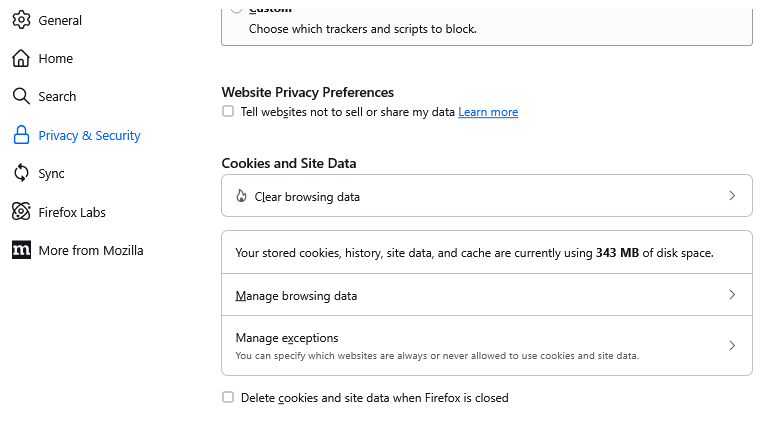
I know the Manage Data... button well. It looks like the buttons in that section changed shape and possibly sequence, but the names are similar:

  • Clear Data... => Clear Browsing Data
  • Manage Data... => Manage Browsing Data
  • Manage Exceptions... => Manage exceptions

Are you not seeing those buttons?
Diese Antwort im Kontext lesen 👍 1

Alle Antworten (2)

Weitere Optionen

Ausgewählte Lösung

I know the Manage Data... button well. It looks like the buttons in that section changed shape and possibly sequence, but the names are similar:

  • Clear Data... => Clear Browsing Data
  • Manage Data... => Manage Browsing Data
  • Manage Exceptions... => Manage exceptions

Are you not seeing those buttons?

Weitere Optionen

THANKS!

Stellen Sie eine Frage

Sie müssen sich mit Ihrem Benutzerkonto anmelden, um auf Beiträge zu antworten. Bitte stellen Sie eine neue Frage, wenn Sie noch kein Benutzerkonto haben.