


Change the colors of the bookmarks sidebar

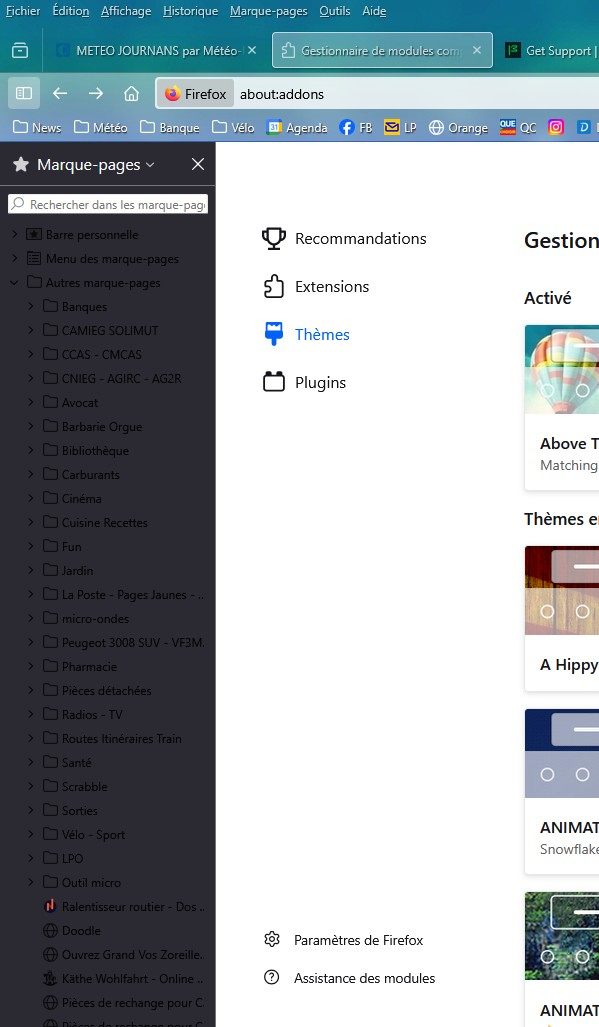
Since the latest Firefox update, the color of the letters appears black on a gray background, making them invisible. How can I change the colors of the bookmarks sidebar? Thanks in advance.
Since the latest Firefox update, the color of the letters appears black on a gray background, making them invisible.
How can I change the colors of the bookmarks sidebar?
Thanks in advance.
Alle Antworten (2)
Hi
I understand that if you are using certain dark themes you may experience issues with text contrast in the sidebar.
A workaround is to use the built-in dark theme or the system theme
This is tracked under Bug 1971487 and a fix will follow in a later release.
Hi
Please can you check for updates to Firefox, as I believe that updating to version 140.0.1 should fix this. This support article will help you to update:
https://support.mozilla.org/en-US/kb/update-firefox-latest-release