


Join us to show up for other Firefox users 🦊. Earn fun badges and Mozilla swag vouchers! Find out more: https://mzl.la/askafox150

Windows 10 reached EOS (end of support) on October 14, 2025. If you are on Windows 10, see this article.

Hilfe durchsuchen

Vorsicht vor Support-Betrug: Wir fordern Sie niemals auf, eine Telefonnummer anzurufen, eine SMS an eine Telefonnummer zu senden oder persönliche Daten preiszugeben. Bitte melden Sie verdächtige Aktivitäten über die Funktion „Missbrauch melden“.

Weitere Informationen

outlook.live.com not working well in Firefox the last few updates, outlook.live.com works well in Chrome

  • 1 Antwort
  • 0 haben dieses Problem
  • 135 Aufrufe
  • Letzte Antwort von SueWitch
  • Archiviert

This problem only occurs in my Hotmail email account at outlook.live.com using Firefox in the last few weeks.

I typed exactly the same including spaces in both Chrome and Firefox. First 2 lines typed in Chrome, saved the draft, last 2 lines typed in Firefox but in Firefox the nonsense occurs. Amazingly the 2 lines typed using Chrome still display well in Firefox. Firefox adds the extra number in the fractions in the space I had typed! How can I get Firefox to work well at outlook.live.com?

This has only happened in the last few weeks, during all those updates. Am on 138.0.4 Are any of these updates buggy?
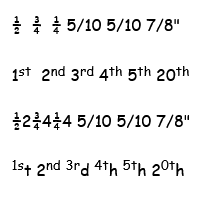
This problem only occurs in my Hotmail email account at outlook.live.com using Firefox in the last few weeks. I typed exactly the same including spaces in both Chrome and Firefox. First 2 lines typed in Chrome, saved the draft, last 2 lines typed in Firefox but in Firefox the nonsense occurs. Amazingly the 2 lines typed using Chrome still display well in Firefox. Firefox adds the extra number in the fractions in the space I had typed! How can I get Firefox to work well at outlook.live.com? This has only happened in the last few weeks, during all those updates. Am on 138.0.4 Are any of these updates buggy?
Angefügte Screenshots

Alle Antworten (1)

Thanks a million for the no help whatsoever. Not a good look for a help forum.

Believe it or not the last Firefox update solved this and it is now working properly again. Nothing I had done had any effect whatsoever.