


Is there a way to turn off tracking URL fragment insertion from the release notes page when clicking "What's New" in the Firefox update modal?

Is there a way to turn off tracking URL fragment insertion from the release notes page when clicking "What's New" in the Firefox update modal?
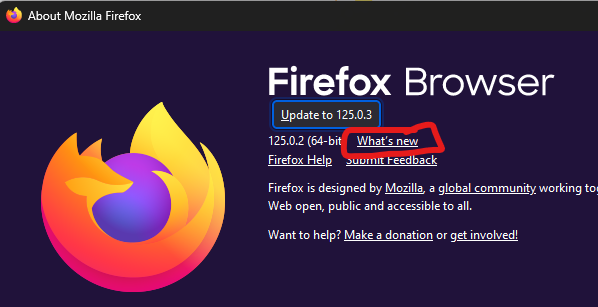
When I click "What's New" in this modal (see Screenshot 1), it loads the release notes page for my current version (although it really should load the release notes page for the version it wants me to upgrade to, but that's another issue altogether), and inserts a bunch of tracking URI fragments onto the URL (see Screenshot 2).
Is there a way (in Settings, about:config, Windows Registry, etc.) to disable that fragment insertion?

Ausgewählte Lösung
Hi Tyler, I don't think there is a setting for that. You can bookmark
https://www.mozilla.org/firefox/releases/
and then manually click into the latest set of notes.
Regarding the version in the link, do you have Firefox set to notify you of available updates (on the Settings page)? The link on that notification panel should be for the upcoming version rather than the current version.
Diese Antwort im Kontext lesen 👍 0Alle Antworten (5)
Ausgewählte Lösung
Hi Tyler, I don't think there is a setting for that. You can bookmark
https://www.mozilla.org/firefox/releases/
and then manually click into the latest set of notes.
Regarding the version in the link, do you have Firefox set to notify you of available updates (on the Settings page)? The link on that notification panel should be for the upcoming version rather than the current version.
jscher2000 - Support Volunteer said
Regarding the version in the link, do you have Firefox set to notify you of available updates (on the Settings page)? The link on that notification panel should be for the upcoming version rather than the current version.
Thanks, No I do not. I update when it is convenient for me, which is often significantly less frequently than whenever Firefox prompts me to do so. I typically skip minor patches that don't affect features or functionality I use.
You can use this link to get the Release notes of the latest version.
cor-el said
You can use this link to get the Release notes of the latest version.
That's not what I'm asking. I'm asking how to prevent tracking information from being inserted into the URL when I click a particular link from a Firefox system window.
There is only "Copy Link Copy Link Without Site Tracking" that you can use to remove some known tracking parameters that you can control via about:config.
- chrome://global/content/antitracking/StripOnShare.json
- privacy.query_stripping.allow_list
- privacy.query_stripping.strip_list
- /questions/1432926 How to automatically remove all tracking codes and tags in URL's?