

Dieses Thema wurde archiviert.
Bitte stellen Sie eine neue Frage, wenn Sie Hilfe benötigen.

Archiviert
typing math exponents squared and cubed in thunderbird

in windows, i could type dsquared as d(alt, 0,1,7,8) and get dsquared,,,,,,how do i that in Thunderbird on linux mint cinnamon victoria......thank you
in windows, i could type dsquared as d(alt, 0,1,7,8) and get dsquared,,,,,,how do i that in Thunderbird on linux mint cinnamon victoria......thank you
Alle Antworten (3)
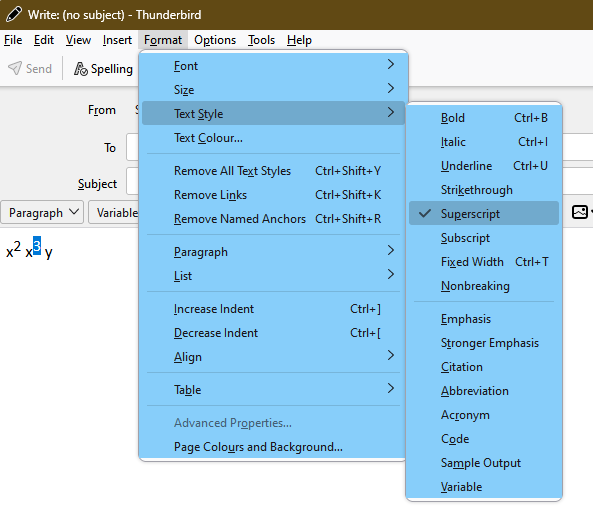
Select the exponent, then Format/Text Style... Superscript (see picture). Press Alt if the Menu Bar with Format is hidden.
the exponent is my signature in emails, letters, etc., b cubed, could you make your instructions more simple? and do not leave anything out! for example, i am in an email and i type b (now how do i cube that b as my signature in the email?)