


Firefox latest release is having issue with embedded js script within the <form></form> tags

Hi,
Has anyone experience any issue with the latest Firefox release (v117.0) where an embeded js script(s) within the form tags printed out in the UI?
I.e. embedded js script within the form tags <form name="input" id="testForm" action="{$url}" method="post" target="_top">
     <script type="text/javascript">
           $(document).ready(function(){
                $("#imageLink").click(function() {
                    var eobImageUrl = $.trim("");
                     var externalFileName = "";
                }
          });
          ....
        </script>
</form>
And this is what displaying on the webpage instead of a blank page:
$(document).ready(function(){ $("#imageLink").click(function(){ var eobImageUrl = $.trim(""); var externalFileName = ""; ...
Thanks.
kear.
Ausgewählte Lösung
Turns out it is a CSS issue.
all: unset - changed to their inherited values if they inherit by default, or to their initial values if not. IS NOT WORKING
- eobForm {
 * {
 	all: unset;
 }
}
--- Working solution --- Change it to all: revert-layer - cascade roll back is working as expected
- eobForm {
 * {
 	all: revert-layer;
 }
} Everything is working as expected. For more info on the all css: https://developer.mozilla.org/en-US/docs/Web/CSS/all#try_it
Diese Antwort im Kontext lesen 👍 0Alle Antworten (7)
Script text inside a form is hidden for me.
Does it still happen in Troubleshoot Mode?
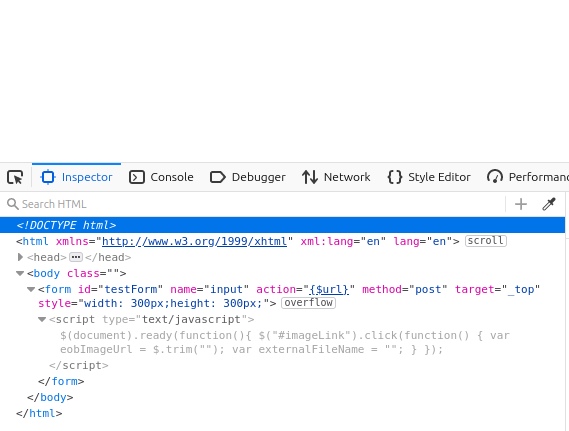
Yes, it show up in the Troubleshoot Mode as well.
The script inside a form we use is part of an xsl page in our application. This "MIGHT" be an xsl related issue and how FF v117.0 process it.
It is 100% functioning as expected with FF v116.0 but is "broken" in FF v117.0 (the latest FF update). For now we rolled FF back to v116.0.
Hopefully Mozilla address this in their v118 slated for later this month.
A test case would be needed for it to be investigated.
Can you share an example page without any sensitive information using right-click > Save Page As > Web Page, HTML?
<meta http-equiv="content-type" content="text/html; charset=windows-1252"> <frame name="Index" frameborder="0" src="Index.jsp_files/Index_FrmA.htm"> <frame name="eob" id="eob" onload="reloadFrames()" frameborder="0" src="Index.jsp_files/Eob.htm"> <noframes></noframes>
Ausgewählte Lösung
Turns out it is a CSS issue.
all: unset - changed to their inherited values if they inherit by default, or to their initial values if not. IS NOT WORKING
- eobForm {
 * {
 	all: unset;
 }
}
--- Working solution --- Change it to all: revert-layer - cascade roll back is working as expected
- eobForm {
 * {
 	all: revert-layer;
 }
} Everything is working as expected. For more info on the all css: https://developer.mozilla.org/en-US/docs/Web/CSS/all#try_it
<script> uses "display: none" but "all: unset" makes it "display: inline" which makes it visible and is consistent with Chrome. The different behavior is because you are using CSS nesting which is fairly new. Firefox is reading the nested wildcard selector while Chrome appears to be ignoring it.
You could avoid CSS nesting for now and use an exception for scripts:
 eobForm :not(script) {
   all: unset;
 }
This question has been locked because the original author has deleted their account. While you can no longer post new replies, the existing content remains available for reference.