


How do I change SMTP server details (for ssl)

My web host has an SSL secured mailserver , but require the outgoing smtp server to be mail.***.**, not my site address - which TB puts in automatically. I can't find a way to change this.
Any help will be greatly appreciated.
Alle Antworten (3)
Ausgewählte Lösung
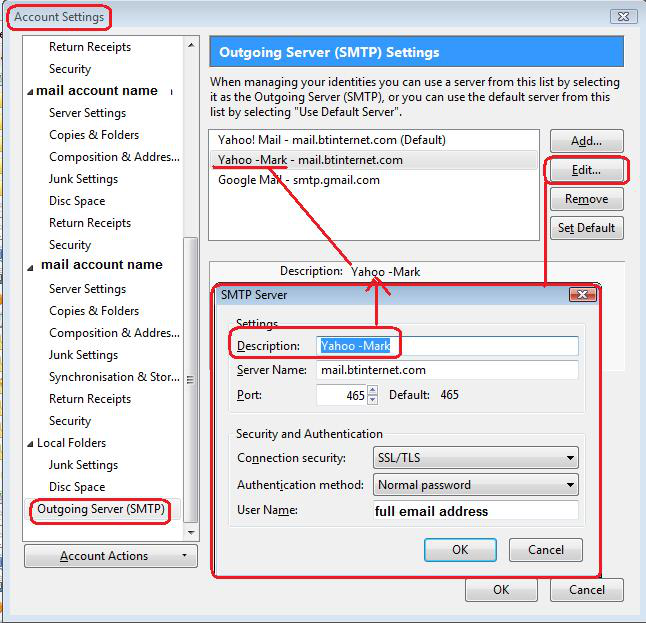
- Right click on mail account in Folder Pane and select 'Settings'
Account Settings window opens
- Bottom of Left Pane - select 'Outgoing Server (SMTP)'
On the right you will see a list of your outgoing servers.
- select the server you use - the username will probably be your email address for mail account
- click on 'Edit'
Use the 'Description' text box to help you identify which mail account uses this server. This is particulary useful if you have more than one outgoing server.
- Type something like 'Personal' or 'Business' etc
- Change the server name and any other details as required.
- click on OK
Make sure the mail account is using that outgoing server.
- In left pane select the mail account name
bottom right will say what 'Outgoing Server (SMTP) it is using.
- Use the drop down to select relevant outgoing server.
This is where the 'Description' field really helps to locate correct one.
- click on 'OK'
Restart Thunderbird.
Images below as a guide to show what areas I'm talking about.

OK, thanks very much. I was trying to edit in server settings, which I assumed was used to change anything. I never scrolled down far enough to see 'server settings',
I have followed all instructions and I am still having problems. I have 1 main account and 1 sub account . the user of each account keeps changing in outgoing smtp therefore I have to check smtp every time I send a message to make sure it has the correct user. I changed internet providers from TW to ATT.Att says it is not their fault. It is TB .I have tried everything you suggest and nothing is correcting the problem. PLEASE ADVISE