


Windows 10 reached EOS (end of support) on October 14, 2025. If you are on Windows 10, see this article.

Hilfe durchsuchen

Vorsicht vor Support-Betrug: Wir fordern Sie niemals auf, eine Telefonnummer anzurufen, eine SMS an eine Telefonnummer zu senden oder persönliche Daten preiszugeben. Bitte melden Sie verdächtige Aktivitäten über die Funktion „Missbrauch melden“.

Weitere Informationen

Display glitch on maximized screen - Firefox v57.0 64 bit

  • 1 Antwort
  • 3 haben dieses Problem
  • 117 Aufrufe
  • Letzte Antwort von philipp
  • Gelöst

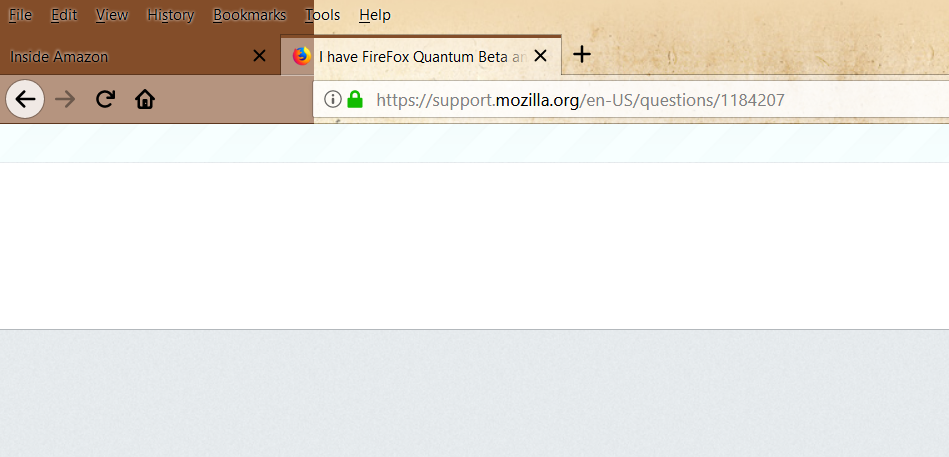
Since upgrading to Firefox v57 I have witnessed a display glitch in fullscreen mode

The menu bar, tab bar, and main address/icon bar are all a much darker color up to the start of the address field. Once the field element starts everything is back to normal

This does not appear to be effecting performance but the black text on dark brown makes it really hard to see the menu. When the window is not maximized it reverts back to normal coloring
Since upgrading to Firefox v57 I have witnessed a display glitch in fullscreen mode The menu bar, tab bar, and main address/icon bar are all a much darker color up to the start of the address field. Once the field element starts everything is back to normal This does not appear to be effecting performance but the black text on dark brown makes it really hard to see the menu. When the window is not maximized it reverts back to normal coloring
Angefügte Screenshots

Geändert am von bbatema

Ausgewählte Lösung

hi, this is likely caused by the theme you're using - probably the background graphic isn't spanning the whole width of your screen. please try a different theme :))

Diese Antwort im Kontext lesen 👍 1

Alle Antworten (1)

Ausgewählte Lösung

hi, this is likely caused by the theme you're using - probably the background graphic isn't spanning the whole width of your screen. please try a different theme :))