


Firefox 56.0.1 is causing fonts issue. Fonts are looking fuzzy and I tried whatever I can do it to fix it but the problem won't go away.

My browser was working fine without any issue but now this issue is coming up in latest versions of Firefox. Fonts don't appear the normal way & look ugly. I even downgraded to version 50 but of no use. I have seen a lot of tutorials about fixing fonts issue but none of them helped. This latest version of Firefox 56.0.1 doesn't show / support hardware acceleration option. In "Troubleshooting Information" for DIRECT2D (under Graphics) it says unavailable by runtime: Failed to acquire a Direct2D 1.1 factory
Any solution?
Ausgewählte Lösung
Just fixed.
Thanks all for your kind help.
Alle Antworten (25)
Sorry I didn't understand where and how to check fonts?
Hi A17U, there are more panels of the Inspector than you can see. Please click the little triangle at the end of the row (Rules, Computed, etc.) to select panels whose headers are not visible. Illustration attached.
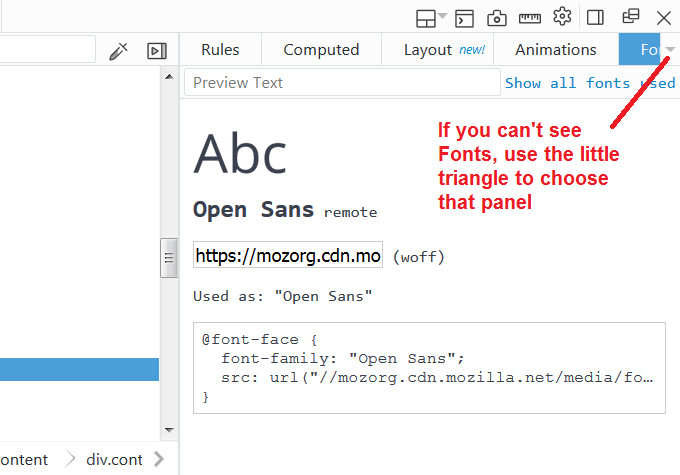
Attached.
Ausgewählte Lösung
Just fixed.
Thanks all for your kind help.
I am on FF 52 esr and I am having font problems too since the latest update. I cleared the values for the following name in about:config and the problem became less annoying gfx.font_rendering.cleartype_params.force_gdi_classic_for_families I also found that certain fonts are causing problems. When I block some font servers with noScript the rendering result improves. The attached screenshots show the appearance of an amazon page with enabled and with blocked FONT@https://m.media-amazon.com
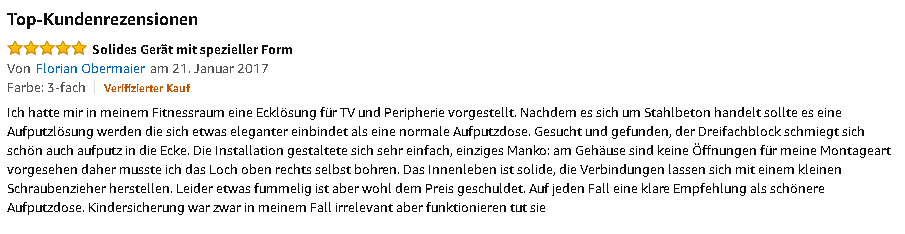
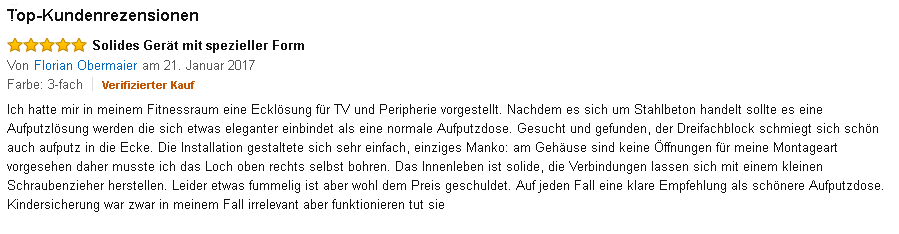
This question has been locked because the original author has deleted their account. While you can no longer post new replies, the existing content remains available for reference.