


Join us to show up for other Firefox users 🦊. Earn fun badges and Mozilla swag vouchers! Find out more: https://mzl.la/askafox150

Windows 10 reached EOS (end of support) on October 14, 2025. If you are on Windows 10, see this article.

Hilfe durchsuchen

Vorsicht vor Support-Betrug: Wir fordern Sie niemals auf, eine Telefonnummer anzurufen, eine SMS an eine Telefonnummer zu senden oder persönliche Daten preiszugeben. Bitte melden Sie verdächtige Aktivitäten über die Funktion „Missbrauch melden“.

Weitere Informationen

The menus for new Web Extensions add-ons do not display correctly.

  • 1 Antwort
  • 4 haben dieses Problem
  • 165 Aufrufe
  • Letzte Antwort von GearsOfWoe
  • Gelöst

I upgraded to the new versions of uBlock Origin and Zoom Page. When I click on the toolbar icon the add-on menu window tries to open and is either empty or too small to show the menu items. For uBlock Origin, a single click opens a tiny menu window. Double-clicking open a larger menu window but it is too small to display all the menu items. Zoom Page WE behaves the same way. I'm using Firefox v 56.0 (64-bit)
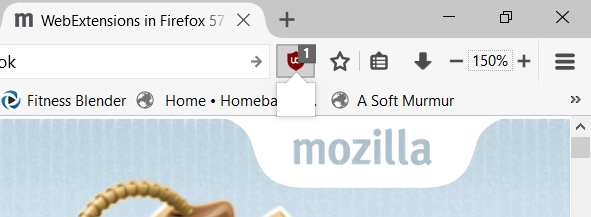
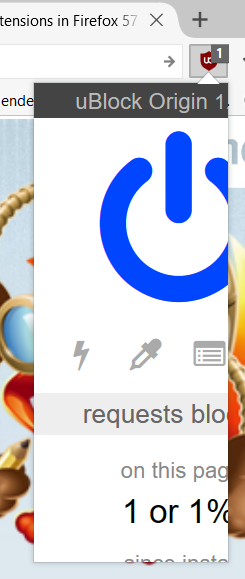
I upgraded to the new versions of uBlock Origin and Zoom Page. When I click on the toolbar icon the add-on menu window tries to open and is either empty or too small to show the menu items. For uBlock Origin, a single click opens a tiny menu window. Double-clicking open a larger menu window but it is too small to display all the menu items. Zoom Page WE behaves the same way. I'm using Firefox v 56.0 (64-bit)
Angefügte Screenshots

Geändert am von GearsOfWoe

Ausgewählte Lösung

My apologies. Just figured it out. The legacy Zoom Page was affecting the size of the menu items in the other extensions. Once I removed it, everything worked fine.

Diese Antwort im Kontext lesen 👍 0

Alle Antworten (1)

Ausgewählte Lösung

My apologies. Just figured it out. The legacy Zoom Page was affecting the size of the menu items in the other extensions. Once I removed it, everything worked fine.