


URL bar

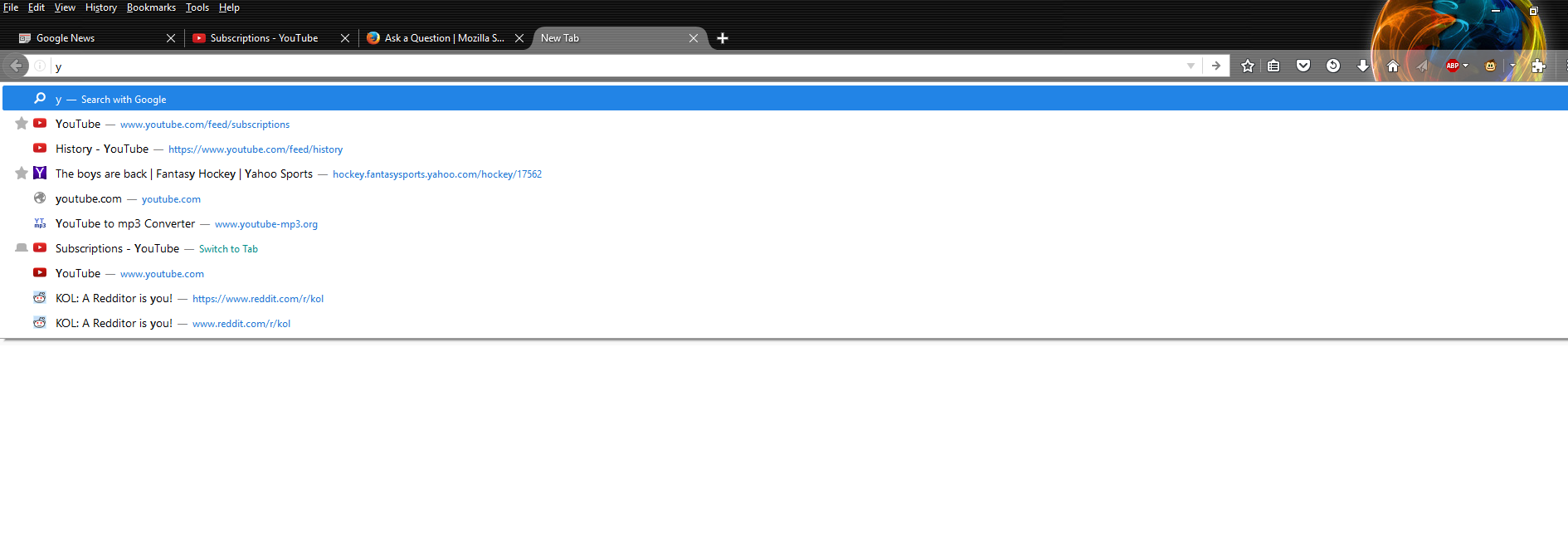
With the update to Firefox 50.0, when I open a new tab and start typing in the URL, I am now prompted with a "search with google" option first, and then my bookmarks below that. It's a very minor complaint, but I am used to simply hitting right arrow and then pressing enter to go to my bookmark. How do I disable the "search with google" feature?
Alle Antworten (2)
Ausgewählte Lösung
Hi owen09, as you may recall, the "explantory" row below the address bar was introduced in Firefox 43. From Firefox 43-47, there was a setting to suppress that row but starting in Firefox 48, that setting doesn't do anything.
You can use custom style rules to modify the appearance of the drop-down, hide the top bar, change, the layout, etc. But in order to have the first "real" matching item auto-selected, you need an add-on. For example:
https://addons.mozilla.org/firefox/addon/enter-selects/
And if you did want to restyle the drop-down, I have a user style online that you can consider: https://userstyles.org/styles/122394/url-bar-tweaks-remove-visit-search-limit-width
By the way, instead of right-arrow, have you tried down-arrow to select that first "real" matching item? That's actually what I've been doing since Firefox 43.