


My scanner brings up a box every time I scan in POS. I need to get rid of it. How.

When I updated to windows 10, each time, at the store, that I scan in a barcode, I get a box which shows me downloads. Now I have it on two computers and I can't get rid of it. Help!
Alle Antworten (1)
Have you tried getting support from the POS software maker? Sounds like an incompatibility between the POS software and Firefox.
Have you tried any troubleshooting in Firefox? Like maybe the Firefox SafeMode?
Firefox Safe Mode is a troubleshooting mode that temporarily turns off hardware acceleration, resets some settings, and disables add-ons (extensions and themes).
If Firefox is open, you can restart in Firefox Safe Mode from the Help menu:
- Click the menu button
 , click Help
  and select Restart with Add-ons Disabled.
If Firefox is not running, you can start Firefox in Safe Mode as follows:
- On Windows: Hold the Shift key when you open the Firefox desktop or Start menu shortcut.
When the Firefox Safe Mode window appears, select "Start in Safe Mode".
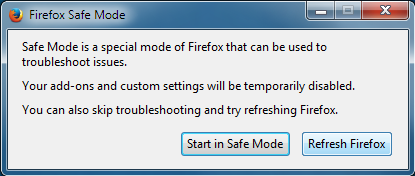
If the issue is not present in Firefox Safe Mode, your problem is probably caused by an extension, theme, or hardware acceleration. Please follow the steps in the Troubleshoot extensions, themes and hardware acceleration issues to solve common Firefox problems article to find the cause.
To exit Firefox Safe Mode, just close Firefox and wait a few seconds before opening Firefox for normal use again.