


Your connection is not secure

Hi All,
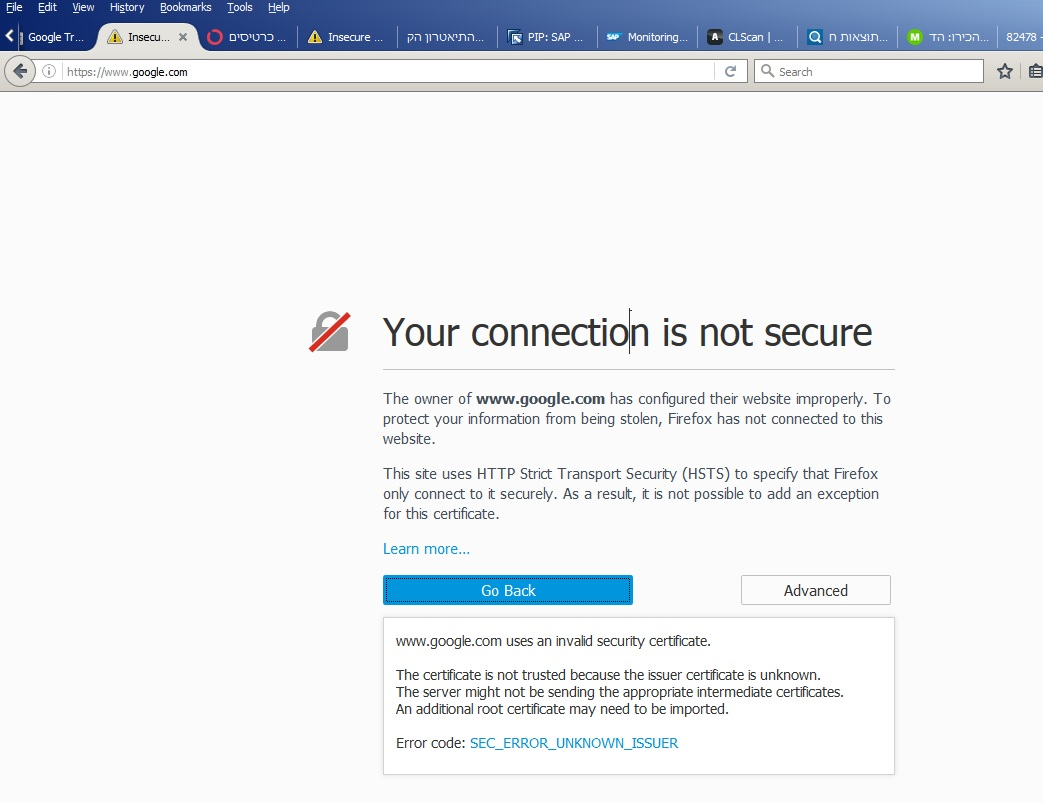
I have this "Your connection is not secure" error on some very legitimate websites (Google, SAP, Mozilla).
I don't have the "Add Exception" option when I click the "Advnaced" (see attachment).
I'm on a corprorate network. My freind in this organization doen't have this issue. His FF version is 35 (or so), while I'm on 45.0.1.
My organization changed its Proxy few days ago and than the issues started.
Regards.
Alle Antworten (3)
Are you connecting via a proxy that sends its own certificate?
If you can't inspect the certificate via Advanced (I Understand the Risks) then try this:
Open the "Add Security Exception" window by pasting this chrome URL in the Firefox location/address bar and check the certificate:
- chrome://pippki/content/exceptionDialog.xul
In the location field of this window type or paste the URL of the website with the https:// protocol prefix (https://xxx.xxx).
- retrieve the certificate via the "Get certificate" button
- click the "View..." button to inspect the certificate in the Certificate Viewer
You can inspect details like the issuer and the certificate chain in the Details tab of the Certificate Viewer. Check who is the issuer of the certificate. If necessary then please attach a screenshot that shows the Certificate Viewer with the issuer.
If the certificate is from your company proxy then you need to install its root certificate in Firefox. Easiest to do this is to export the certificate in another browser that works and import the certificate in the Firefox Certificate Manager.
- Tools > Options > Advanced > Certificates: View Certificates
Firefox uses its own certificate store and not the OS system store like other browser possibly do.
Dear cor-el,
Attached please find a screen shot of the certificate of Google from IE.
In IE, Google is in the "Untrasted Publisher". I tried to export it in several ways, but I always get error "...do not own the corresponding private key..." when I try to import into FF.
Regards.
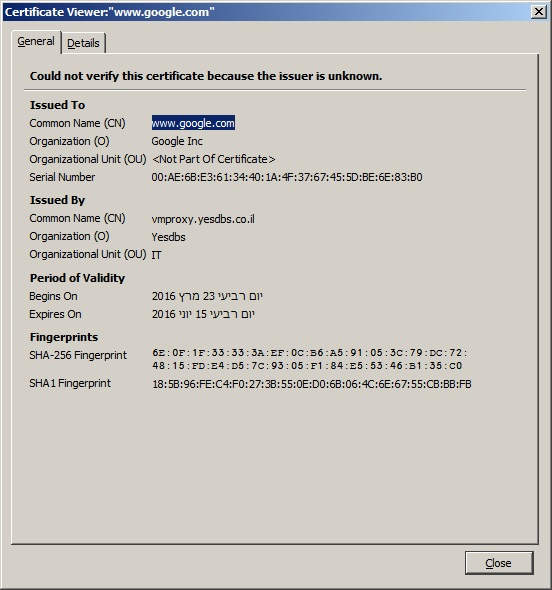
You can see that the certificate is issued by a proxy (Yesdbs: vmproxy.yesdbs.co.il).
Is Yesdbs your ISP?
Did you try to contact that company or possibly check its FAQ pages?