


Slow keypad response

After latest Firefox update, my keypad speed has slowed to beyond usable.
Alle Antworten (3)
Hello Orvinson, try Firefox Safe Mode to see if the problem goes away. Firefox Safe Mode is a troubleshooting mode that temporarily turns off hardware acceleration, resets some settings, and disables add-ons (extensions and themes).
If Firefox is open, you can restart in Firefox Safe Mode from the Help menu:
- Click the menu button
 , click Help
  and select Restart with Add-ons Disabled.
When the Firefox Safe Mode window appears, select "Start in Safe Mode".
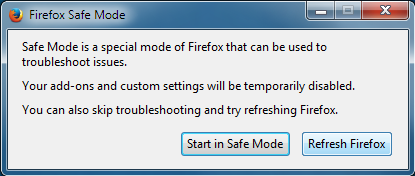
If the issue is not present in Firefox Safe Mode, your problem is probably caused by an extension, theme, or hardware acceleration. Please follow the steps in the Troubleshoot extensions, themes and hardware acceleration issues to solve common Firefox problems article to find the cause.
To exit Firefox Safe Mode, just close Firefox and wait a few seconds before opening Firefox for normal use again.
When you figure out what's causing your issues, please let us know. It might help others with the same problem.
thank you
Thanks, ideato. And sorry about my slow response. Safe mode does indeed cure the problem. Turning off acceleration seems to be the issue, however it does not seem quite as fast as when in safe mode.

If you have an antivirus toolbar, especially Norton Toolbar, try turning it off. That sure solved the problem for me. Took me awhile to figure that out because that *didn't* help when I had a similar problem a few years ago. Back then, just updating to the new version of FF (when it came out) solved the slowness and typing hesitation.