


I've updated flash to 16.0.0.305 and Firefox is still blocking it

As above, really. I've made sure Firefox is the right version. I've updated Flash to .305 as shown in "about:addons," but it's still blocking. I've restarted my computer, with the restarting of firefox that that implies. All the questions I've seen in the forums were telling the same answer: update. But I can't update any further (yet) and I'm not sure of the next step.
Alle Antworten (8)
You will or should be able to view the videos, and even set Firefox to remember on a site by site basis to allow that. Click the links to allow then watch for the notifications options that pop up top left.
Ordinarily I would say I imagine you updated but did not repeat the updates enough. It is best to check with Adobe's own site must be done with Firefox. (You may wish to repeat the check with any other browsers you use)
I did think the version ending .305 is correct. I will have to check on Windows 7 myself. I don't know whether something else on your computer could affect this.
- Is the Director plugin necessary ? Try disabling or uninstalling that. It has been known to cause issues having Director& FlashPlayer installed together. Disable or remove Add-ons
- Maybe the Flashgot or some other extension, for some mysterious reason is a problem. As a quick check please try restarting Firefox in safe mode Use Troubleshoot Mode in Firefox
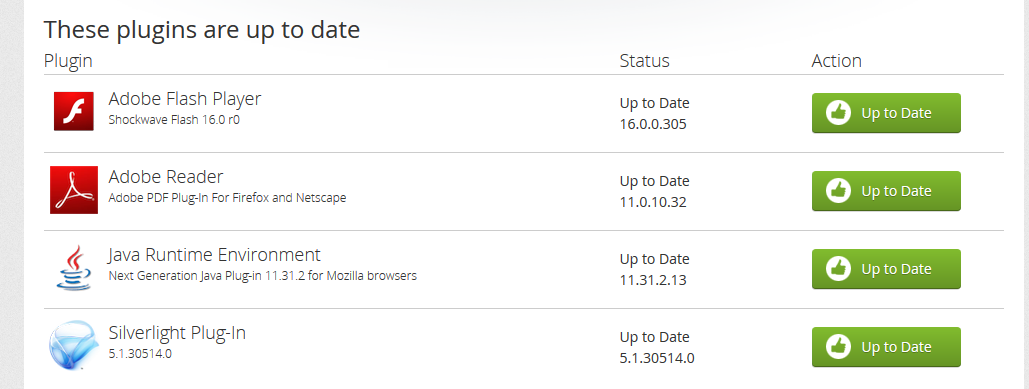
I did check on Windows 7 Firefox is not blocking my Flashplayer, and plugincheck is working correctly. Screenshot attached (thumbnail expands if clicked)
John99 said
I did check on Windows 7 Firefox is not blocking my Flashplayer, and plugincheck is working correctly. Screenshot attached (thumbnail expands if clicked)
Going to the "Check to see if..." page on mine shows the same I'm afraid. It's why this is quite so frustrating.
Also thanks for the suggestions about Director and the other plugins, but I forgot to mention having already tried shutting them off. I had, but that doesn't mean it was a bad suggestion.
Did you try safe mode ? I do not have "no script" installed, but that is pretty powerful and I imagine could easily interfere with the plugincheck on the Mozilla page. Or possibly on the reporting and results on video pages.
John99 said
Did you try safe mode ? I do not have "no script" installed, but that is pretty powerful and I imagine could easily interfere with the plugincheck on the Mozilla page. Or possibly on the reporting and results on video pages.
Yeah, it, flashgot and the FVD were all things I tried disabling. All at once and one at a time. No love I'm afraid.
hi, when you type about:plugins into the address bar, can you copy the whole content of that page and put them into http://pastebin.mozilla.org/ or a similar service and paste a link here on the forum? this might be helpful in assessing the problem. thank you!
http://pastebin.mozilla.org/8745760
By the way I just wanted to thank everyone for their time helping me on this. It's not the end of the world, but it is a couple clicks per page, per video.
Geändert am von RandallJN
thanks RandallJN, everything there looks as it's supposed to be so this couldn't explain the source of the problem unfortunately. one other thing to try is to force a reload of the blocklist from mozilla's servers. it is explained at https://wiki.mozilla.org/Blocklisting/Testing#Forcing_a_Blocklist_Ping how to do this.