


How do I print out an email -- just the email?

With the change in recent email format, my ability to printout the email has disappeared. No problems before this rcent change. The 2 options available: the "File" option on the menu at top left of page, and the 3 horizontal bars indicating "menu" on the top right of page -- BOTH print out the whole page with the email itself truncated.
Another irritating issue is my inability to find the email address of the sender. This has got to be easy to find, BUT I CAN'T find it!!
Ausgewählte Lösung
Hi!
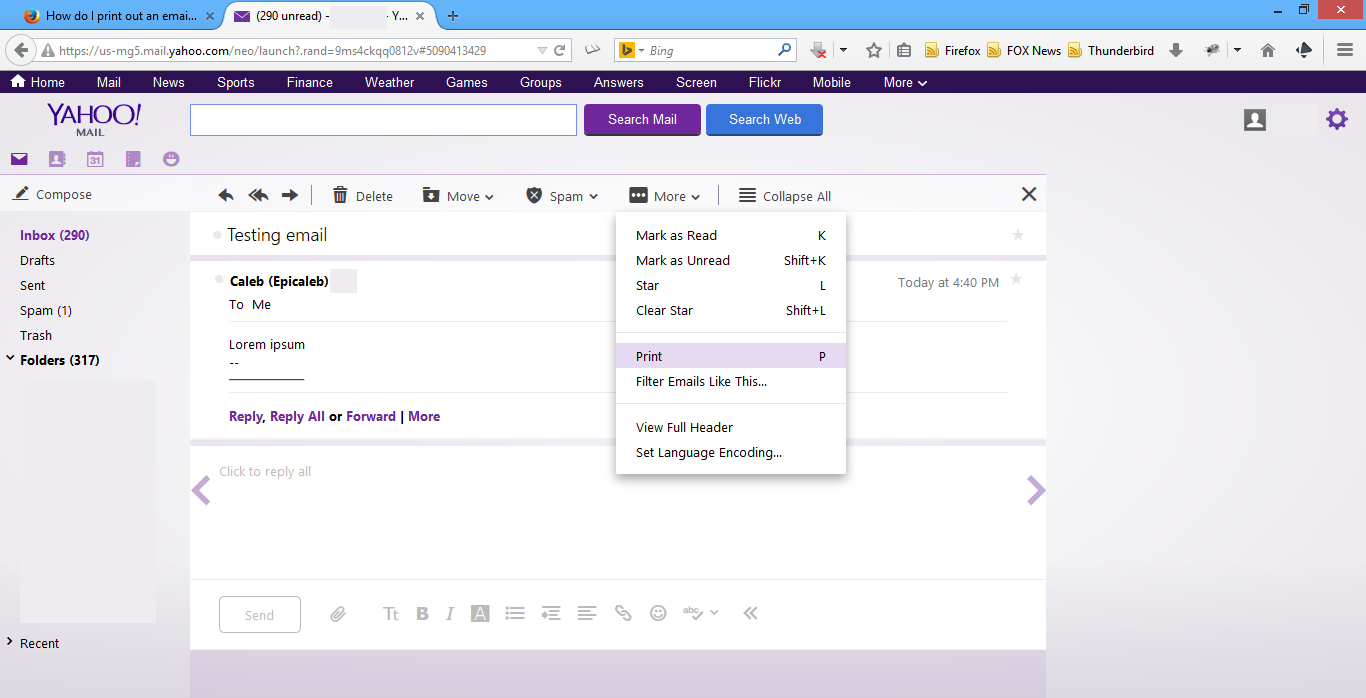
To print out an email, first click on the email from the inbox. Now that you're looking at the email viewing pane, you can click "More" > "Print" (as seen in first image below). It will print the email.
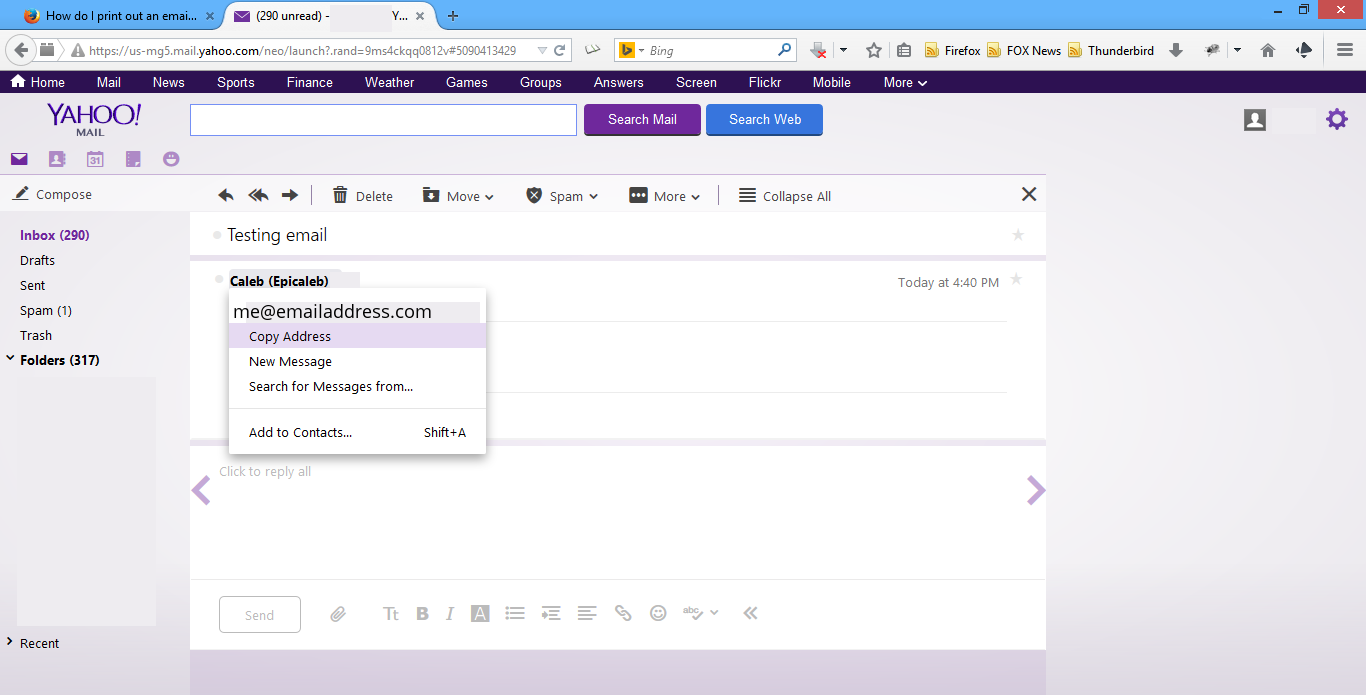
To find the sender's address, click on the sender's name (as seen in second image). A menu containing the address and other options to take will pop up. Mousing over the sender's name also shows the address.
I hope that solved your problem!
If it did, would you please choose this answer as your solution? It would help other Firefox users to find help on the forums faster and more efficiently. Thanks!
And of course, feel free to post back if you need more help! You should contact Yahoo! customer support if you have further questions regarding their products, though; they'd be most able to quickly provide assistance. :)
Happy browsing!
Diese Antwort im Kontext lesen 👍 0Alle Antworten (8)
Hi!
I'm not quite clear on what you're referring to; are you using Thunderbird? Or are you accessing some webmail client (Outlook.com, Yahoo! Mail, Gmail, etc) with Firefox?
Thanks for the clarification!
Geändert am von Epicaleb

What provider are you using?
Try this. On your provider, open the message to its own window. Look for a printer icon. You may have to check several menus.
Thank you for responding. I did what you suggested but the only 2 options for "print" did not get just the email content.
I am using yahoo email. Another kind soul (Epicaleb) responded and also asked that question. Great question -- obviously I'm not a sophisticated user.
Makes me think that perhaps I should be contacting yahoo email?
Thanks for your question. I'm using yahoo email. I am not a sophisticated user, and receiving two replies that ask the same question makes me think that perhaps I should be asking Yahoo email about printing the email contents -- not Mozilla. True?
Ausgewählte Lösung
Hi!
To print out an email, first click on the email from the inbox. Now that you're looking at the email viewing pane, you can click "More" > "Print" (as seen in first image below). It will print the email.
To find the sender's address, click on the sender's name (as seen in second image). A menu containing the address and other options to take will pop up. Mousing over the sender's name also shows the address.
I hope that solved your problem!
If it did, would you please choose this answer as your solution? It would help other Firefox users to find help on the forums faster and more efficiently. Thanks!
And of course, feel free to post back if you need more help! You should contact Yahoo! customer support if you have further questions regarding their products, though; they'd be most able to quickly provide assistance. :)
Happy browsing!
Geändert am von Epicaleb
Thank you sooooo much! I was so frustrrated but BOTH your suggestions solved my issues. I appreciate you taking the time to reply, and the clarity of your responses. Thanks again, Andrea
I'm glad we could help! If you need any assistance with Mozilla products, you know where to find us.
- -) guess what? when I clicked on "Mark it as solved", I got a message "An Error Occurred". How cute is that?
Appreciated your help very much!