


Delay moving messages to and from 4 certain mailboxes (win10, v152)
It's very odd. Normally moving an email, say from the Inbox to the relevant year's archive, takes "no time at all".
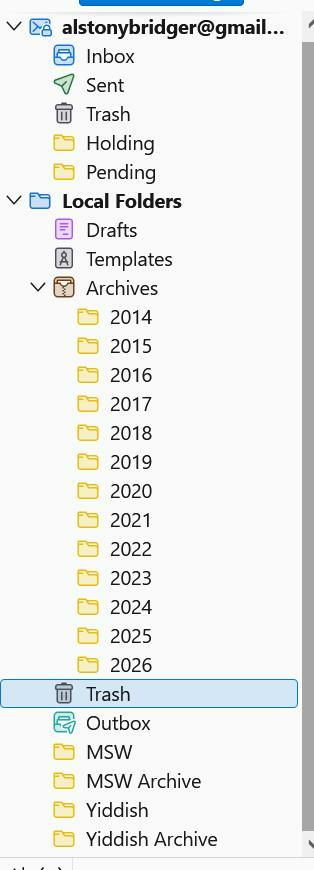
Which is true for all the mailboxes shown on the attached screenshot, EXCEPT for the four at the bottom. Moving even one message from Inbox to Yiddish can take ten seconds or longer (with the dreaded "Not Responding" occasionally). Moving something in the opposite direction is also screwy, only from those four.
I had thought that it was because they're rather large. This first started when there were just Yiddish and MSW, and I split off most of the earlier years into the archives shown. To no avail.
It's only an annoyance, but I'm puzzled about how such a thing could happen.
Also very slow tagging or untagging a message just in those mailboxes.
Ændret af Wayne Mery den
Alle svar (44)
At least say goodbye
AlBridger said
No one knows how to enable the Thunderbird performance profiler?
Sorry for the delay. Haven't forgotten, but PTOs involved and we're also on short work weeks.
But no new news so far because unsuccessful so far to determine why there is a problem in the enabling process - we know" how to enable but there seems to be a bug.
Ok, I'll be quiet. The bug is mostly annoying (I've learned to wait until the transfer is done, and not adding more to the queue until it's done).
Wake me up when you've figured something out.
Time to declare it a "feature"?
Is there not somewhere a debug-build, which might trace things?
Ændret af AlBridger den