


Suggestions cover up the Address Bar.

This started recently, maybe with a recent Firefox upgrade.
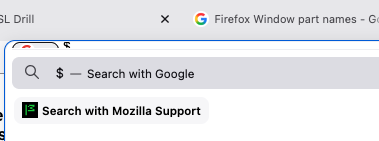
Normally, when you start typing in the Address Bar of a Firefox Window, a dropdown list of suggestions appears. Very helpful.
However, NOW, the dropdown list covers up the Address Bar so I can't see what I'm typing. I can still type, and what I type goes properly into the Address Bar, only I cannot see it. (See attached screensnatch.)
Do I have a switch in the wrong position, or is this a bug?
--Gil
(I'm on 151.0.4 (aarch64), running under macOS Sequoia 15.7.3 on a MacBook Air M1, 2020.)
Alle svar (1)
Valgt løsning
Electrojim posted this same question 2 years ago with the Post Title "List of suggested sites positioned too high."
TyDraniu responded on 5/19/24, at 8:06 AM with "It looks like you're using custom userChrome.css modifications. Try to remove it, or at least go to about:config and turn off toolkit.legacyUserProfileCustomizations.stylesheets preference." Electrojim said, "that did the job!"
On My Machine, I changed "toolkit.legacyUserProfileCustomizations.stylesheets preference" from true to false. I tested but found no change in Firefox's behavior.
Then I Quit and Relaunched Firefox. It worked!
I love this forum! I love Firefox!
--Gil
Ændret af GilDawson den