


Bind 4th & 5th mouse buttons to previous tab / next tab

Hello,
Based on this previous post https://support.mozilla.org/en-US/questions/1195138
I have turned off mousebutton.4th.enabled and mousebutton.5th.enabled
But I wish to bind these buttons to previous tab / next tab How can I accomplish this ? Thanks
Alle svar (5)

Salon, I do not know if Firefox provides its own native ability to rebind those keys.
Does your mouse provide the ability to rebind its keys? If it does, then you could use its software to bind the buttons to ctrl+pageup and ctrl+pagedown (which are Firefox hotkeys for switching to adjacent tabs).
Hello, I have a logitech mouse but I do not wish to install the proprietary software required to remap the keys.
I have also tried using X-Mouse Button Control but I have had issues with the keys getting stuck, but it felt really good to switch tabs from the mouse !
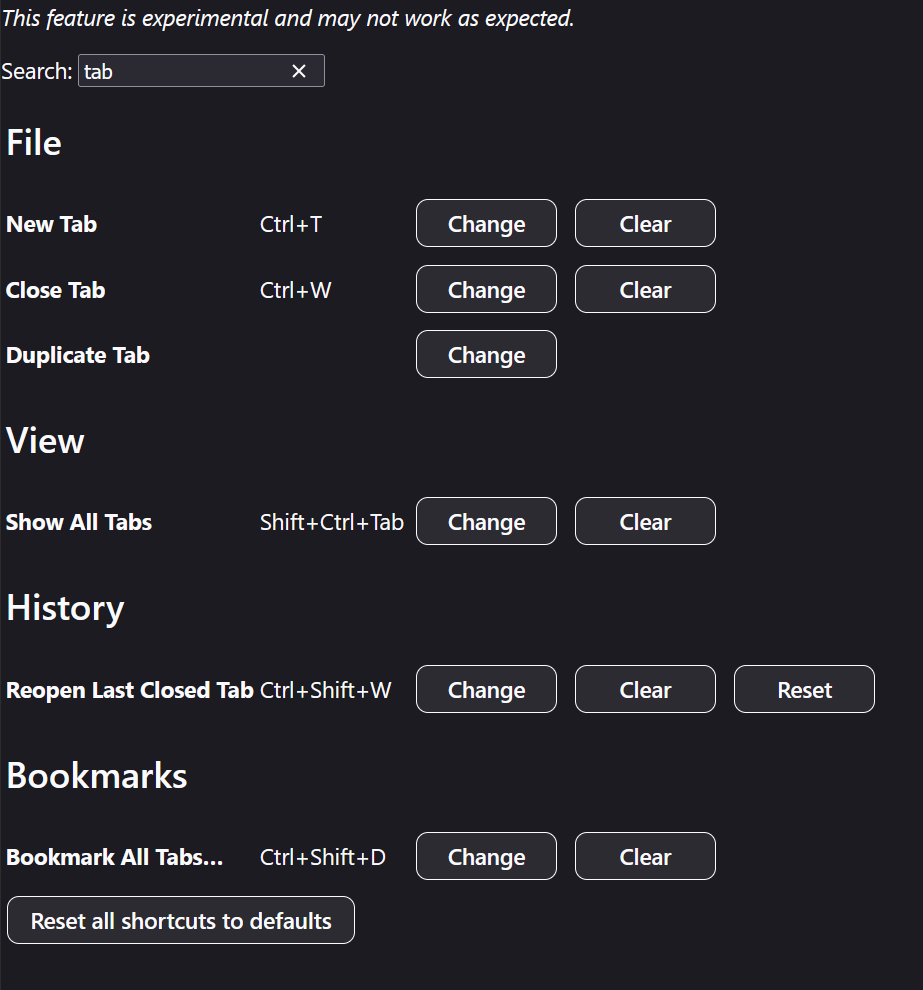
I also tried re-binding using about:keyboards
But next tab / previous tab are not part of the actions that can be bound !
Also it does not allow binding of mice !
And this is despite it being asked multiple time in the threads regarding the creation of the action binding page !
As per the following previous discussions
https://connect.mozilla.org/t5/ideas/customizable-hotkeys/idi-p/4979/
https://connect.mozilla.org/t5/discussions/hotkeys-yes-please/m-p/66376/
Hello
For information, https://support.mozilla.org/en-US/questions/1585291#answer-1822882 Take a look at the screenshot
Ændret af Agent virtuel den
I looked at the screenshot, read the entire list several times, I do not see a go to left tab, go to right tab bindable action Also this page does not allow binding of mouse buttons nor gestures nor binding of multiple keys to the same action !
A test on Firefox Nightly https://www.youtube.com/watch?v=oelHqTo41yY