


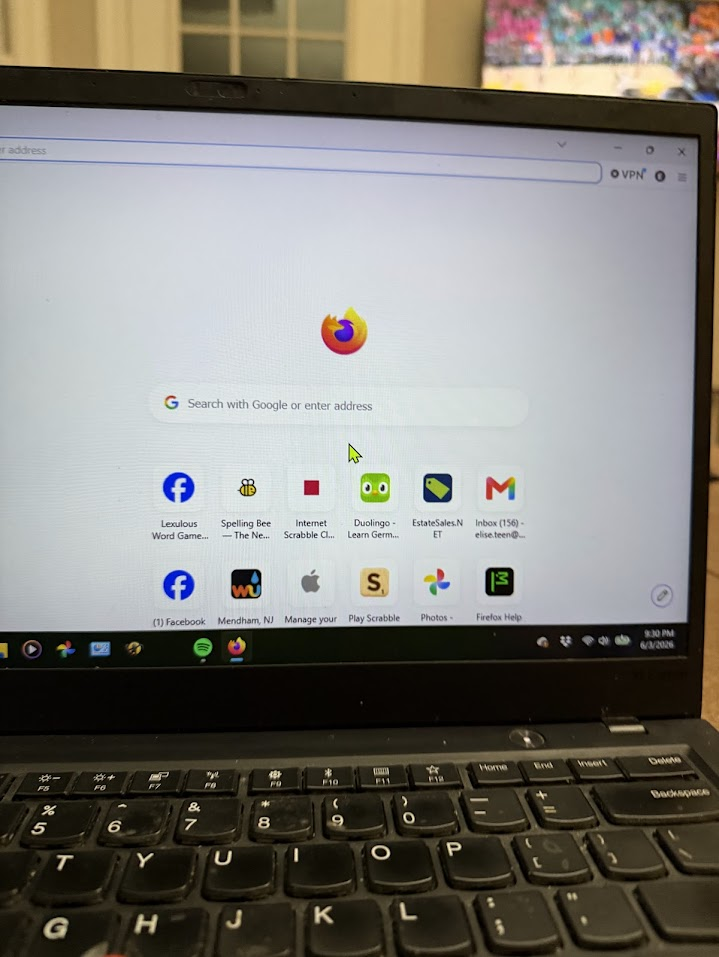
Main screen on firefox has empty space on 3 sides and bottom and everything I load needs to be moved to be seen

The Firefox main screen has about 2" of space on 3 ides. The icons are so far down (the 4th side) that I cannot read the second line without moving the page up. Many of the web sites I load are off kilter, mostly NYT and Facebook games which always have to be adjusted to a place where they are on the screen correctly. I have spent several hours searching through forums, resetting , refreshing , changing zoom, you name it. I then repeated the process with Gemini, at which point it seemed I only Made the Google search bar smaller but by now I m not even sure.
Alle svar (1)

Hi,
Please can you send us a photo of your entire screen both in the current mode and of a Private Window.
You can open a private window by searching for the option in your start menu called Firefox Private Browsing, or by pressing the Ctrl + Shift + P keys at the same time while Firefox is open.