


Windows 10 reached EOS (end of support) on October 14, 2025. If you are on Windows 10, see this article.

Søg i Support

Avoid support scams. We will never ask you to call or text a phone number or share personal information. Please report suspicious activity using the “Report Abuse” option.

Læs mere

Need urgent help setting up problematic IMAP account Please?

  • 1 svar
  • 0 har dette problem
  • Seneste svar af david
  • Åben

Trying to setup Thunderbird for wife’s new laptop… Her 4 separate email accounts with auto setup for the IMAP server info without issues. One account however will not – VERY frustrating as this works fine on her old laptop. Thunderbird setup now appears to have an extra (4th) field required when setting up the account: Usually, its just name, email address and password. I see there’s now an extra box titled ‘Your Login’ being required for auto login. I have no idea what this field should be set to. Also, when I attempt to do a manual setup for the account, the port numbers and server names shown on the internet are completely different to those used on auto, and still get rejected. Doesn’t help that MS trying (and succeeding) to confuse us with all this “Outlook vs Outlook Classic vs Outlook.com”. My wife is unable to continue her work until I get this sorted:-( PLEEEAAASE can someone help me setup this xxxxxxx@outlook.com email account in Thunderbird as an IMAP account?
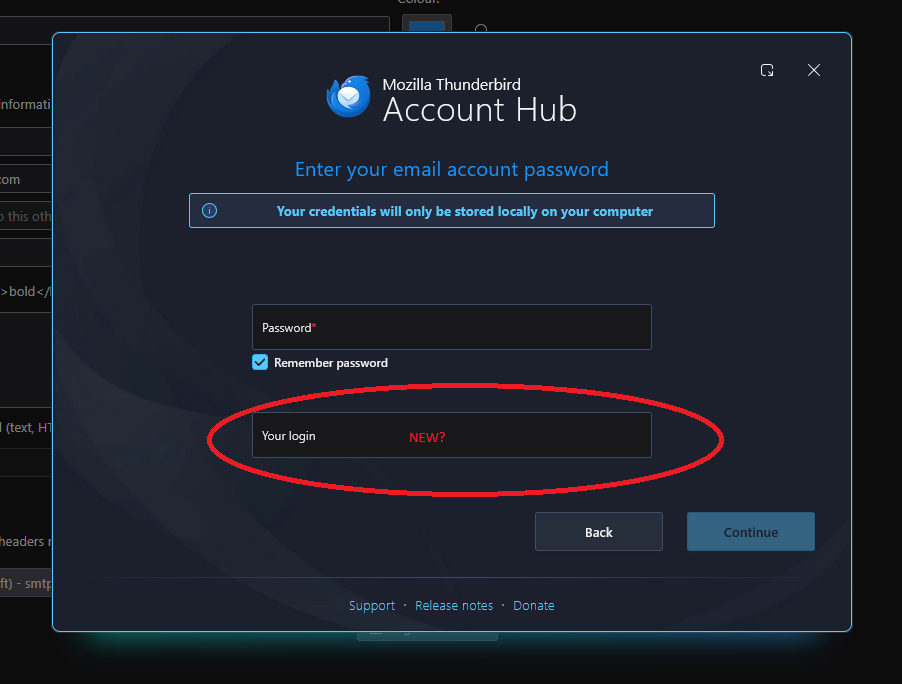
Trying to setup Thunderbird for wife’s new laptop… Her 4 separate email accounts with auto setup for the IMAP server info without issues. One account however will not – VERY frustrating as this works fine on her old laptop. Thunderbird setup now appears to have an extra (4th) field required when setting up the account: Usually, its just name, email address and password. I see there’s now an extra box titled ‘Your Login’ being required for auto login. I have no idea what this field should be set to. Also, when I attempt to do a manual setup for the account, the port numbers and server names shown on the internet are completely different to those used on auto, and still get rejected. Doesn’t help that MS trying (and succeeding) to confuse us with all this “Outlook vs Outlook Classic vs Outlook.com”. My wife is unable to continue her work until I get this sorted:-( PLEEEAAASE can someone help me setup this xxxxxxx@outlook.com email account in Thunderbird as an IMAP account?
Vedhæftede skærmbilleder

Alle svar (1)

It may help to know with version of thunderbird you are using. Windows? Is the new account hub in settings>general on or off? Can you do a screenshot of first setup screen you see? Is this an exchange account? thank you.

Stil et spørgsmål

Du skal logge ind på din konto for at svare på et indlæg. Start et nyt spørgsmål, hvis du ikke har en konto endnu.