


the backup file is not being created
helloooo
i am experiencing an issue with firefox where backup (Firefox Backup) is not working since version 148.0
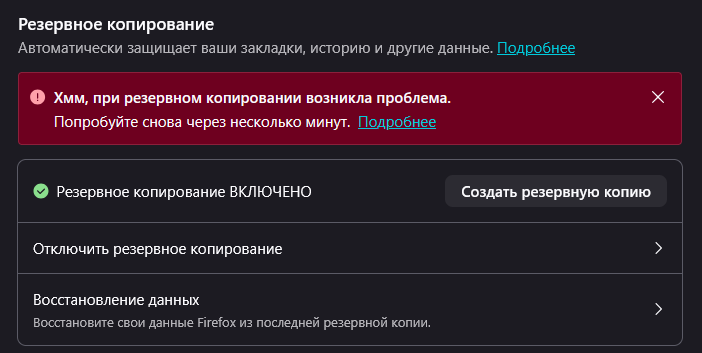
problem: - when I try to create a backup, i get the error: “Hmm, there was a problem with the backup. Please try again in a few minutes.”
what I have already tried: - enabled and disabled backup password - changed the backup folder/location - cleared browser cache - tested across multiple updates (issue persists)
- backup is enabled, but I cannot create one - the error occurs every time - restarting the browser and system did not help
Valgt løsning
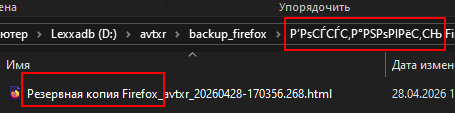
after deleting the files from the "snapshots" folder, the backup went without error. but when I started the backup again, i got the error again, then i just deleted the "backups" folder – now everything works.
but its strange that such characters appear – apparently there's a problem with cyrillic.
Læs dette svar i sammenhæng 👍 0Alle svar (10)

Hey! So sorry to hear about this :( Could you go to about:config and then search up the preference browser.backup.backup-debug-info and share what it's set to?
{"lastBackupAttempt":1777034400,"errorCode":{"name":"BackupError","stack":"#prepareStagingFolder@resource:///modules/backup/BackupService.sys.mjs:1976:25\n","unremovableContents":["C:\\Users\\User\\AppData\\Roaming\\Mozilla\\Firefox\\Profiles\\4yhq4lxf.default-1533239578278\\backups\\snapshots\\2026-03-26T10-15-28Z.zip","C:\\Users\\User\\AppData\\Roaming\\Mozilla\\Firefox\\Profiles\\4yhq4lxf.default-1533239578278\\backups\\snapshots\\archive.html","C:\\Users\\User\\AppData\\Roaming\\Mozilla\\Firefox\\Profiles\\4yhq4lxf.default-1533239578278\\backups\\snapshots\\staging-0","C:\\Users\\User\\AppData\\Roaming\\Mozilla\\Firefox\\Profiles\\4yhq4lxf.default-1533239578278\\backups\\snapshots\\staging-1","C:\\Users\\User\\AppData\\Roaming\\Mozilla\\Firefox\\Profiles\\4yhq4lxf.default-1533239578278\\backups\\snapshots\\staging-2","C:\\Users\\User\\AppData\\Roaming\\Mozilla\\Firefox\\Profiles\\4yhq4lxf.default-1533239578278\\backups\\snapshots\\staging-3"]},"lastRunStep":5}

Looks like a problem with #prepareStagingFolder
Are there messages in the Browser Console related to the backup?
Decoded:
 lastBackupAttempt:1777034400; (2026-04-24T12:40:00.000Z)
 errorCode:
  name:BackupError;
  stack:#prepareStagingFolder@resource:///modules/backup/BackupService.sys.mjs:1976:25\n;
  unremovableContents:
   0:C:\Users\User\AppData\Roaming\Mozilla\Firefox\Profiles\4yhq4lxf.default-1533239578278\backups\snapshots\2026-03-26T10-15-28Z.zip;
   1:C:\Users\User\AppData\Roaming\Mozilla\Firefox\Profiles\4yhq4lxf.default-1533239578278\backups\snapshots\archive.html;
   2:C:\Users\User\AppData\Roaming\Mozilla\Firefox\Profiles\4yhq4lxf.default-1533239578278\backups\snapshots\staging-0;
   3:C:\Users\User\AppData\Roaming\Mozilla\Firefox\Profiles\4yhq4lxf.default-1533239578278\backups\snapshots\staging-1;
   4:C:\Users\User\AppData\Roaming\Mozilla\Firefox\Profiles\4yhq4lxf.default-1533239578278\backups\snapshots\staging-2;
   5:C:\Users\User\AppData\Roaming\Mozilla\Firefox\Profiles\4yhq4lxf.default-1533239578278\backups\snapshots\staging-3;
 lastRunStep:5;
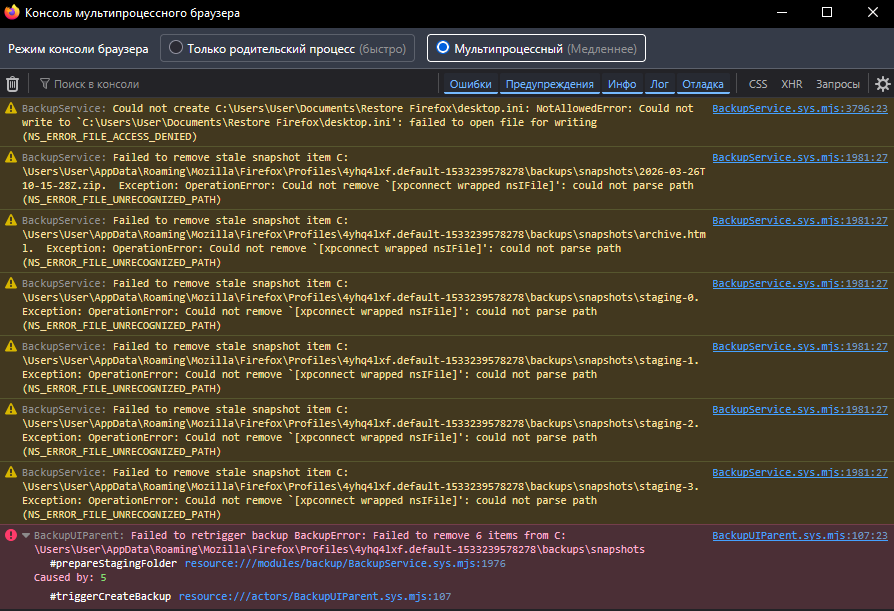
Maybe check the write permissions of the snapshots folder with the path in the screenshot as Firefox isn't able to remove previously saved snapshots.
It could also be possible that your security software keeps an handle on files.
Reboot the computer into Windows Safe Mode with network support to see if that has effect.
maybe just delete these files?
my antivirus is always turned off, except in a few cases.
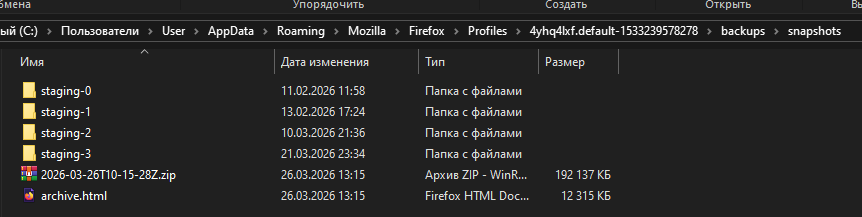
There's also a message (the first one) that Firefox can't write to "C:\Users\User\Documents\Restore Firefox", which would be critical for creating a backup. So, while you can remove the mentioned folders/files manually, that alone may not be enough to fix this.
Valgt løsning
after deleting the files from the "snapshots" folder, the backup went without error. but when I started the backup again, i got the error again, then i just deleted the "backups" folder – now everything works.
but its strange that such characters appear – apparently there's a problem with cyrillic.
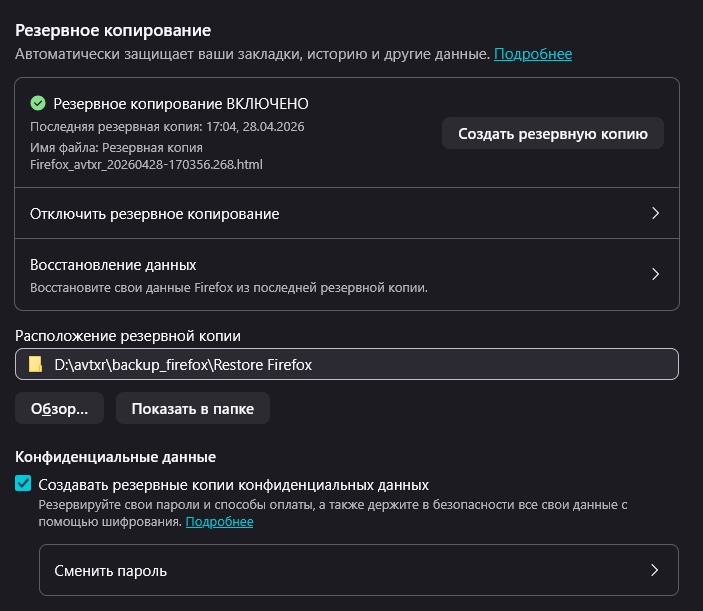



The release notes for the latest Firefox version, 150.0.2, say "Fixed an issue that could prevent Firefox’s local backup feature from completing successfully", if this is related.