


Adding a Google account pushes me to sign into Mozilla Email rather than Google Sign In

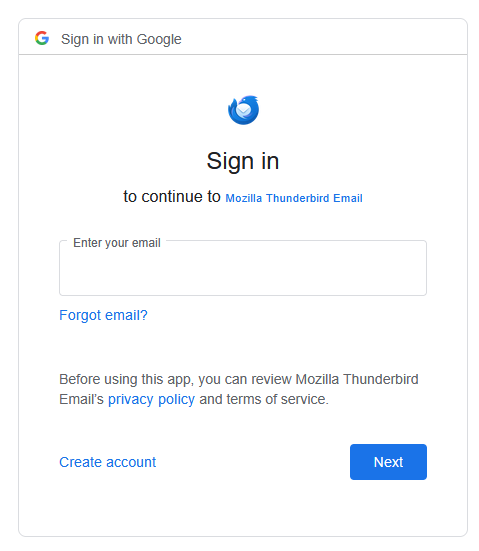
I am trying to add one of my Google email accounts to Thunderbird. It brings up the "Sign in with Google" window, which is normal. But instead of "Sign in to continue to Google...", it says "Sign in to continue to Mozilla Thunderbird Email". Which then generates an error: "Error 400. The server cannot process the request because it is malformed. It should not be retried. That’s all we know." I've not ever experienced this issue before; adding a Google account has always been super easy and straightforward.
Alle svar (11)

Make sure cookies are allowed in Thunderbird. Also, don't use a VPN while authenticating. https://support.mozilla.org/en-US/kb/automatic-conversion-google-mail-accounts-oauth20
Ændret af christ1 den
Thanks, I'm not using a VPN, and I make sure cookies are allowed, then rebooted Thunderbird. Still having the same issue.
Are you running a local web server, or any other service listening on TCP port 80 on localhost?
I am trying to add one of my Google email accounts to Thunderbird.
What exactly are the steps you're doing when you attempt to create the account in Thunderbird?
It brings up the "Sign in with Google" window, which is normal.
I don't think this is normal. What you should get is an OAuth2 dialog where you must enter your credentials and following that, grant permission for Thunderbird Mail to access some or all of the following data: mail, contacts, and calendar. Also see https://support.mozilla.org/en-US/kb/automatic-conversion-google-mail-accounts-oauth20
Ændret af christ1 den
I'm going to Settings > New Account > Email, then entering my credentials. I get a green checkmark that says: "Configuration Found in Mozilla ISP database" Then select "Done".
What normally happens when I add an account that runs through Google is the "Sign in with Google" screen pops up so I can log into my account to connect it.
This time however, it's the screenshot that I shared. It says "Sign in with Google" at the top, but then says "Sign in to continue to Mozilla Thunderbird Email"
If you're using the still experimental account hub, try to turn it off. At the top right of the Thunderbird window, click the menu button ≡ > Settings > General > Account hub Un-check "Create accounts in the new Account Hub"
Does it make any difference when attempting to set up the account?
Confirmed that "Create accounts in the new Account Hub" was already not checked.
Please post your Troubleshooting Information. At the top right of the Thunderbird window, click the menu button ≡, then select Help > Troubleshooting Information. Press the "Copy text to clipboard button" and paste the information into your reply.
Do you need the information all the way down to "Printing", or just select areas like the "Application Basics"? I'm not really wanting to publicly post the mail accounts and things like that.
It will be enough to post as much of the Troubleshooting Information as what fits into the reply box. Feel free to edit out any accounts unrelated to Google/Gmail.