


Windows 10 reached EOS (end of support) on October 14, 2025. If you are on Windows 10, see this article.

Søg i Support

Avoid support scams. We will never ask you to call or text a phone number or share personal information. Please report suspicious activity using the “Report Abuse” option.

Læs mere

Lost access to many mail folders and emails on my Windows 10 laptop!

  • 2 svar
  • 2 har dette problem
  • 33 visninger
  • Seneste svar af AdmiralR
  • Åben

Since April 9, 6:14 PM CDT, most folders (e.g., Drafts, Templates, Sent) on my primary laptop in my primary POP email account, [edited]@bdcusa.com, have disappeared; and ALL SUBfolders in my Inbox have disappeared. Over 185,000 emails have vanished overnight!

On my primary laptop, I'm using Thunderbird 149.0.1 (64-bit) on the release update channel, still running 64-bit Windows 10 Professional, and have nothing backed up to the cloud.

Fortunately, on my secondary laptop, I'm using Thunderbird 115.18.0 (32-bit) on the esr update channel, running 32-bit Windows 7 Professional. I say, "fortunately," because ALL folders and emails are still there, so I know they haven't been vaporized!

How do I return all folders and emails for this email account to visibility and access on my primary laptop? Detailed directions appreciated.
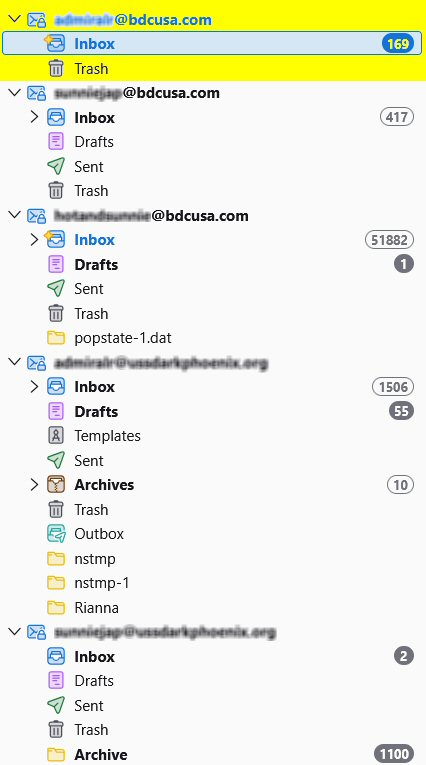
Since April 9, 6:14 PM CDT, most folders (e.g., Drafts, Templates, Sent) on my primary laptop in my primary POP email account, [edited]@bdcusa.com, have disappeared; and ALL SUBfolders in my Inbox have disappeared. Over 185,000 emails have vanished overnight! On my primary laptop, I'm using Thunderbird 149.0.1 (64-bit) on the '''release''' update channel, still running 64-bit Windows 10 Professional, and have nothing backed up to the cloud. Fortunately, on my secondary laptop, I'm using Thunderbird 115.18.0 (32-bit) on the '''esr''' update channel, running 32-bit Windows 7 Professional. I say, "fortunately," because ALL folders and emails are still there, so I know they haven't been vaporized! How do I return all folders and emails for this email account to visibility and access on my primary laptop? Detailed directions appreciated.
Vedhæftede skærmbilleder

Ændret af christ1 den

Alle svar (2)

hmmm...

Ændret af Jackson Kasi den

It's now been 2 weeks without a useful answer, much less a solution. So let me ask a "workaround" question:

How could I easily, efficiently, and safely copy the contents of entire folders from one computer to a destination computer without damaging/deleting items already in those folders on the destination computer?

Thank you.

Stil et spørgsmål

Du skal logge ind på din konto for at svare på et indlæg. Start et nyt spørgsmål, hvis du ikke har en konto endnu.