


Should a Profile backup create a hierarchy of folders with emails in them?

I deleted my Thunderbird account and created a new one on the same computer. I used a Profile saved on my external hard drive. The address book info was replicated. The hierarchy of folders and their emails were not replicated in the left hand pane. Is there a way to retrieve those folders with their content? Please, I am not super techno-savvy, so take me step by step. Thank you.
Valgt løsning
jyjcraig said
Are all the posts, including the screen shots, visible to anyone who checks out this thread?
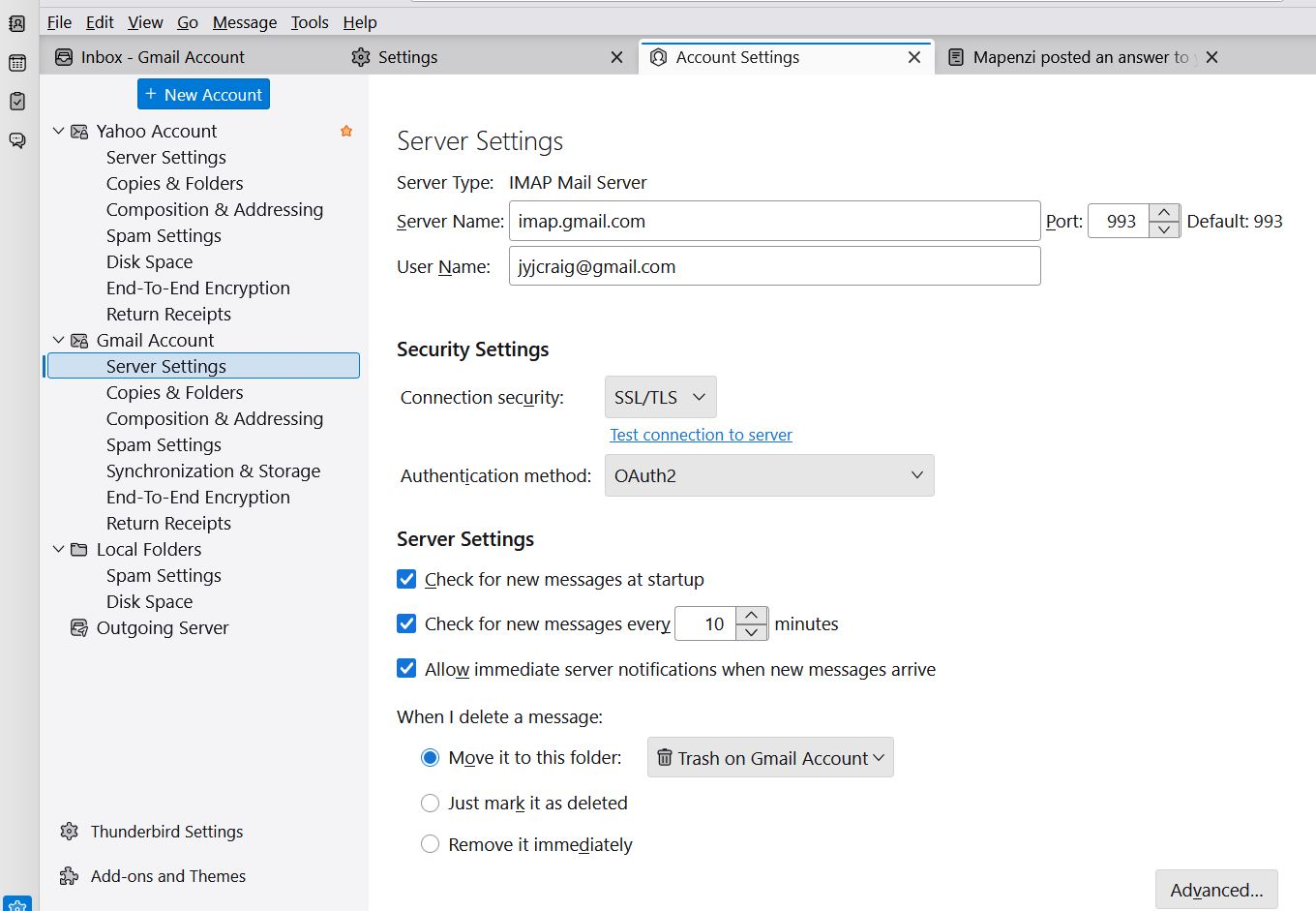
Yes they are. This is a public forum. Your email address is visible in the Account Settings image. Delete the image, we don't need it.
jyjcraig said
Return to pop, please.
Here we go: open Account Settings, click "New Account" > "Mail account..." and begin to set up your account for your existing gmail address. But this time take care to select "POP" or "POP3" in the account hub (image) If you succeed to create this new POP account, Thunderbird will only download the messages which remained on the server. So we will link the new account to your old message files in "pop.gmail.com" in Mail: in Account Settings > your new account > Server-Settings > Message Storage > Local Directory > click on the "Browse..." button, then navigate to the Mail folder in your profile folder, select pop.gmail.com and click "Open". Thunderbird will prompt you for a restart, and after the restart you should be able to see your folders and sub-folders of the Inbox
Læs dette svar i sammenhæng 👍 0Alle svar (20)
Go to Help > Trouble Shooting Information > Profile Folder > Open Folder, then quit Thunderbird. A profile folder named somewhat like "xxxxxxxxx.default-release" is now displayed. Go up two levels in the hierarchy of the Windows file manager to the folder "Thunderbird": the latter contains a folder Profiles and a file profiles.ini Open the folder 'Profiles' and make a screen shot of its contents. Then open the file 'profiles.ini' in a text editor and make a screen shot of its contents.
[InstallD78BF5DD33499EC2] Default=Profiles/ewhto9un.default-release Locked=1
[Profile1] Name=default IsRelative=1 Path=Profiles/w0oveygz.default Default=1
[Profile0] Name=default-release IsRelative=1 Path=Profiles/ewhto9un.default-release
[General] StartWithLastProfile=1 Version=2
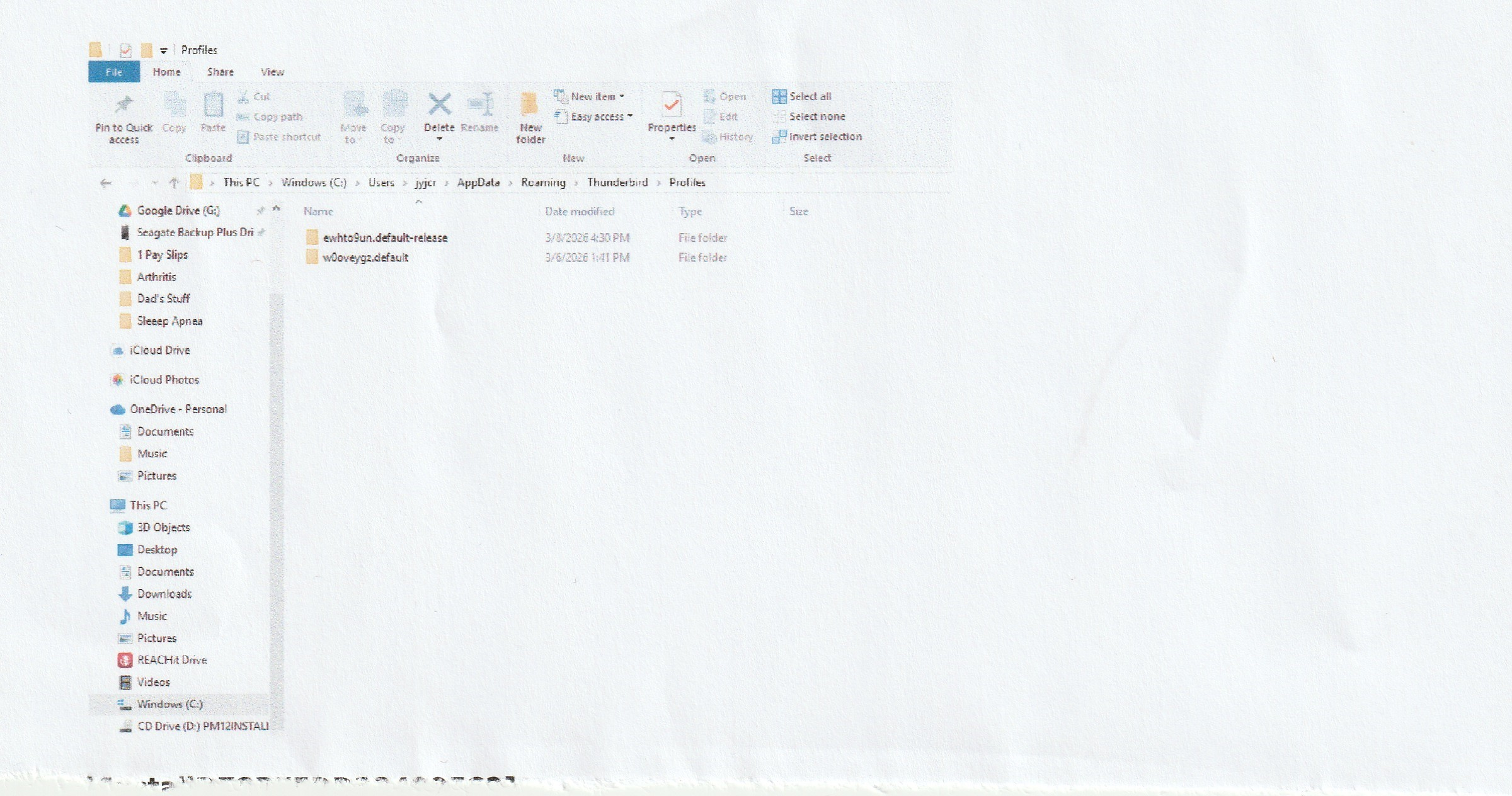
Thank you for your screen shots but unfortunately I don't understand what you did exactly and what is now missing in your folder pane.
jyjcraig said
I deleted my Thunderbird account and created a new one on the same computer.
What you you mean by "Thunderbird account"?
Did you delete your Thunderbird profile or did you delete an email account which you had created in Thunderbird? My guess is the latter, so did you delete a POP or an IMAP account?
jyjcraig said
I used a Profile saved on my external hard drive.
In which way did you use the saved profile on the external HD? What did you copy from the saved profile to your actual profile? Please describe as exactly as possible what you did from the beginning.
What you you mean by "Thunderbird account"?
I'm not sure what I did. You are working with an old guy that knows enough to get himself into trouble!! I think I uninstalled Thunderbird and re-installed it - linked it to my Yahoo account and my Gmail account.
Did you delete your Thunderbird profile or did you delete an email account which you had created in Thunderbird?
I have never worked with profiles before. The most I have done in this process was to overwrite one profile with another.
The accounts - Yahoo and Gmail - were deleted and re-linked.
The backup profile was copied to the external hard drive when I did a general backup of the computer hard drive.
Please describe as exactly as possible what you did from the beginning.
It's been a week since all this started and I'm not sure what I did at the beginning. I've made a mess of things and I will probably never get back the hierarchy of folders and subfolders and their emails that I had previously set up prior to this situation.
I appreciate you trying to help. Thank you.
Maybe I shouldn't waste any more of your time. You have put enough into it already.
Attached is a picture of the hierarchy of folders. For some reason, when I set up the Yahoo and Gmail accounts within Thunderbird, there are only about 20 folders/subfolders instead of the 40-45 that I originally had - and most of the folders you see in the picture are empty, unlike the original folders. I do not know if there is any way to restore the original folders and their emails. It's hard for me to understand how the address book is like the original, yet the folders/subfolders with emails are not.
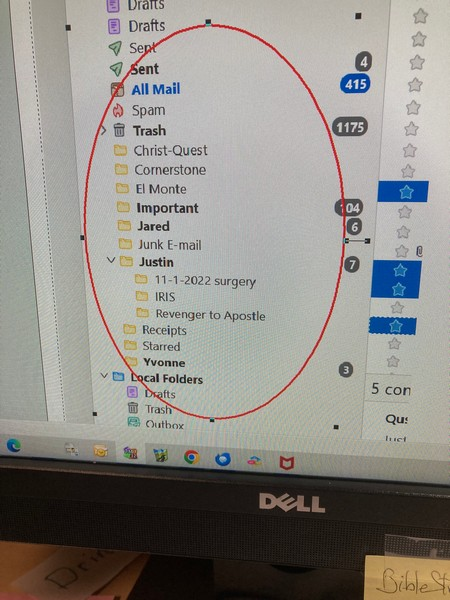
Okay, your screen shot might help to start with. Those yellow folders in the folder pane between Trash and Local Folders are folders that you created in one of your accounts which seems to be an IMAP account. So R-click on the account name > Subscribe... to open a "Subscribe" window with the folder list for this account (image). Search for your missing folders, and if you find them set a check-mark and click OK.
If the missing folders are not displayed in the folder list, we will have to look up your Thunderbird profile saved on the external hard drive. If we can find the message files corresponding to your missing folders we will in a first step import them in your Local Folders.
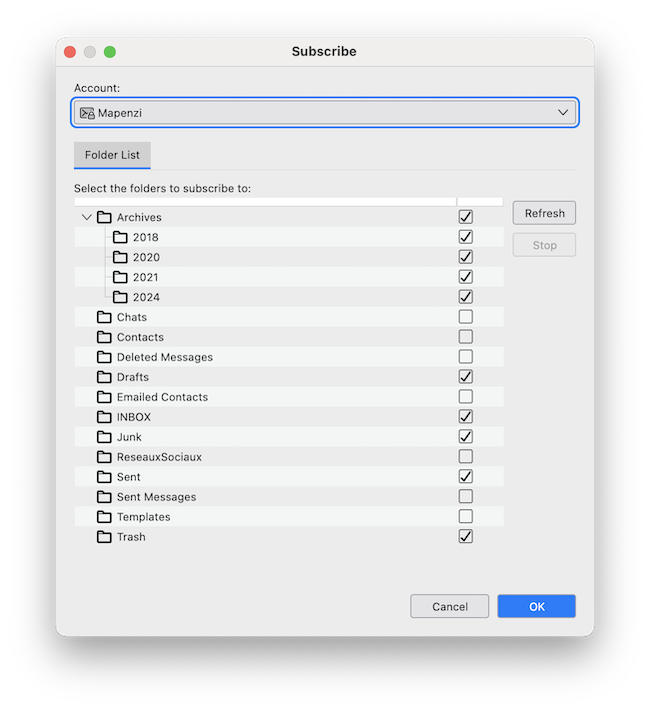
I opened the "Subscribe" window, and the missing folders were not there, only the folders in the screen shot that I sent to you.
The Gmail account is an IMAP account.
External drive ewhto9un.default-release 10/12/2025
Thank you.
jyjcraig said
External drive ewhto9un.default-release 10/12/2025
Thank you, hope is raising but first let's take a look at that saved copy of your profile folder on your external drive. Open ewhto9un.default-release, search and open the sub-folder ImapMail which should contain at least one account folder with a name such as "imap.xxx.xx" or maybe "secureimap.xxx.xx" Please show the contents of the "imap.xxx.xx" or "secureimap.xxx.xx" account folder
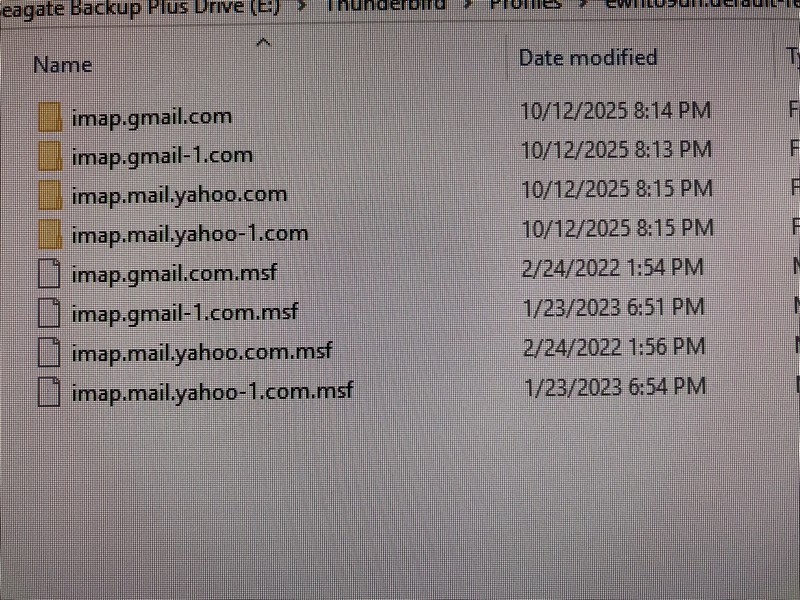
Your screen shot shows that it is a bit more complicated then I was hoping for since you seem to have two Gmail imap accounts. But there also is a slight possibility that you have only one Gmail account which had once been deleted and then set up again; this would explain the second account folder "imap.gmail-1.com"
Since I don't know "the whole thing" please open both imap.gmail.... account folders one after the other and look for files with the names of "Christ-Quest", "Comerstone", "El Monte", "Jared", .... "Yvonne", which correspond to the folders shown in your first screen shot. Do this to identify which of the two imap.gmail.... account folders corresponds to the IMAP account shown in your first screen shot in which we see all the folders cited above. If you succeed to identify the "good" imap.gmail... account folder, please show a screen shot with ist complete contents.
Ændret af Mapenzi den
I dug into all the folders and found something interesting. Most of the folder names are in the lists, but they are file names rather than folder names.
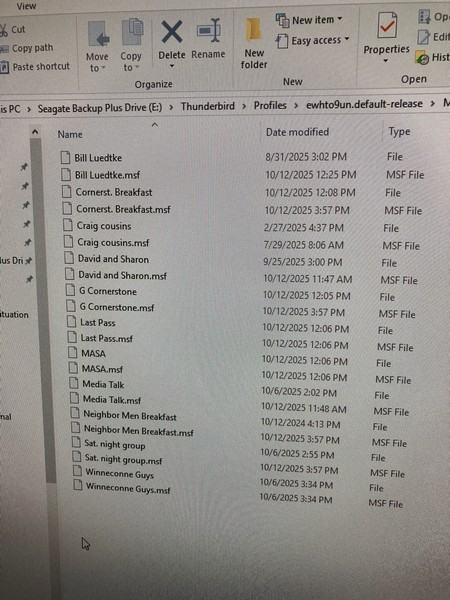
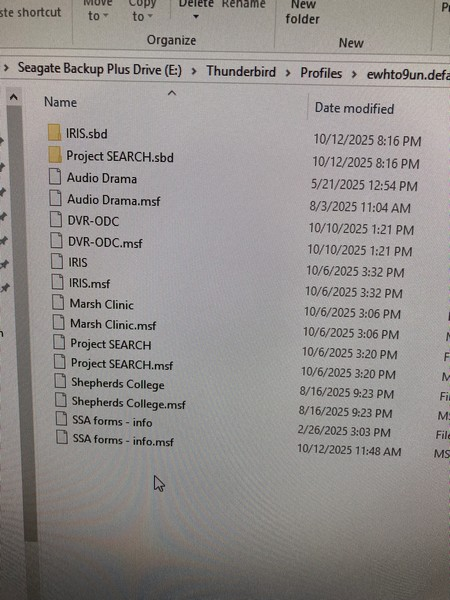
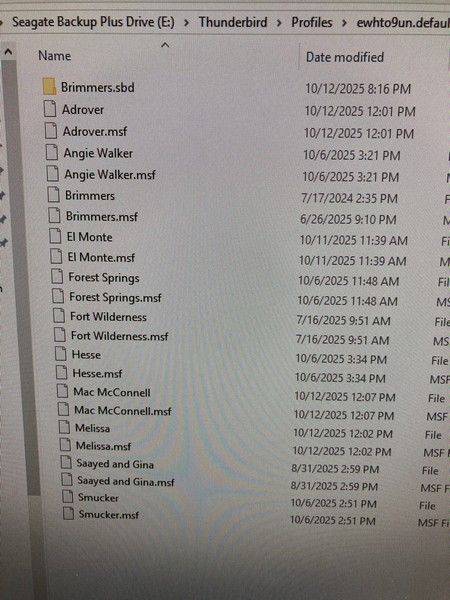
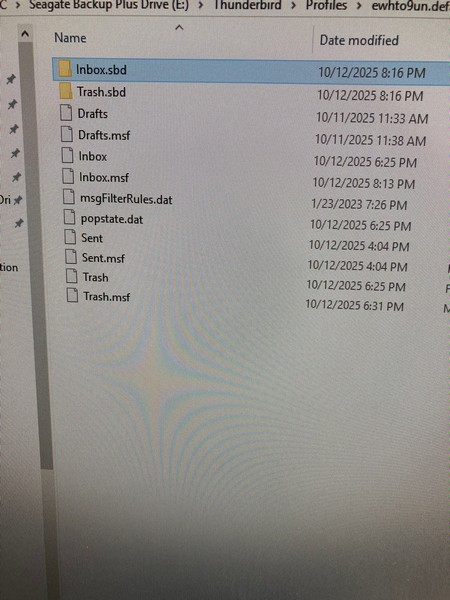
Your screen shots, done with a smartphone, are irritating since I cannot see neither the full path to the folder of which you show the contents nor the file size. So I have not the slightest idea to which email account all those files belong. The names of the folders shown in the image of your message from 3/9/26 don't appear in any of the new screen shots. Note that a message folder in Thunderbird is represented in the profile by a so-called mailbox file (text file without extension). To be able to help you efficaciously I depend on your info and above all on your screen shots. Without knowing where exactly are located all those files you show in four images I can't do anything to retrieve your missing folders.
Windows: how to take screen shots https://support.microsoft.com/en-us/windows/use-snipping-tool-to-capture-screenshots-00246869-1843-655f-f220-97299b865f6b
Ændret af Mapenzi den
Thank you for introducing me to the Snipping Tool. I was not aware that such a tool existed, and that it saved in jpeg.
I think I know what you are after. In the new uploaded images from the Mail folder, I have 3 folder images in which I have highlighted the file names which are the names of the missing folders.
I can understand your agitation, working with someone who is not techno savvy and not on your wavelength.
If you want more screenshots, please explain what you want.
Thank you.
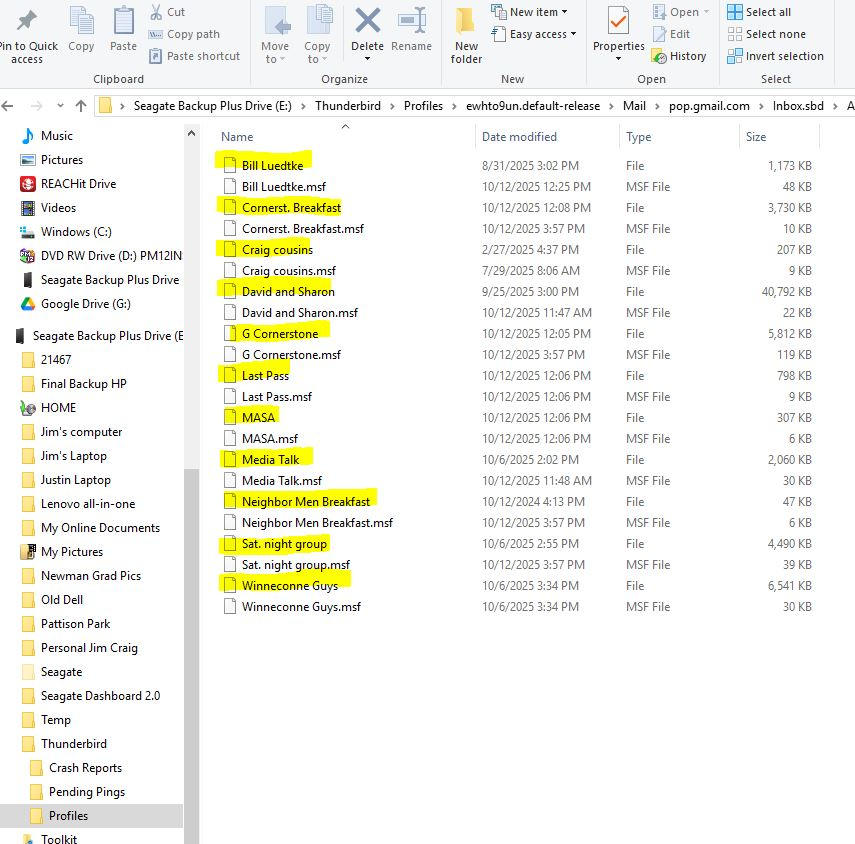
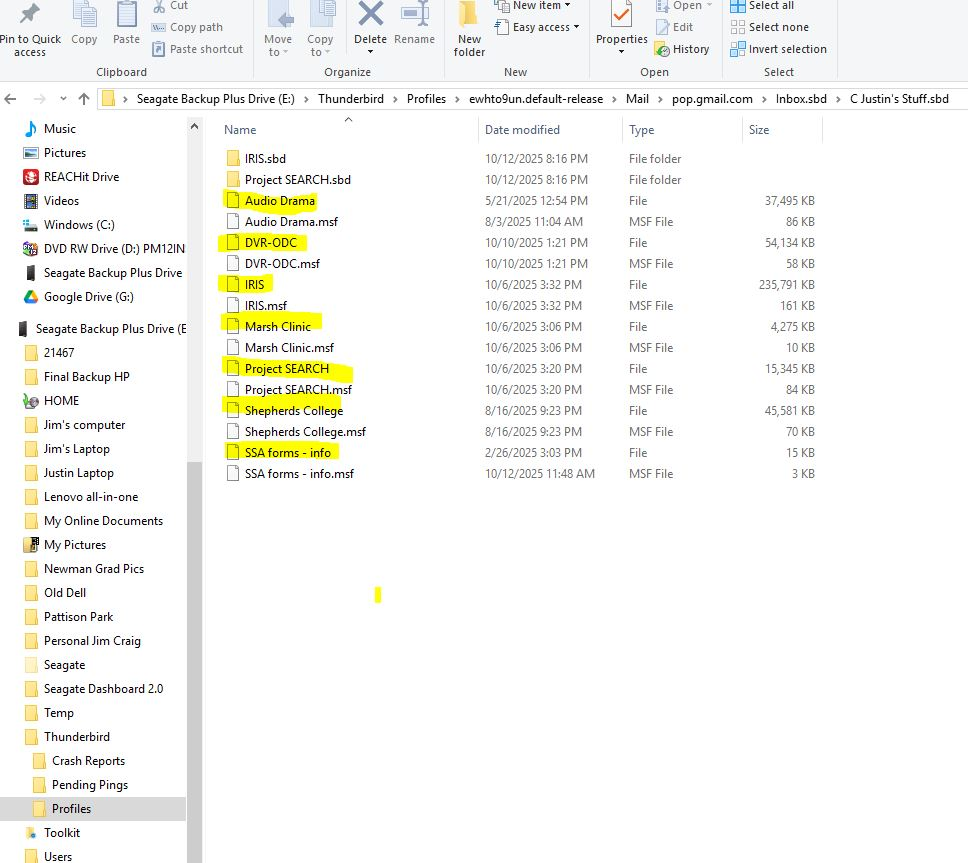
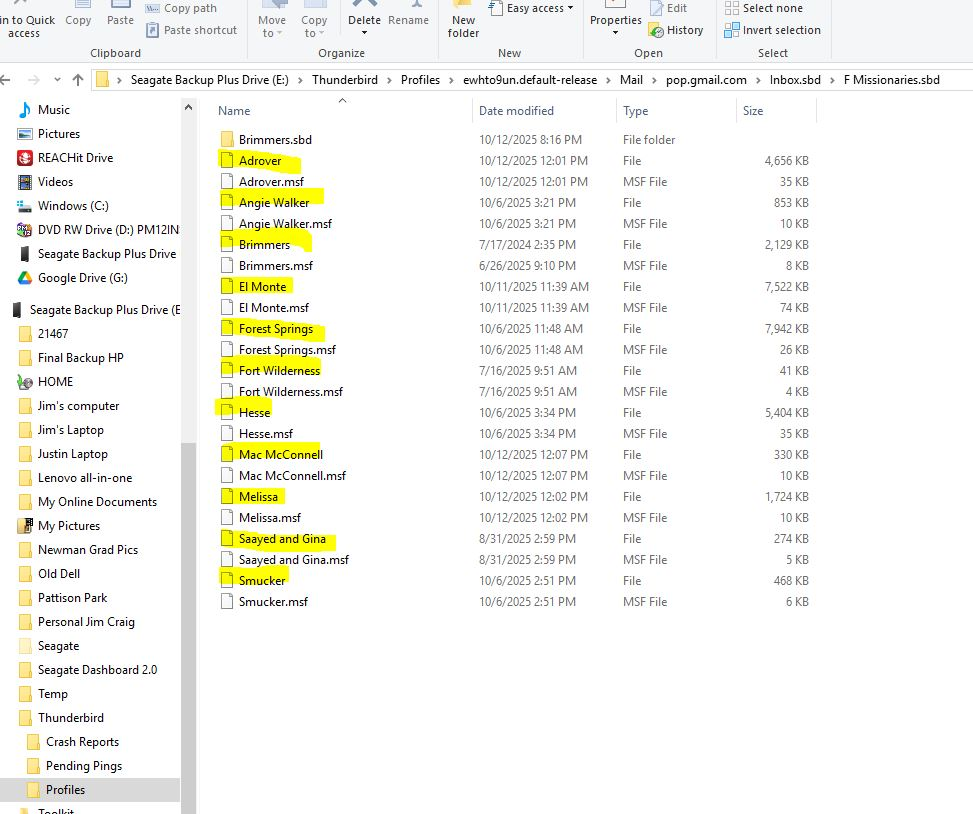
Thank you for the new screen shots which show me that the situation is even more complicated than I thought. In the beginning you wrote that the missing folders are part of a Gmail IMAP account. Now I see that that in your profile backup from December the actually missing folders have been part of a Gmail POP account!! I was going to see the light at the end of the tunnel but each of your new responses proves that I was going in the wrong direction. Probably you had a Gmail POP account when you made the profile backup in December. But maybe you also had set up a Gmail IMAP account since there are imap.gmail.vom account folders in the backup. Than later in your actual TB profile you probably deleted this POP account for an unknown reason before recreating it as an IMAP account. And since your old folders were stored locally they didn't appear in the new IMAP account. But all this is pure speculation and to have the whole picture I need to look on your screen or get still more screen shots. Let's suppose that all those sub-folders you had created in your Gmail POP account (shown in your recent screen shots of the backup) are still present in your actual working profile ? If this were true it would be rather simple to recreate the corresponding POP account and link it with the pop.gmail.com account in Mail.
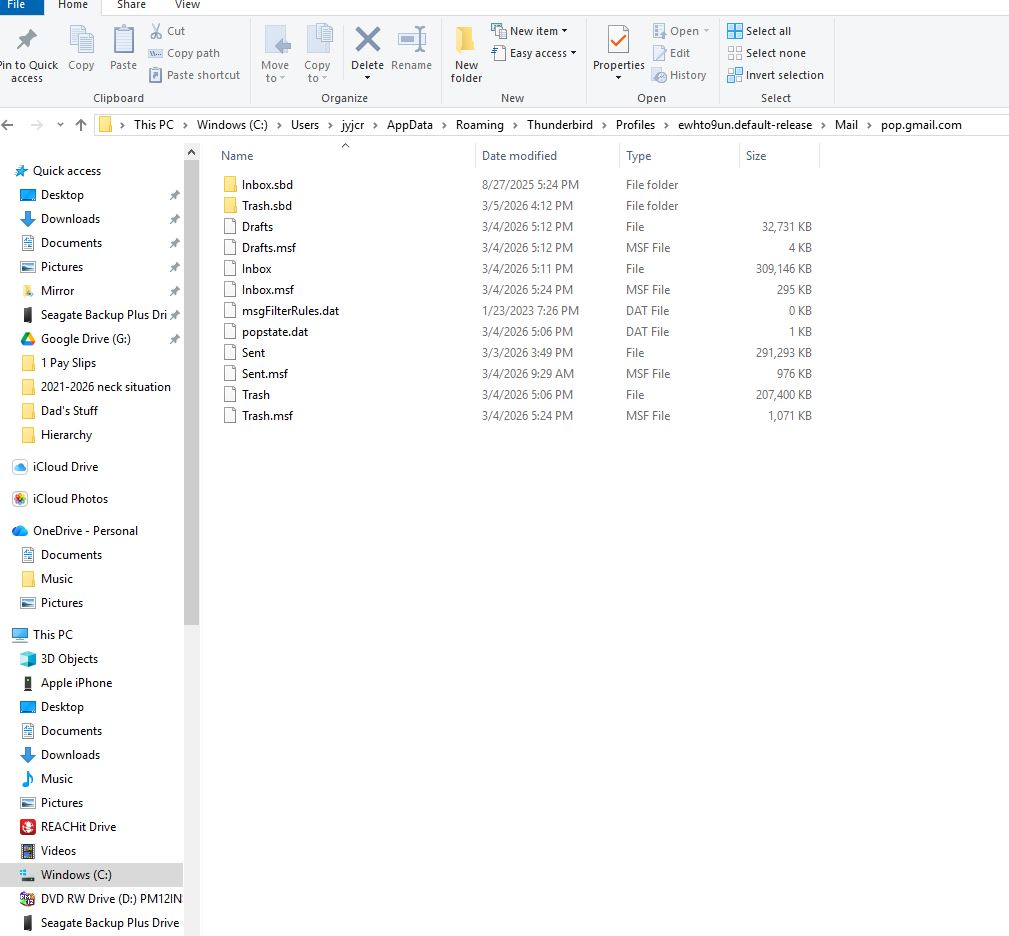
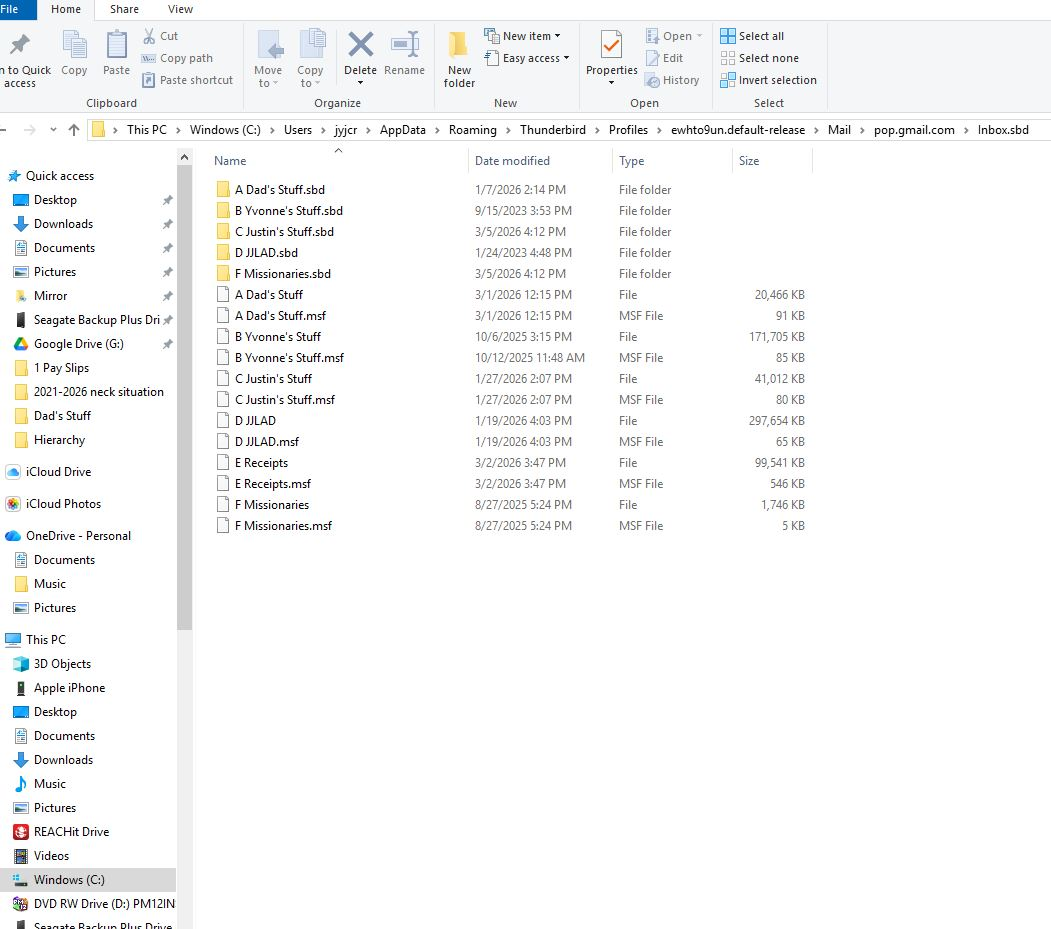
Verify if the actual Gmail account is a POP or an IMAP account. To do this go the Account settings > Account name > Server Settings > Server type... Also go to Help > Troubleshooting Information > Profile Folder > Open Folder, then close Thunderbird. In the profile folder open the Mail folder and if it contains a "pop.gmail.com" account folder show the contents of the latter. If there is an Inbox.sbd file folder in pop.gmail.com open it and show screen shots of its contents.
You are spending so much time with me that I feel very bad.
Here are the screen shots you requested.
Thank you.
jyjcraig said
You are spending so much time with me that I feel very bad.
Don't feel bad, I've got plenty of time to spend.
jyjcraig said
Here are the screen shots you requested.
Very nice screen shots, indeed. They prove that until recently you had been using a Gmail POP account in which you had created a big folder/sub-folder hierarchy under your Inbox. Then, about a week ago, you deleted this account for un unknown reason and created a new Gmail account, but this time as an IMAP account, maybe unintentionally.
Did you create the new account with the same Gmail address? I don't know... but for the time being I guess that the email address is the same. Now you should tell me if the deleting of your Gmai POP account was an error or if you really wanted to switch from POP to IMAP for this same address.
If it was an error and you prefer to go back to POP, we can do this rather easily by setting up your account again, this time as a POP account, and then we will link the new account with the "pop.gmail.com" account folder in Mail in your actual profile (details later).
If you created the IMAP account deliberately and want to continue using it, but in the same time you want to have access to your old folder/sub-folder hierarchy in the pop.gmail.com account folder in Mail, there is a solution to manually transfer (copy-paste) the entire Inbox.sbd file folder from pop.gmail.com to Local Folders in Mail as a first step. Then rename Inbox.sbd in whatever you want (preferably short name without special signs) : suppose you replace 'Inbox' with 'My_stuff', so Inbox.sbd would become 'My_stuff.sbd' , but we are not yet finished: In order to outsmart Thunderbird we also have to create an empty text file with an app such as Notepad, name it 'My_stuff' (without the extension .txt your system will add to the name) and move the 'My_stuff' file in Local Folders where it goes together with the 'My_stuff.sbd' folder. The empty 'My_stuff' file is absolutely necessary since without it Thunderbird wouldn't display your big migrated folder hierarchy in Local Folders in the folder pane.
I stop here because I have to wait for your decision ( maybe I still don't see the whole picture and there are still more pieces in your puzzle) • return to POP? • stay with IMAP but migrate the old POP folder hierarchy to Local Folders in order to have an easy access and continue to use it in the future
Ændret af Mapenzi den
Return to pop, please.
Are all the posts, including the screen shots, visible to anyone who checks out this thread?
Valgt løsning
jyjcraig said
Are all the posts, including the screen shots, visible to anyone who checks out this thread?
Yes they are. This is a public forum. Your email address is visible in the Account Settings image. Delete the image, we don't need it.
jyjcraig said
Return to pop, please.
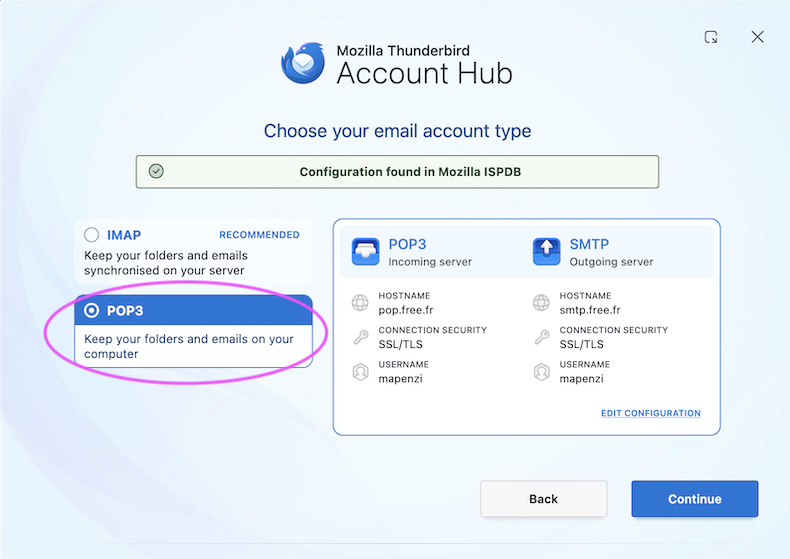
Here we go: open Account Settings, click "New Account" > "Mail account..." and begin to set up your account for your existing gmail address. But this time take care to select "POP" or "POP3" in the account hub (image) If you succeed to create this new POP account, Thunderbird will only download the messages which remained on the server. So we will link the new account to your old message files in "pop.gmail.com" in Mail: in Account Settings > your new account > Server-Settings > Message Storage > Local Directory > click on the "Browse..." button, then navigate to the Mail folder in your profile folder, select pop.gmail.com and click "Open". Thunderbird will prompt you for a restart, and after the restart you should be able to see your folders and sub-folders of the Inbox

You are amazing! Your persistence, perseverance, time, knowledge, wisdom and more! You have taught me so much. And, yes, humbled me appropriately. If there was a way to thank you beyond words, I would. I know this is a public forum, yet know that I will be praying for you. Thank you so much for getting my folders back!
Ændret af jyjcraig den