


outgoing mail from Thunderbird is sent but never arrives

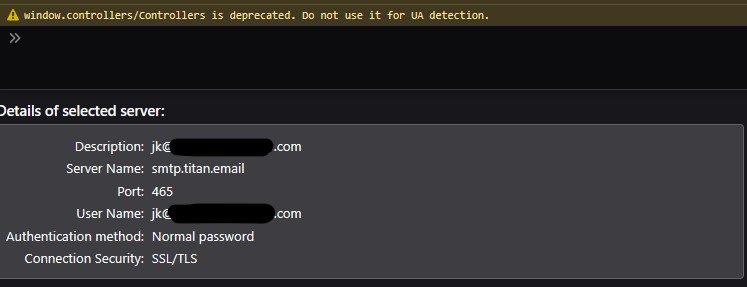
Hello, I just moved my email host from Microsoft to Bluehost and I am having trouble getting Thunderbird set up correctly. I can send and receive from Bluehost webmail, and I can receive in Thunderbird, but not send. I can reply successfully, but all sent mail from Thunderbird shows as sent but never arrives.
I am running Windows 10 and using Thunderbird 140.7.1esr
Any help would be great. Thank you!
John
Valgt løsning
Sometimes things just work out. This isn't the first time I've seen 'miracles' here. All the best to you.
Alle svar (13)
Have you tried sending to yourself? A possibility that exists with all web-hosted email accounts is that the appropriate security settings, such as DKIM and SPF, may not be properly configured, causing the email to be rejected. If messages to yourself are not being received, I encourage you to contact Bluehost tech support to investigate.
I have only been sending to myself using a different email address as the recipient. The bluehost online webmail works perfectly, so I assumed it was not their settings that needed adjusting. From my perspective, only Thunderbird is having an issue, so I assumed it must be a setting in Thunderbird that needs attention.
Was that a wrong assumption?
Thank you for the suggestion though. I will follow up with Bluehost in the meantime to see if they have any insight as well.
Ændret af johnk311y2020 den
Webmail does not use the same setup configuration. If you send from yourself to yourself and the mail doesn't appear, bluehost is rejecting it. If there was a configuration problem, bluehost would not have accepted the message for sending.
Update: Bluehost is having me add a new DNS record to improve my email's reputation. They believe that is why the emails are not making it back to Thunderbird. I have to wait for that to propagate, but I will report back later if it works or not.
Update: after adding two new DNS records, Thunderbird will now send and receive emails to and from myself. However, I still can't get through to my gmail account. Does Gmail require additional DNS security measures? I am so over my head here. Any help is greatly appreciated. John
You have confirmed that your email account now works. But Gmail is very picky. If gmail is ignoring you, there is a problem somewhere in your account settings, not settings that you do, but settings that the server administrator (bluehost) does. And, server admin stuff is over my head. Maybe, someone here with that knowledge will add more info. I believe it relates to DKIM and SPF settings but, again, I am not familar with that.
Update: After adding a new DNS record, the Webmail works now completely, but I still can't send an email to my gmail account from Thunderbird.
Recap: I have a new Bluehost email account. Using the Bluehost(Titan) webmail app, I can send email to myself and to my gmail account in Thunderbird. From Thunderbird, I can send email to myself using the new email account, but I can't send email from using my new email account from Thunderbird to my gmail account.
I've checked Gmail's webmail browser to make sure and they are not arriving there either.
So I'm stuck. It works from the Webmail app on Bluehost, but not from Thunderbird. Why might that be?
Thanks
Ændret af johnk311y2020 den
It's like I said; the problem is how your account is configured on the server, not by you but by bluehost. Webmail is its own world and has nothing to do with mail sent from your PC. Receiving email servers generally compare the domain name (it is not bluehost.com) with the server itself (which IS bluehost.com) and then checks to see if that is a scam. Finding no integrity check that the bluehost server is legit for your domain, it rejects the message. Ok, my explanation isn't technical, but that's what is happening. This problem is not uncommon when setting up email accounts on web hosting sites Thunderbird is not the problem.
Thank you for the explanation. At this point, I'm hoping someone with an insight into what Gmail is looking for will chime in. Bluehost doesn't seem to know for sure, but they are more than willing to give me records to try out. Seeing as how the functionality has increased incrementally since I started tinkering with them, this does seem like the right track. Just not there yet.
johnk311y2020 said
Thank you for the explanation. At this point, I'm hoping someone with an insight into what Gmail is looking for will chime in. Bluehost doesn't seem to know for sure, but they are more than willing to give me records to try out. Seeing as how the functionality has increased incrementally since I started tinkering with them, this does seem like the right track. Just not there yet.
Google do document their requirements. Have you read them?
Google uses DMARC, SPF and DKIM you only talk of two DNS entries you had to add, have you got all three they are all required by Google. Additionally you have to keep your SPAM flagged mail to under .3% is you are sending marketing email.
What is the domain you moved. clearly it is not titan.email as they are an emailing service provider and that presents another raft of possible points of failure, such as is they are mentioned in your domains MX record. EMail for Bill@Google.com will fail if the source server is titan.email and that server is not mentioned in the DNS MX record for the email addresses domain. Unfortunately everyone thinks this web stuff is a cottage industry and you can get by. It is in reality big business and paying a professional to set up your web properties is a very good idea if you are in any way dependent on having functional web services, like a payment portal or ordering or in this case email. Take yourself over to this website https://intodns.com/ plug in your domain and see what they have to say about how it is configured. I would have looked, but you have gone to lengths of withhold the domain information, so do it yourself.
That is super helpful. I am sorry if I have not provided enough information. This is my first post here and my interpretation of the prompt led me to believe any personal information should be redacted. I don't know enough about this to know what I need to know.
I hadn't thought to look for Google's requirements, I will take a shot at that. That is a good idea.
The link you provided is awesome. That is exactly what I was looking for. I will compare the notes to the DNS records I have and try out the suggestions. Thank you!
One last update. I tinkered and tinkered with this and never arrived at a full understanding of what I needed to do. The dnschecker showed many issues that both my Doman hosting service and email hosting service thought were not really issues. In the end, I tested and tested it, recruiting help from both services to try and find the culprit, and then suddenly it started working.
My best guess is the DNSchecker is not 100% accurate and there was still some propagation left to do that took many days, or possibly many reloads to fully propagate until finally it worked. 5 days since I switched email hosts, and the last significant changes were made 4 days ago.
All's well that ends well I suppose. Thank you all for the help and guidance.
Valgt løsning
Sometimes things just work out. This isn't the first time I've seen 'miracles' here. All the best to you.