


sent messages keep getting sent to local folder
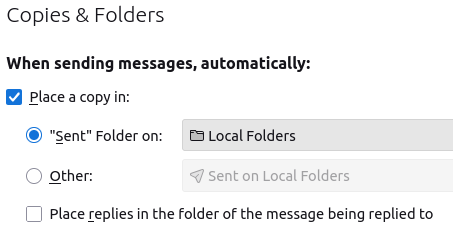
So, from time to time I need to find a sent email, it is not in my sent folder, I check my settings and there it is, I then set it to use my sent folder on the IMAP server, this works for a while, but then seems the next time I want to find something in the sent folder it has reverted back. Any Thoughts?
Valgt løsning
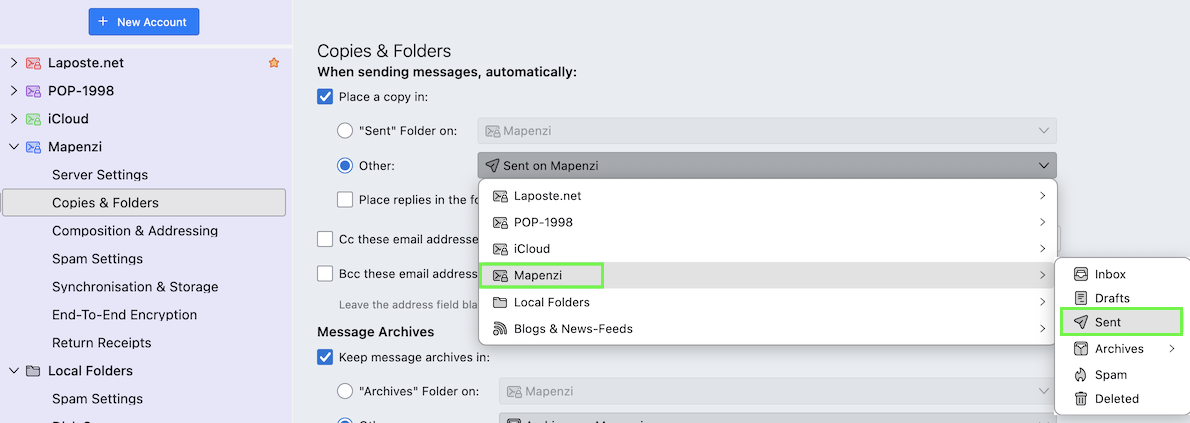
Try this (see my image): activate the radio button ◉ Other then open the drop-down menu, select your account and then 'Sent'
Læs dette svar i sammenhæng 👍 1Alle svar (4)
And I just found it set back local folders again, BTW I never use Thunderbird offline.

Valgt løsning
Try this (see my image): activate the radio button ◉ Other then open the drop-down menu, select your account and then 'Sent'
Mapenzi said
Try this (see my image): activate the radio button ◉ Other then open the drop-down menu, select your account and then 'Sent'
Thank You, I just changed it, time will tell.
Thank You Mapenzi, it has now been several days, several reboots, and the settings are sticking.